

When players cannot join a Quake Live server on PlayNHost, check first that the badge says Online and that they typed /connect with the whole Server Address from Overview, port included. Next, check that their password matches Server Password exactly and that the server is not full.
Work through the causes
- The server is not ready. The badge on Overview must say Online. On the Console tab, the server is ready once it prints
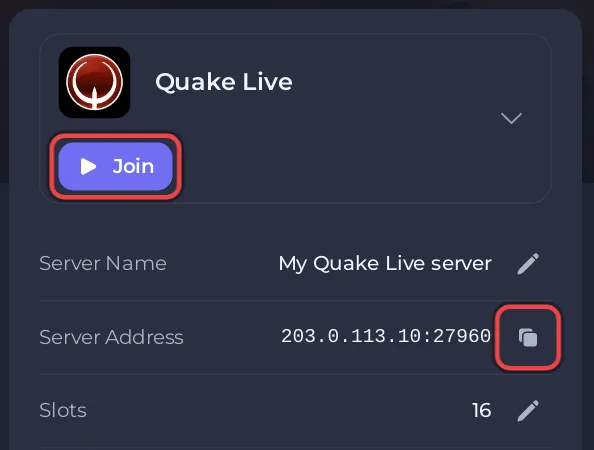
zmq stats and rcon passwords updated. The first start after you add Workshop items takes longer, because Quake Live downloads them first. - The port is missing or wrong. Copy the address with Join or the copy icon next to Server Address and paste it after
/connect, for example/connect 203.0.113.10:27960. The part after the colon is your server's port, so keep it. See How to join your Quake Live server. - The password does not match. With Server Password set, the server stops everyone who connects without it. Check the value under Settings, Game Settings: How to change your Quake Live server name and password.
- The password changed, but the server did not restart. A new Server Password applies at the next start. After a save the panel says "Saved. The server must restart before these take effect." Click Restart now.
- The server is full. Quake Live refuses connections past Max Players, the limit your plan includes. Type
statusin the Console to see who is connected, and compare with the Slots row on Overview: How to change player slots on your Quake Live server. - Server Type is not Internet. A new server has Server Type
2(Internet). The panel describes0(Offline) and1(LAN) only as not listed, and no official source says whether they still let players in over the internet. If someone set one of them, set it back to2and restart: How to list your Quake Live server in the server browser.
Only one player cannot join
- Check that they run Quake Live from Steam. The game is on Steam for Windows only, and each player needs it in their own Steam library: Which players can join your Quake Live server?
- Ask them to paste the address you sent with
/connect, rather than an address they used before. - Ask them to type the password again, exactly as you sent it.
I can join, my friends cannot
Your friends need the same address you use, port included, and the password if you set one. Send both in one message: How to invite friends to your Quake Live server.
Still stuck?
Open a ticket with the time of the attempt and what Quake Live showed. Other problems: Quake Live server problems and fixes.


