

To change a Quake Live server's name or password on PlayNHost, open the Settings tab, edit Server Name or Server Password under Game Settings, then click Restart now. The name can be up to 70 characters, the password up to 20, and neither can contain a double quote or a backslash.
How do I change the name and password?
- Open your server in the panel and click the Settings tab.
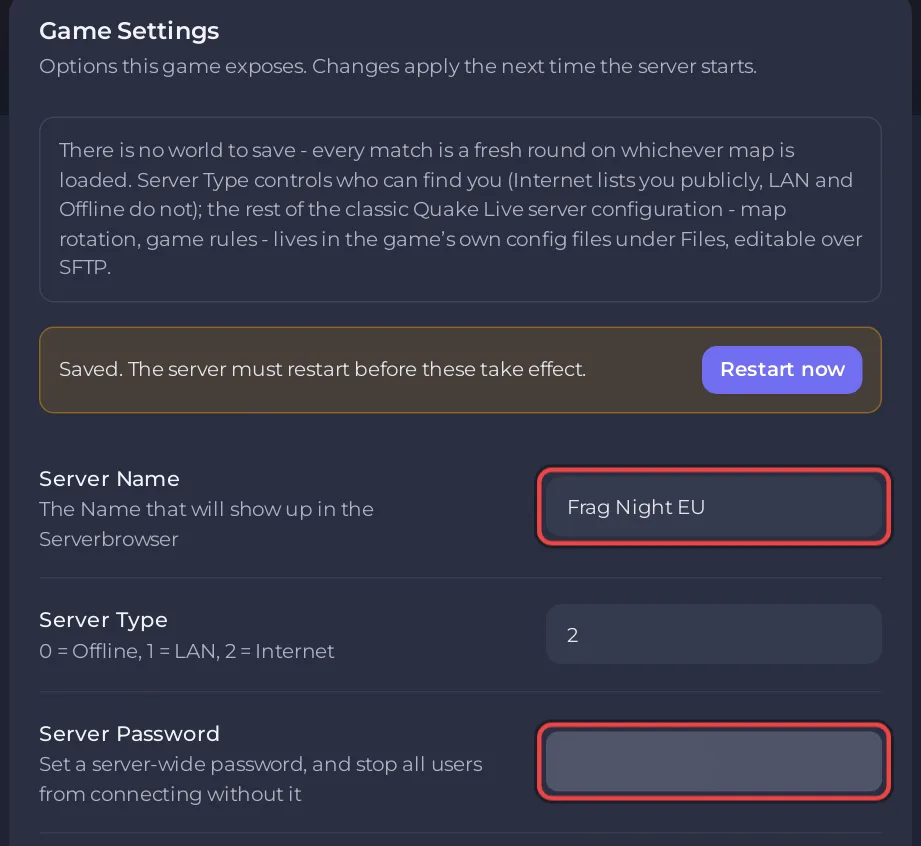
- Under Game Settings, click into Server Name and type the name you want players to see in the server list.
- To keep the server private, type a password in Server Password. To open it to everyone again, empty the field.
- Click outside the field. The panel saves it and shows "Saved. The server must restart before these take effect."
- Click Restart now. When the badge says Online again, the new name and password are live.
Players who connect without the password are stopped by the server. Send it to them with the address: How to invite friends to your Quake Live server.
What can the name and password contain?
| Field | Default | Limit |
|---|---|---|
| Server Name | A Quake Live Server | Required, up to 70 characters |
| Server Password | empty (no password) | Up to 20 characters |
Neither field takes a double quote ("), a backslash (\) or a line break. The panel passes both values to Quake Live inside quotes, so it refuses these characters instead of letting them break the start of the server.
Is the name on Overview the same as the Server Name setting?
No. The pencil next to Server Name on the Overview page renames the server in the panel only, and its Rename Server dialog says so: "This only changes your server's name in the panel." The name players see in Quake Live comes from Server Name on the Settings tab, under Game Settings.
Questions people ask
Does a password hide the server from the list? No. The listing depends on Server Type: How to list your Quake Live server in the server browser.
Is the RCON Password the same thing? No. RCON Password opens the remote console to outside tools and has nothing to do with joining: How to connect an RCON tool to your Quake Live server.
Can a friend change these for me? Yes, if you invite them to the panel with a role that can change settings: How to invite friends and give them access.


