

To add Steam Workshop items to a Quake Live server on PlayNHost, open the Workshop tab, paste each item's Steam Workshop address or id under Workshop items, click Save, then Restart to apply. Quake Live downloads every listed item itself while it starts. A map from the Workshop also needs a line in baseq3/mappool.txt before it comes up in the rotation.
How do I add an item?
- Find the item in the Quake Live Workshop on Steam and copy its address. The id is the number at the end, after
?id=. - Open your server in the panel and click the Workshop tab.
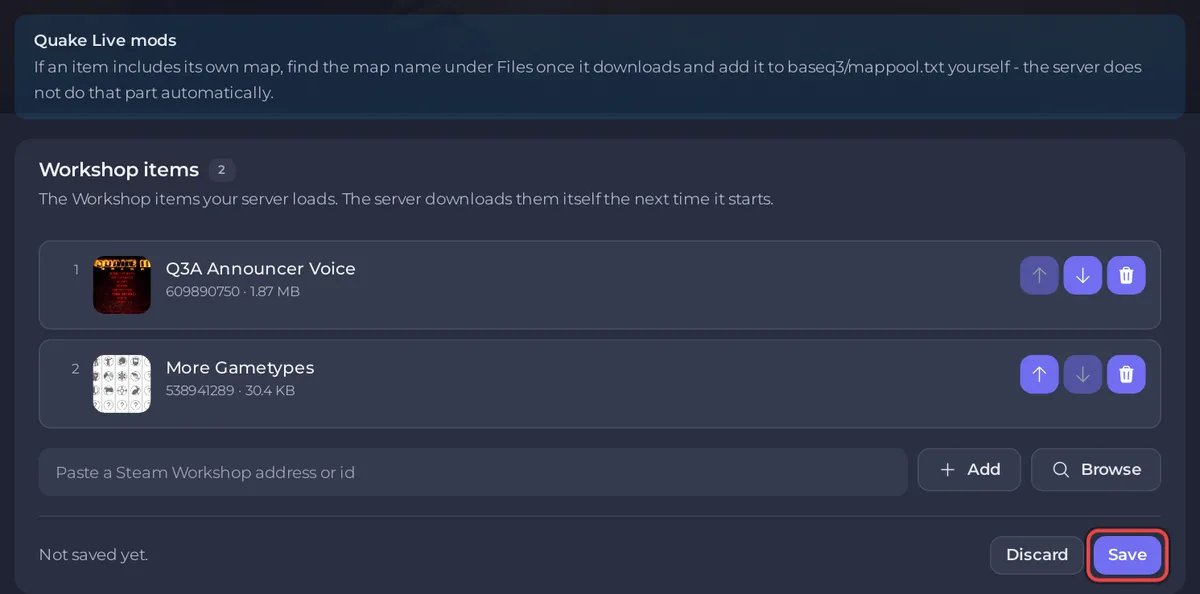
- In the Workshop items card, paste the address or the id into Paste a Steam Workshop address or id and click Add. Or click Browse, search the Workshop in the Add to Workshop items window and click Add next to an item.
- Check the new row. The panel looks each id up on Steam and marks problems, such as Not found, Wrong game or Collection.
- Click Save. The panel shows "Saved, and not applied yet" and "The server picks this up the next time it starts."
- Click Restart to apply. In the Console, Quake Live prints a line such as
Workshop item 701783942: requesting download.for each item andWaiting on 1 Workshop downloads: 0.00%while it downloads, then ends withzmq stats and rcon passwords updated.
The same list is the Workshop IDs field under Game Settings on the Settings tab, as ids separated by commas. Editing either place changes the other.
How does the server load Workshop items?
At every start, the panel writes the ids from Workshop items into baseq3/workshop.txt, one per line, and Quake Live downloads each listed item before it finishes starting. Quake Live's official server readme adds that an item that fails to download is skipped and the server carries on starting. The files land under Files in steamapps/workshop/content/282440/, in a folder named after the item's id. Removing an id from the list removes it from workshop.txt at the next start, and an empty list means no Workshop content. PlayNHost tested this on a real Quake Live server on 15 Sep 2026: item 701783942 downloaded and the server reached Online.
Edit the list on the Workshop tab, not workshop.txt itself: the panel rewrites that file at every start.
How do I put a Workshop map into the rotation?
Downloading a map does not add it to the maps your server plays. The panel's note on the Workshop tab says it: find the map name under Files once it downloads and add it to baseq3/mappool.txt yourself.
- Add the map's item and restart, as in the steps above.
- Find the map name. Look on the item's Workshop page, and in the item's folder under Files:
steamapps/workshop/content/282440/followed by the item's id. - Open Files, go into
baseq3and clickmappool.txt. - Add a line for the new map, written the same way as the lines already in the file. Each line is a map name and a factory (a set of game rules), separated by
|, per the official server readme. - Click Save content, then restart the server.
Take a backup before you edit the file, so you can go back: How to back up and restore your Quake Live server. If the server does not reach Online after the change, undo your line and restart.
What does each warning mean?
| Mark | What the panel says | What to do |
|---|---|---|
| Not found | Steam has no Workshop item with this id | Check the number at the end of the item's address |
| Wrong game | The item was published for another game | Pick a Quake Live item |
| Collection | The id is a Steam collection; this field takes single items | Add the items from the collection one by one |
You can still save a list with a marked entry, but that entry will not load.
Questions people ask
Who can edit the Workshop list? The server owner, and anyone you invited under Team & Roles with the Change startup permission.
Do players have to subscribe to the items? No. The official server readme says Quake Live downloads custom content to players automatically, as long as it comes from the Steam Workshop, which is why custom maps for a server must be Workshop items.
Do I need to reinstall? No. A restart is enough: Quake Live downloads the items at every start.
The server takes long to start after I added items. That is the download. Watch the Console: while new lines appear, it is still working. More fixes: Quake Live server problems and fixes.


