

To start a Quake Live server on PlayNHost, click Start on the server's Overview page and wait for the badge to say Online. The Console prints zmq stats and rcon passwords updated when Quake Live is ready for players. On PlayNHost's test server that took about 11 seconds.
How do I start it?
- Open your server in the panel. The badge near the name says Offline.
- Click Start. The badge changes to Starting.
- Click the Console tab to watch the server start.
- Wait for the line
zmq stats and rcon passwords updated. The badge then says Online and players can join.
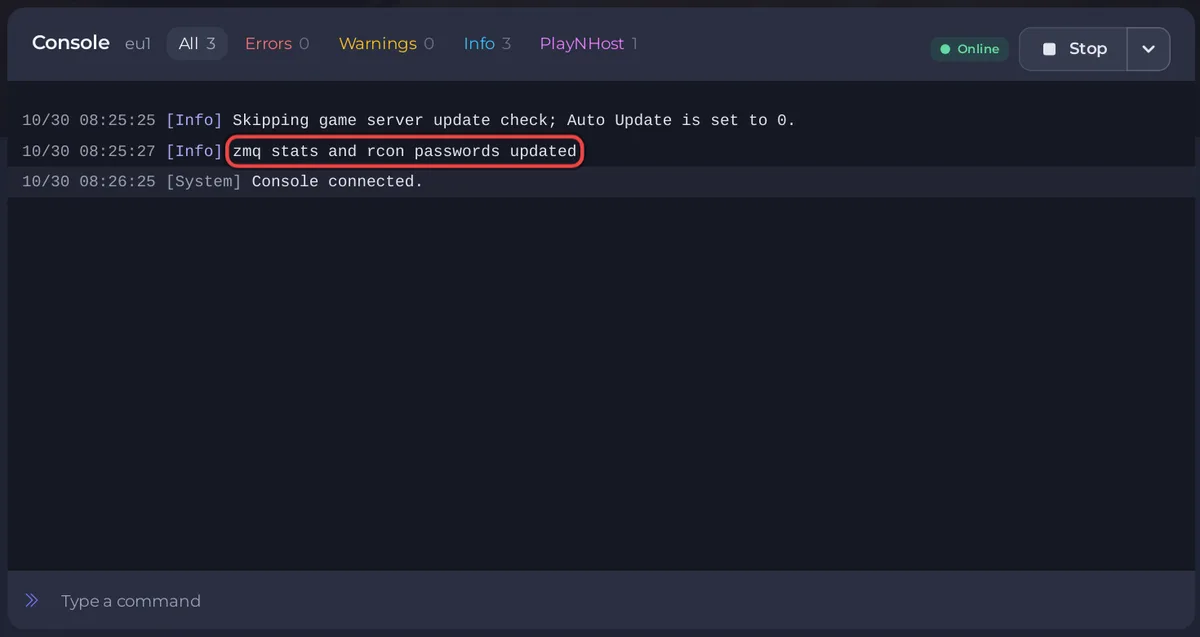
Why does the ready line mention RCON?
The panel always switches on Quake Live's remote console, on your server's own port. When RCON Password is empty, Quake Live makes up a random password of its own and keeps it to itself, so nobody outside the server can use the remote console. The line zmq stats and rcon passwords updated is Quake Live confirming that, and the panel takes it as the sign that the server is ready. The Console box in the panel works either way: How to use the Console and commands on your Quake Live server.
How long does the first start take?
The game files are already installed when you get the server, so the start goes straight to Quake Live. With Auto Update off, the default, the Console first prints Skipping game server update check; Auto Update is set to 0. and then starts the game. PlayNHost's test server reached Online in about 11 seconds. If you added Steam Workshop items, that start is longer, because Quake Live downloads each item before it finishes starting. As long as new lines keep appearing in the Console, the server is still working.
What does a new Quake Live server already have?
Everything below is on the Settings tab, under Game Settings:
- Server Name:
A Quake Live Server. Change it before you invite people: How to change your Quake Live server name and password. - Server Type:
2, which means Internet: the server is listed publicly. See How to list your Quake Live server in the server browser. - Server Password: empty, so anyone with the address can join.
- Max Players: the number of players your plan includes, read only here. Change it with the Slots row on Overview: How to change player slots on your Quake Live server.
- FPS:
40, read only. - RCON Password: empty, so the remote console is closed to outside tools.
- Workshop IDs: empty, so no Steam Workshop content.
- Auto Update (under Show advanced): off.
A new server also has an Automatic backup schedule under Quick Tasks when your plan has backup slots. It takes a full backup once a night: How to back up and restore your Quake Live server.
There is no world to create or save. As the panel's own help text says, every match is a fresh round on whichever map is loaded. The first map is picked at random from the server's map pool, according to Quake Live's official server readme, so you do not set a starting map.
What should I do next?
If the badge never reaches Online, see Quake Live server problems and fixes and How to fix a server that will not start.


