

To run a command on a Quake Live server on PlayNHost, open the Console tab, type the command in the Type a command box and press Enter. The box sends it straight to the Quake Live server, without the remote console, so it works with RCON Password empty. status lists who is connected and map_restart restarts the match.
How do I send a command?
- Open your server in the panel, check that the badge on Overview says Online, and click the Console tab.
- Click the Type a command box at the bottom.
- Type the command without a slash, for example
status, and press Enter. - Read Quake Live's answer in the output above the box.
Which commands work?
These commands were run on a PlayNHost Quake Live server:
| Command | What it does | Source |
|---|---|---|
status | Shows the server status and the connected players; since update 1066 it includes their Steam IDs | Run by PlayNHost; Quake Live update 1066, 16 Dec 2015 |
map_restart | Ends the current round and reloads the map | Sent by the panel's Restart Match task, run by PlayNHost |
echo and a text | Prints the text in the Console | Run by PlayNHost |
Since update 1066, Quake Live also prints the Steam ID of each player who connects, so the Console shows who joined.
Do not type quit: it is the command the panel itself uses to stop Quake Live, so the server shuts down. Use Stop, or Restart under Additional power actions, instead.
What do the start lines mean?
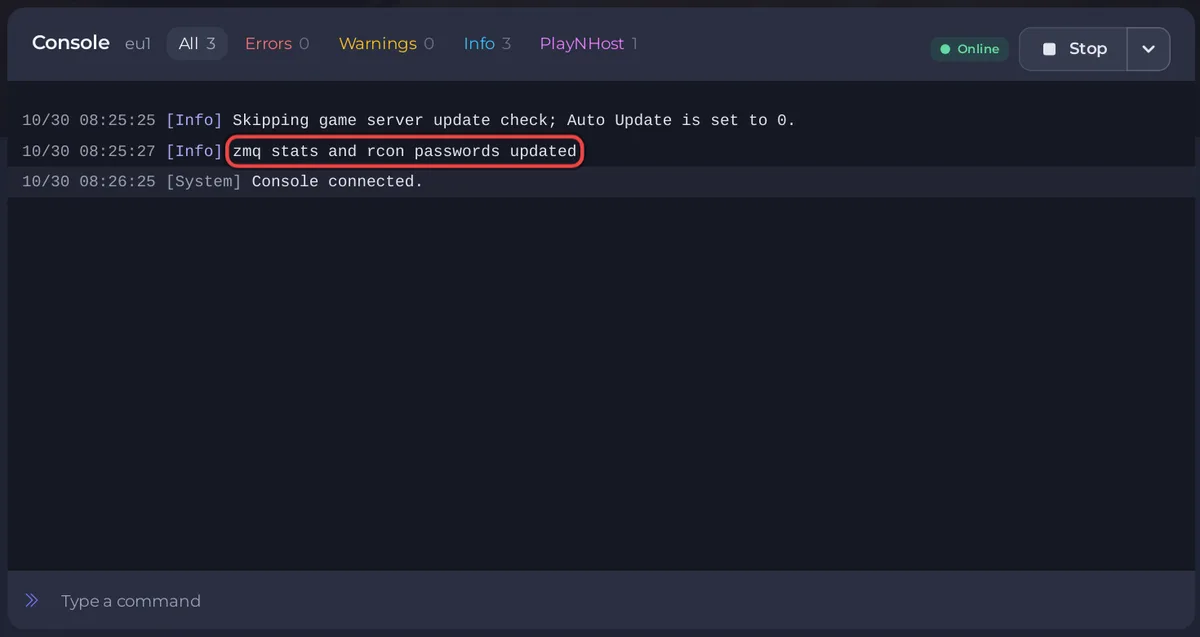
When the server starts, the Console shows Quake Live loading. The line zmq stats and rcon passwords updated means the server is ready, and the badge turns Online. With Workshop items in your list, the start takes longer, because Quake Live downloads them before it is ready: How to add Steam Workshop items to your Quake Live server.
What else is on the Console tab?
- Start or Stop, with Restart and Kill under Additional power actions, the arrow next to it. Use Kill only when the server does not stop by itself: the panel warns that it "could result in irreversible data loss".
- Search the console finds a word in the output.
- More console actions holds Clear Log, Download log and Share log. A downloaded log is what support needs when something goes wrong.
Can I send commands from outside the panel?
Yes, with Quake Live's own remote console, which needs an RCON Password and a tool that speaks its ZeroMQ protocol: How to connect an RCON tool to your Quake Live server. To give a friend the Console in the panel instead, invite them with the Use the console permission: How to invite friends to your Quake Live server.
General guide: How to use the console and run commands.


