%7B.s%7Banimation%3Ab%201.5s%20ease-out%20both%7D.d%7Banimation-delay%3A.16s%7D%7D%40keyframes%20b%7B0%25%7Bfill%3A%23F4F6FA%7D18%25%7Bfill%3A%23FFE08A%7D34%25%2C70%25%7Bfill%3A%23FF8A1F%7D80%25%7Bfill%3A%23FFE08A%7D100%25%7Bfill%3A%23FF8A1F%7D%7D%3C%2Fstyle%3E%3Cg%20transform%3D%22translate(143%20428.93)%20scale(3.885906)%22%3E%3Cg%20transform%3D%22translate(0%202)%22%20fill%3D%22%23706EF0%22%3E%3Cpath%20d%3D%22M0%200%20H48%20A40%2040%200%200%201%2048%2080%20V100%20H0%20Z%22%2F%3E%3Cpath%20transform%3D%22translate(91.75%200)%22%20d%3D%22M0%200%20L48%200%20L48%2050%20L76%2050%20L76%20100%20L0%20100%20Z%22%2F%3E%3Cpath%20transform%3D%22translate(173%200)%22%20d%3D%22M0%20100%20L58%20-4%20L116%20100%20Z%22%2F%3E%3Cpath%20transform%3D%22translate(264.25%200)%22%20d%3D%22M0%200%20L104%200%20L76%2050%20L76%20100%20L28%20100%20L28%2050%20Z%22%2F%3E%3Cg%20transform%3D%22translate(375%200)%22%3E%3Cpath%20d%3D%22M0%200%20L50%2038%20L50%200%20L100%200%20L100%20100%20L0%20100%20Z%22%20fill%3D%22%23F4F6FA%22%2F%3E%3Crect%20class%3D%22s%22%20x%3D%2247%22%20y%3D%2263%22%20width%3D%2219%22%20height%3D%2230%22%2F%3E%3Crect%20class%3D%22s%20d%22%20x%3D%2274%22%20y%3D%2263%22%20width%3D%2219%22%20height%3D%2230%22%2F%3E%3C%2Fg%3E%3Cpath%20transform%3D%22translate(484.75%200)%22%20d%3D%22M0%200%20L48%200%20L48%2037%20L52%2037%20L52%200%20L100%200%20L100%20100%20L52%20100%20L52%2063%20L48%2063%20L48%20100%20L0%20100%20Z%22%2F%3E%3Cpath%20transform%3D%22translate(588.5%200)%22%20d%3D%22M0%2050%20A53%2053%200%201%200%20106%2050%20A53%2053%200%201%200%200%2050%20Z%22%2F%3E%3Cpath%20transform%3D%22translate(698.25%200)%22%20d%3D%22M25%200%20H102%20V50%20H77%20A25%2025%200%200%201%2077%20100%20H0%20V50%20H25%20A25%2025%200%200%201%2025%200%20Z%22%2F%3E%3Cpath%20transform%3D%22translate(804%200)%22%20d%3D%22M0%200%20L90%200%20L90%2050%20L69%2050%20L69%20100%20L21%20100%20L21%2050%20L0%2050%20Z%22%2F%3E%3C%2Fg%3E%3C%2Fg%3E%3C%2Fsvg%3E)


Click Players in the left menu to see everyone who has ever joined your Project Zomboid server, not only who is on now. Click a player to open their window: their character, skills and history, and buttons to kick, ban, give a role, reset their password or use admin powers. The Bans and Tickets tabs hold the ban lists and the help requests players send from the game.
Open the page
- Open your server in the panel and click Players in the left menu. The Manage players button on the Active players card of the Overview opens the same page.
- The tiles at the top count Online now, Ever joined, Staff and Bans.
- The line on the right says when the list was updated. With the server stopped it says "The server is stopped. The list is from its files.": you can read the page, but actions wait until the server runs.

Find a player
- Search with Find by name, character or SteamID.
- Sort by Last seen, Name, Hours survived or Role.
- Filter with All, Online, Staff, Banned or Dead.
- Each row shows the player's role, when they were last seen ("On the server now" while they play), the hours their character survived, and Show on map, which opens the Live map at them.
The player window
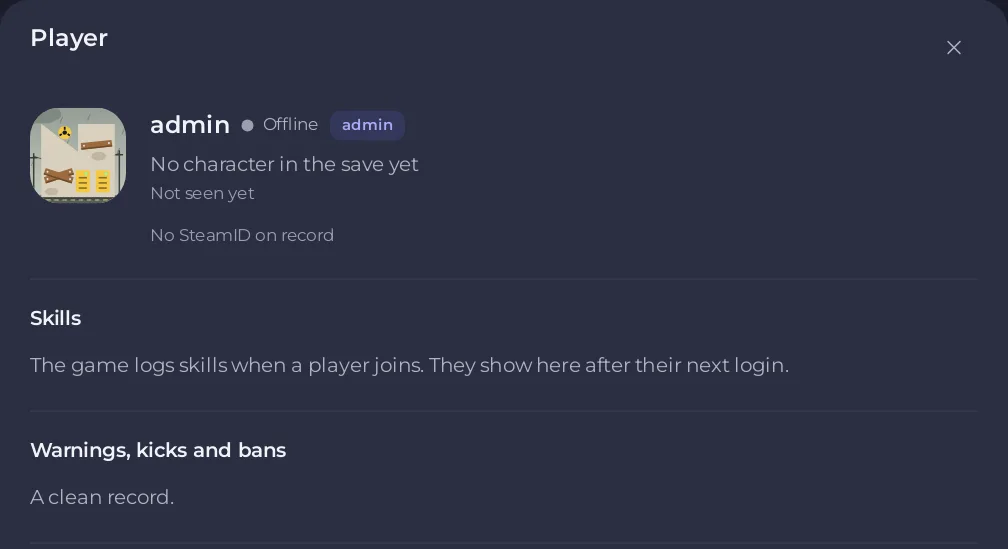
Click a row. The window Player shows:
- Online or Offline, and Banned, Dead or Alive.
- "Plays as" and the character's name, the hours survived, and their SteamID with a copy button.
- Skills, from the game log of this boot. The game logs skills when a player joins, so they show after their next login.
- Warnings, kicks and bans: their record, or "A clean record."
Then the actions, grouped:
| Section | What you can do | Guide |
|---|---|---|
| Moderation | Kick, Ban (with Also ban their IP), Unban, mute in Voice chat, Remove their map symbols | How to kick, ban and whitelist players |
| Account | Role and Apply, Reset password, Remove account | How to set access levels |
| Admin powers | Teleport, give an item, give XP, god mode, invisible, no clip | How to use admin powers |
| Events at this player | Send a horde, lightning or thunder | How to use admin powers |
Some actions need the player to be on the server. They are greyed out with "They need to be on the server for this." A ban works while they are offline.
The other tabs and cards
- Bans: banned players, banned SteamIDs, banned IP addresses and the allowed SteamIDs, each with Unban or Remove: How to unban a player on your Project Zomboid server.
- Tickets: help requests players send from the game: How to answer player tickets on your Project Zomboid server.
- World events: helicopter, gunshot, weather and the speed of time: How to trigger world events on your Project Zomboid server.
- Add a player: make an account for a whitelist server: How to run a whitelist-only Project Zomboid server.
What it needs
- The page needs console access and the permission to read file contents, because the lists come from the game's own files. Account changes also need the file permissions a hand edit would need. A helper without them sees "Your role on this server cannot change accounts."
- Every action is a command the panel sends to the game, so the server must be running.
- Before the first start there is no accounts file yet: the page says No accounts file yet. Start the server once, and players show up as they join.
- If some of the game's files cannot be read, the page says which parts are empty.
Good to know
- Who is on right now is also on the Overview: How to see who is online on your Project Zomboid server.
- Everything the panel does here goes into the Activity log: How to see what happened on your server.





