%7B.s%7Banimation%3Ab%201.5s%20ease-out%20both%7D.d%7Banimation-delay%3A.16s%7D%7D%40keyframes%20b%7B0%25%7Bfill%3A%23F4F6FA%7D18%25%7Bfill%3A%23FFE08A%7D34%25%2C70%25%7Bfill%3A%23FF8A1F%7D80%25%7Bfill%3A%23FFE08A%7D100%25%7Bfill%3A%23FF8A1F%7D%7D%3C%2Fstyle%3E%3Cg%20transform%3D%22translate(143%20428.93)%20scale(3.885906)%22%3E%3Cg%20transform%3D%22translate(0%202)%22%20fill%3D%22%23706EF0%22%3E%3Cpath%20d%3D%22M0%200%20H48%20A40%2040%200%200%201%2048%2080%20V100%20H0%20Z%22%2F%3E%3Cpath%20transform%3D%22translate(91.75%200)%22%20d%3D%22M0%200%20L48%200%20L48%2050%20L76%2050%20L76%20100%20L0%20100%20Z%22%2F%3E%3Cpath%20transform%3D%22translate(173%200)%22%20d%3D%22M0%20100%20L58%20-4%20L116%20100%20Z%22%2F%3E%3Cpath%20transform%3D%22translate(264.25%200)%22%20d%3D%22M0%200%20L104%200%20L76%2050%20L76%20100%20L28%20100%20L28%2050%20Z%22%2F%3E%3Cg%20transform%3D%22translate(375%200)%22%3E%3Cpath%20d%3D%22M0%200%20L50%2038%20L50%200%20L100%200%20L100%20100%20L0%20100%20Z%22%20fill%3D%22%23F4F6FA%22%2F%3E%3Crect%20class%3D%22s%22%20x%3D%2247%22%20y%3D%2263%22%20width%3D%2219%22%20height%3D%2230%22%2F%3E%3Crect%20class%3D%22s%20d%22%20x%3D%2274%22%20y%3D%2263%22%20width%3D%2219%22%20height%3D%2230%22%2F%3E%3C%2Fg%3E%3Cpath%20transform%3D%22translate(484.75%200)%22%20d%3D%22M0%200%20L48%200%20L48%2037%20L52%2037%20L52%200%20L100%200%20L100%20100%20L52%20100%20L52%2063%20L48%2063%20L48%20100%20L0%20100%20Z%22%2F%3E%3Cpath%20transform%3D%22translate(588.5%200)%22%20d%3D%22M0%2050%20A53%2053%200%201%200%20106%2050%20A53%2053%200%201%200%200%2050%20Z%22%2F%3E%3Cpath%20transform%3D%22translate(698.25%200)%22%20d%3D%22M25%200%20H102%20V50%20H77%20A25%2025%200%200%201%2077%20100%20H0%20V50%20H25%20A25%2025%200%200%201%2025%200%20Z%22%2F%3E%3Cpath%20transform%3D%22translate(804%200)%22%20d%3D%22M0%200%20L90%200%20L90%2050%20L69%2050%20L69%20100%20L21%20100%20L21%2050%20L0%2050%20Z%22%2F%3E%3C%2Fg%3E%3C%2Fg%3E%3C%2Fsvg%3E)


The World events card on the Players page lets you shake up the world without typing commands: send the Helicopter, fire a Gunshot, start or stop rain, start a Storm, choose Clear skies, or change the Speed of time. The big ones ask you to confirm with Do it, and the server must be running.
Open the card
- Open your server in the panel and click Players in the left menu.
- The World events card is on the right of the Players tab. While the server is stopped it says "Start the server to use these."
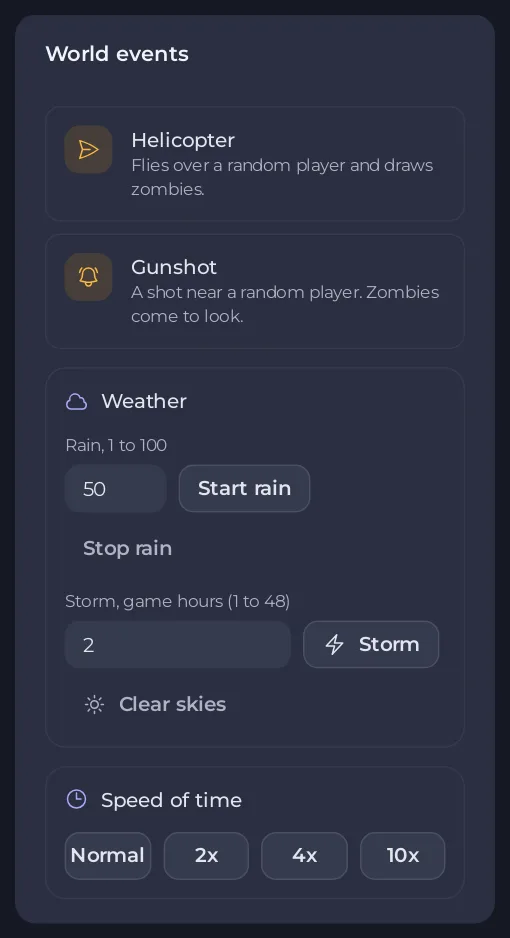
The events
| Event | What it does |
|---|---|
| Helicopter | "Flies over a random player and draws zombies." The window warns that it pulls every zombie around after it. |
| Gunshot | "A shot near a random player. Zombies come to look." |
| Start rain | Rain at the strength you type under Rain, 1 to 100. Stop rain ends it. |
| Storm | Lightning and thunder for the number of game hours you type, 1 to 48. "Thunder draws zombies." |
| Clear skies | Stops the weather. |
| Speed of time | Normal, 2x, 4x or 10x. "Days pass N times faster for everyone on the server, with everything that runs on game time." Choose Normal to go back. |
Helicopter, Gunshot, Storm and every Speed of time choice open a window first: read it and click Do it. Start rain, Stop rain and Clear skies act at once. The panel confirms each one, for example "The helicopter is on its way".
Good to know
- These events reach everyone on the server. Tell your players before you send a helicopter at night.
- A faster time speeds up everything that runs on game time, for everyone. Set it back to Normal when you are done.
- Events aimed at one player, a horde or a lightning strike, are in that player's window: How to use admin powers on your Project Zomboid server.
- Each event goes into the Activity log. The rest of the page: How to use the Players page of your Project Zomboid server.





