%7B.s%7Banimation%3Ab%201.5s%20ease-out%20both%7D.d%7Banimation-delay%3A.16s%7D%7D%40keyframes%20b%7B0%25%7Bfill%3A%23F4F6FA%7D18%25%7Bfill%3A%23FFE08A%7D34%25%2C70%25%7Bfill%3A%23FF8A1F%7D80%25%7Bfill%3A%23FFE08A%7D100%25%7Bfill%3A%23FF8A1F%7D%7D%3C%2Fstyle%3E%3Cg%20transform%3D%22translate(143%20428.93)%20scale(3.885906)%22%3E%3Cg%20transform%3D%22translate(0%202)%22%20fill%3D%22%23706EF0%22%3E%3Cpath%20d%3D%22M0%200%20H48%20A40%2040%200%200%201%2048%2080%20V100%20H0%20Z%22%2F%3E%3Cpath%20transform%3D%22translate(91.75%200)%22%20d%3D%22M0%200%20L48%200%20L48%2050%20L76%2050%20L76%20100%20L0%20100%20Z%22%2F%3E%3Cpath%20transform%3D%22translate(173%200)%22%20d%3D%22M0%20100%20L58%20-4%20L116%20100%20Z%22%2F%3E%3Cpath%20transform%3D%22translate(264.25%200)%22%20d%3D%22M0%200%20L104%200%20L76%2050%20L76%20100%20L28%20100%20L28%2050%20Z%22%2F%3E%3Cg%20transform%3D%22translate(375%200)%22%3E%3Cpath%20d%3D%22M0%200%20L50%2038%20L50%200%20L100%200%20L100%20100%20L0%20100%20Z%22%20fill%3D%22%23F4F6FA%22%2F%3E%3Crect%20class%3D%22s%22%20x%3D%2247%22%20y%3D%2263%22%20width%3D%2219%22%20height%3D%2230%22%2F%3E%3Crect%20class%3D%22s%20d%22%20x%3D%2274%22%20y%3D%2263%22%20width%3D%2219%22%20height%3D%2230%22%2F%3E%3C%2Fg%3E%3Cpath%20transform%3D%22translate(484.75%200)%22%20d%3D%22M0%200%20L48%200%20L48%2037%20L52%2037%20L52%200%20L100%200%20L100%20100%20L52%20100%20L52%2063%20L48%2063%20L48%20100%20L0%20100%20Z%22%2F%3E%3Cpath%20transform%3D%22translate(588.5%200)%22%20d%3D%22M0%2050%20A53%2053%200%201%200%20106%2050%20A53%2053%200%201%200%200%2050%20Z%22%2F%3E%3Cpath%20transform%3D%22translate(698.25%200)%22%20d%3D%22M25%200%20H102%20V50%20H77%20A25%2025%200%200%201%2077%20100%20H0%20V50%20H25%20A25%2025%200%200%201%2025%200%20Z%22%2F%3E%3Cpath%20transform%3D%22translate(804%200)%22%20d%3D%22M0%200%20L90%200%20L90%2050%20L69%2050%20L69%20100%20L21%20100%20L21%2050%20L0%2050%20Z%22%2F%3E%3C%2Fg%3E%3C%2Fg%3E%3C%2Fsvg%3E)


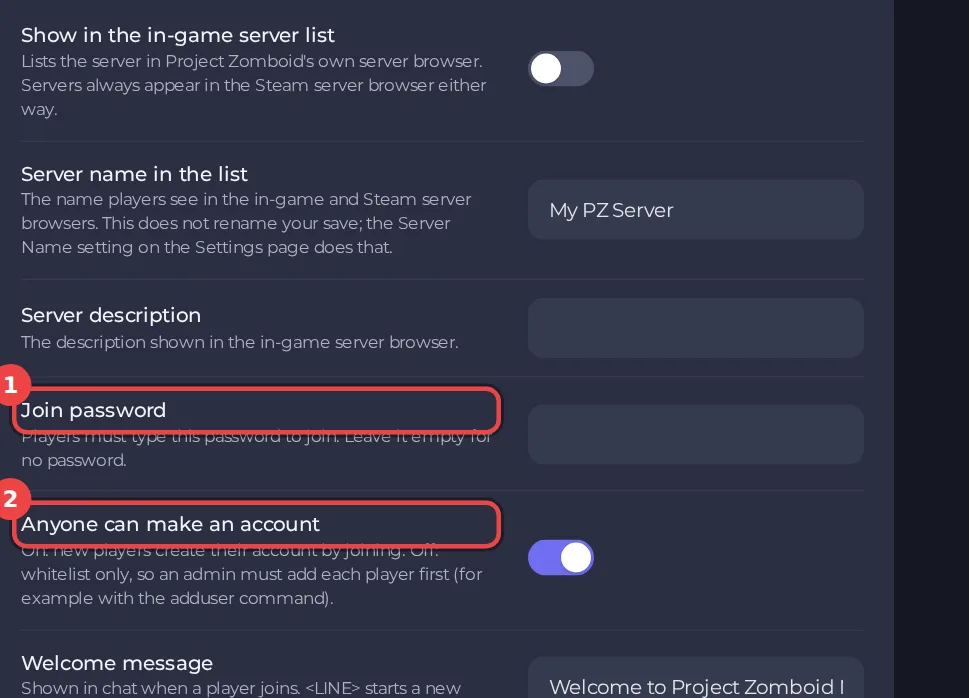
To allow only players you choose, turn off Anyone can make an account in the Server Settings editor. A new player then cannot create an account by joining. You add each player to the whitelist, either with Add to whitelist on the Active players card or with the adduser command in the Console.
Close the server to new accounts
- Stop the server. Open Settings, then Server Settings under Config files.
- In the group Listing and joining, turn off Anyone can make an account. The editor says: "Off: whitelist only, so an admin must add each player first."
- Click Save only or Save & start.
Add players
A player who is online: open Actions for their name on the Active players card, choose Add to whitelist and click Add. The server confirms it. The player must be on the server.
A player who has not joined yet: in the Console type:
`` adduser "username" "password" ``
The game's help says: "Use this command to add a new user to a whitelisted server. Use: /adduser "username" "password" -- password is optional". Tell the player the username and password, and they join with them.
Remove someone
- On the Active players card, click Whitelist.
- Type the name exactly as it is on the whitelist and click Remove. The person does not need to be online. While the server is closed, a removed player can no longer join.
Good to know
- The setting Remove dead players from the whitelist in the same group deletes a player's account when their character dies. On a whitelist-only server that stops them from making a new one. Leave it off unless you want that.
- The whitelist and the accounts are kept in the player database
.cache/db/<Server Name>.db. Wiping the world database also removes them: How to delete a Project Zomboid world or start fresh. - A password adds another lock: How to set a join password on your Project Zomboid server. More choices: How to make your Project Zomboid server public or private.





