%7B.s%7Banimation%3Ab%201.5s%20ease-out%20both%7D.d%7Banimation-delay%3A.16s%7D%7D%40keyframes%20b%7B0%25%7Bfill%3A%23F4F6FA%7D18%25%7Bfill%3A%23FFE08A%7D34%25%2C70%25%7Bfill%3A%23FF8A1F%7D80%25%7Bfill%3A%23FFE08A%7D100%25%7Bfill%3A%23FF8A1F%7D%7D%3C%2Fstyle%3E%3Cg%20transform%3D%22translate(143%20428.93)%20scale(3.885906)%22%3E%3Cg%20transform%3D%22translate(0%202)%22%20fill%3D%22%23706EF0%22%3E%3Cpath%20d%3D%22M0%200%20H48%20A40%2040%200%200%201%2048%2080%20V100%20H0%20Z%22%2F%3E%3Cpath%20transform%3D%22translate(91.75%200)%22%20d%3D%22M0%200%20L48%200%20L48%2050%20L76%2050%20L76%20100%20L0%20100%20Z%22%2F%3E%3Cpath%20transform%3D%22translate(173%200)%22%20d%3D%22M0%20100%20L58%20-4%20L116%20100%20Z%22%2F%3E%3Cpath%20transform%3D%22translate(264.25%200)%22%20d%3D%22M0%200%20L104%200%20L76%2050%20L76%20100%20L28%20100%20L28%2050%20Z%22%2F%3E%3Cg%20transform%3D%22translate(375%200)%22%3E%3Cpath%20d%3D%22M0%200%20L50%2038%20L50%200%20L100%200%20L100%20100%20L0%20100%20Z%22%20fill%3D%22%23F4F6FA%22%2F%3E%3Crect%20class%3D%22s%22%20x%3D%2247%22%20y%3D%2263%22%20width%3D%2219%22%20height%3D%2230%22%2F%3E%3Crect%20class%3D%22s%20d%22%20x%3D%2274%22%20y%3D%2263%22%20width%3D%2219%22%20height%3D%2230%22%2F%3E%3C%2Fg%3E%3Cpath%20transform%3D%22translate(484.75%200)%22%20d%3D%22M0%200%20L48%200%20L48%2037%20L52%2037%20L52%200%20L100%200%20L100%20100%20L52%20100%20L52%2063%20L48%2063%20L48%20100%20L0%20100%20Z%22%2F%3E%3Cpath%20transform%3D%22translate(588.5%200)%22%20d%3D%22M0%2050%20A53%2053%200%201%200%20106%2050%20A53%2053%200%201%200%200%2050%20Z%22%2F%3E%3Cpath%20transform%3D%22translate(698.25%200)%22%20d%3D%22M25%200%20H102%20V50%20H77%20A25%2025%200%200%201%2077%20100%20H0%20V50%20H25%20A25%2025%200%200%201%2025%200%20Z%22%2F%3E%3Cpath%20transform%3D%22translate(804%200)%22%20d%3D%22M0%200%20L90%200%20L90%2050%20L69%2050%20L69%20100%20L21%20100%20L21%2050%20L0%2050%20Z%22%2F%3E%3C%2Fg%3E%3C%2Fg%3E%3C%2Fsvg%3E)


Open Players, click a player who is on the server, and scroll to Admin powers. From there you can teleport them to another player, give them an item or XP, and switch God mode, Invisible or No clip on and off. Events at this player sends a horde, lightning or thunder at them. The panel sends the game's own commands for you.
Open the player window
- Open your server in the panel and click Players in the left menu. The server must be running.
- Click the player. They must be on the server: for an offline player these buttons are greyed out with "They need to be on the server for this."
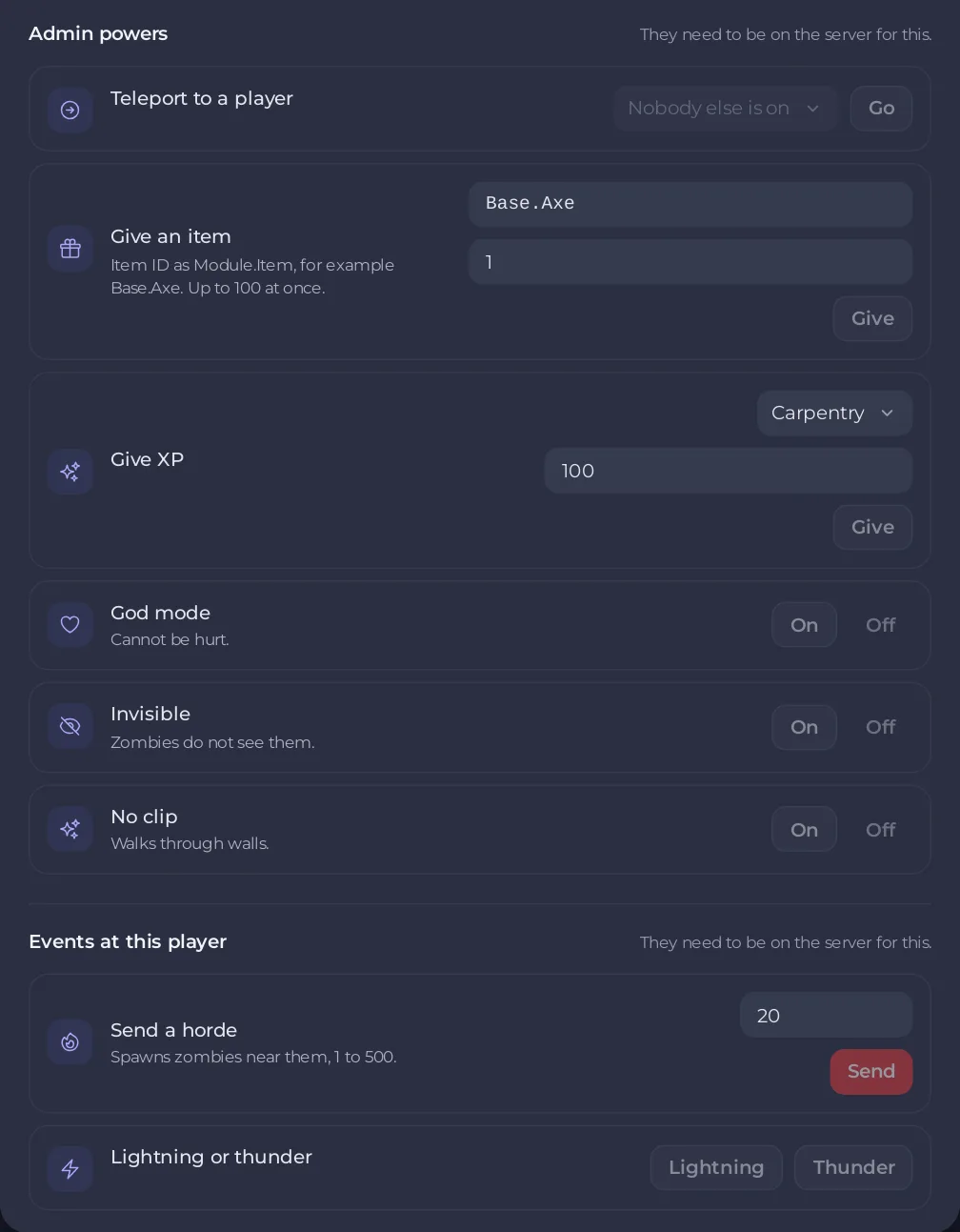
Admin powers
| Power | How | Limits |
|---|---|---|
| Teleport to a player | Pick a player under Teleport to, click Go | The other player must be on too |
| Give an item | Type the Item ID, the number in How many, click Give | "Item ID as Module.Item, for example Base.Axe. Up to 100 at once." |
| Give XP | Pick the Skill, type the XP, click Give | 1 to 100000 XP |
| God mode | On or Off | "Cannot be hurt." |
| Invisible | On or Off | "Zombies do not see them." |
| No clip | On or Off | "Walks through walls." |
The panel confirms each one, for example "Gave 5 Base.Axe to" and the player's name.
Events at this player
| Event | How | Limits |
|---|---|---|
| Send a horde | Type the number of Zombies, click Send | "Spawns zombies near them, 1 to 500." |
| Lightning or thunder | Click Lightning or Thunder | Thunder draws zombies |
Events for the whole server, such as a helicopter or rain, are on the World events card: How to trigger world events on your Project Zomboid server.
Find an item ID
An item ID is the module, a dot and the item's name, such as Base.Axe. The same form is used by Banned Item IDs: How to ban items from loot on your Project Zomboid server. Items from mods have the mod's own module name.
Good to know
- These powers change the running game. Give them out with care, and back up before big changes: How to back up and restore your Project Zomboid world.
- Every power used here goes into the Activity log with the player's name: How to see what happened on your server.
- The same commands typed by hand: Project Zomboid admin commands that work.
- The rest of the player window: How to use the Players page of your Project Zomboid server.





