

 MINECRAFT HOSTING
 GAME SERVERS
 Game Panel
You can change your plan whenever your needs change: more memory for a bigger world, a longer billing cycle to save money, or an extra such as more backup space. Everything is on the My plan page of the server.
Open My plan
- Open your server in the panel.
- Click My plan in the left menu, at the bottom.
The page shows your plan with its resources and price, the next billing date, your billing cycle, and how many player slots you use. Below are your usage against the plan limits, the server's location, and its configurable options.
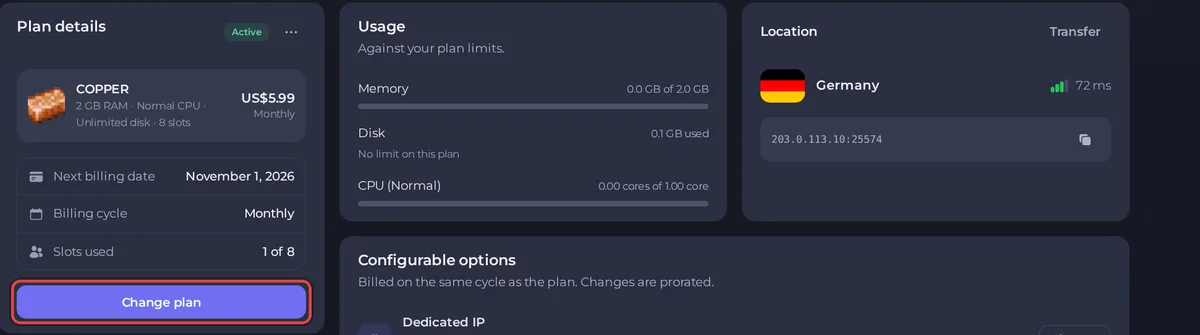
Change plan or billing cycle
- Click Change plan. The wizard has three steps: Plan, Options and Review.
- Plan: under Billing cycle choose Monthly, Quarterly or Yearly. Longer cycles cost less per month. Below, pick a plan from the list, which shows the memory and price of each. Your current plan is marked Current.
- Options: change add-ons if you want to. See below.
- Review: check the charges. The panel shows what you will pay now and what changes. Confirm to continue.
- If the change costs money, an invoice is created. Pay it to apply the change. If you pick a smaller plan, the Review step shows an Open a ticket button instead of a confirm button. See How to view, pay and download your invoices.
The wizard tells you the date by which to change: "Change your plan before it renews on" your next billing date.
Upgrades and downgrades
- Upgrades take effect as soon as you pay for them. You pay a prorated amount for the difference until your next renewal. Then restart the server from the console so it starts on the new plan.
- Moving to a smaller plan is not done in the panel yet. Pick the smaller plan in the wizard and it tells you to open a ticket. We then move you down at the end of your current paid term, so you keep what you paid for until then. See How to open a support ticket.
If a change is waiting for payment, the page shows Change pending. You can cancel a pending change from there and its invoice is cancelled with it.
Change options only
Under Configurable options each option has a Change button. Changes are billed on the same cycle as your plan and are prorated.
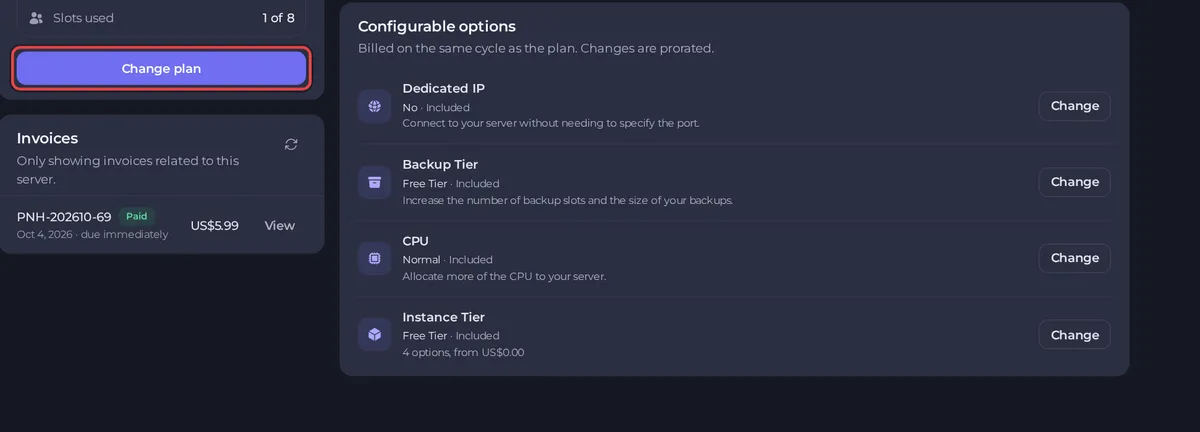
- Dedicated IP: an address only your server uses. See How to find your server's ports and IP address, and add a dedicated IP.
- Backup Tier: more backup slots and bigger backups. See How to create, download and restore backups.
- CPU: a larger share of processing power for busy servers.
- Instance Tier: room for more instances on one server. See How to use instances to switch between worlds.
Good to know
- Only the owner of the plan can change it. People you invite cannot.
- Your files and world are kept when you change plan.
- Player slots can be changed separately, within your plan's limit. See How to rename your server and change player slots.
- Prices on the page are in your account's currency.





