

 MINECRAFT HOSTING
 GAME SERVERS
 Game Panel
An instance is a saved setup of your server with its own world and files. With instances you can keep a survival world and a creative world on the same server and switch between them, or try a modded setup without touching your main one. The panel also calls them setups.
Open Instances
- Open your server in the panel.
- Click Instances in the left menu.
The page shows your Active instance, with its name, its server type and version, and an Edit button. Below it, Your instances lists every instance and how many slots you have used, for example 1 of 2 slots.

Create a new instance
- Click Create new.
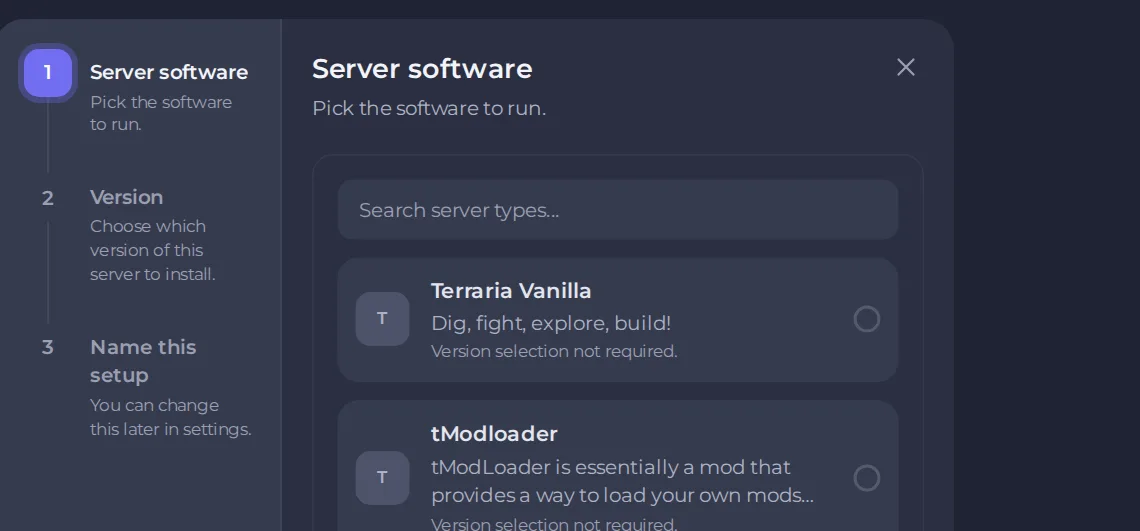
- Server software: choose the software the new instance should run. Use the search box to find it. Some types need no version choice, and the list says so.
- Version: choose which version to install, if the game has them.
- Name this setup: give it a name you will recognise. You can rename it later with the Edit button on the instance.
For games with several ways to play, the wizard starts with How do you want to play?, so you may see an extra step.
Switch between instances
Find the other instance in the list and click Switch & play (or Switch to it). A window says your server will go offline. Click Switch to confirm. Switching stops the server and moves its files, so players are disconnected, and the world you switch away from stays exactly where it is. Switch back at any time to pick it up again.
Tell players before you switch, and take a backup first if the world matters. See How to create, download and restore backups.
How many instances you can have
The counter shows your limit. It is set by the Instance Tier on your plan, which you can raise. When your slots are full, the plan owner sees an Add a slot button in place of Create new. Everyone else sees a note that the owner can add more. Open My plan, find Instance Tier under configurable options and click Change. See How to change your plan or billing cycle.
Good to know
- Each instance keeps its own files, so mods and settings in one do not appear in another.
- Instances share your plan's resources. Only one runs at a time.





