

 MINECRAFT HOSTING
 GAME SERVERS
 Game Panel
You can cancel a server yourself at any time, and you never need to contact us to stop renewals. If you only want a break, you may be able to pause instead.
Before you cancel: download anything you want to keep, such as your world and your configuration. Files, worlds and backups are removed when a server is terminated. See How to create, download and restore backups.
Cancel a plan
- Open the server in the panel and click My plan in the left menu.
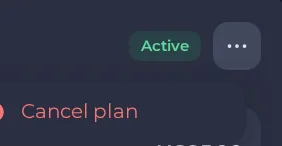
- On the Plan details card, click the ... button beside the Active badge.
- Choose Cancel plan. (You can also open Billing, use the ... menu on the server's row and choose Cancel this plan.) The menu item is greyed out while a plan change is waiting.
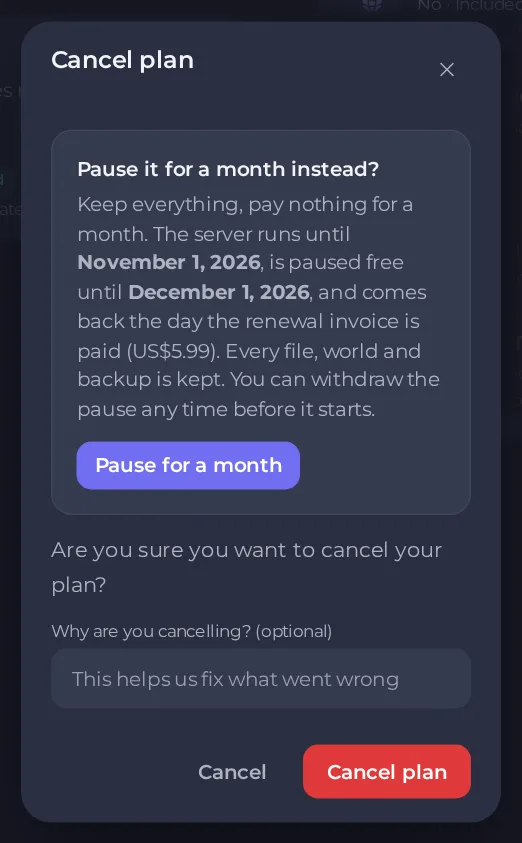
- In the Cancel plan window, read the message. If your plan can be paused, a card first offers Pause it for a month instead.
- If you want, tell us why in Why are you cancelling?. It is optional and helps us fix what went wrong.
- Click Cancel plan to confirm. The panel confirms with Cancellation request submitted.
What happens after you cancel
- The cancellation takes effect at the end of the billing period you have already paid for. Your server keeps running until then.
- The plan page shows a notice that this plan is set to cancel, so you can see that your request was received and do not cancel twice. The server keeps running to the end of the period you paid for, which is the Next billing date on the plan page.
- No new renewal invoice is created for it.
- When the period ends, the server is terminated and its data is removed.
If you cancelled by mistake, open a ticket before the period ends and ask us to reverse it. See How to open a support ticket.
Pause instead of cancelling
When your plan is eligible, the cancel window offers to pause it for a month:
- You keep everything and pay nothing for that month.
- The server runs until your current renewal date, is paused free for a month after that, and comes back the day the renewal invoice is paid.
- Every file, world and backup is kept.
- You can withdraw the pause any time before it starts.
Choose Pause for a month in the window to book it. A plan can be paused once every six months, and only while it is active, has a renewal coming up and has no change waiting. If the offer does not appear, your plan cannot be paused right now.
Cancel, refund or close the account
- Cancelling is not a refund. Money already paid is not returned by cancelling. New orders have a 72-hour money-back guarantee. See How refunds work.
- Closing your account does not stop billing on its own. Cancel each plan first. See How to close your account.
Recurring payments you set up elsewhere
Our Terms of Service make it your responsibility to cancel any recurring payment you set up with your payment provider. If you did that, cancel it there as well. See How payment methods and automatic renewals work.





