

 MINECRAFT HOSTING
 GAME SERVERS
 Game Panel
Both settings are on the Overview page of your server, in the row of details at the top.
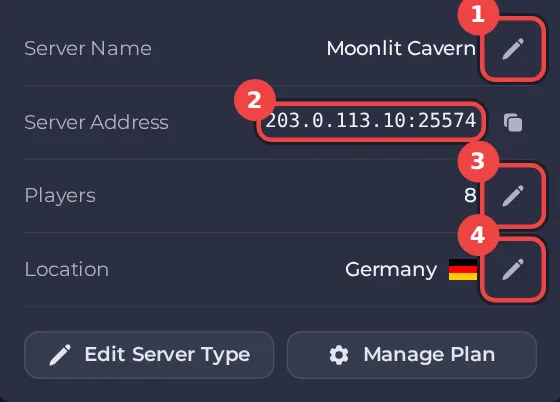
Rename your server
The name you give a server is for your own use in the panel. It is how you tell your servers apart.
- Open your server in the panel.
- On Overview, click the pencil next to Server Name.
- Type the new name. It can be up to 32 characters.
- Click Rename.
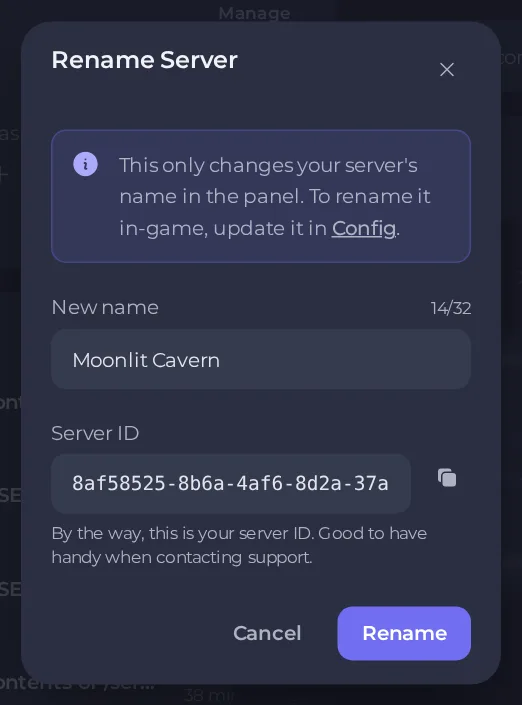
This only changes the name in the panel. To change the name players see in the game's server list, change it in the game's own settings. See How to change your server settings.
Find your server ID
The same window shows your Server ID with a copy button. It is good to have handy when you contact support, because it identifies exactly which server you mean. See How to open a support ticket.
Change player slots
Player slots set how many players the game will accept at once.
- On Overview, click the pencil next to Players. It appears only for games whose slots can be changed, and only if your role allows it.
- Enter the number you want. If your plan has a player limit, you can go anywhere up to it, and raise it again later. The window tells you whether your plan caps player slots.
- Click Update.
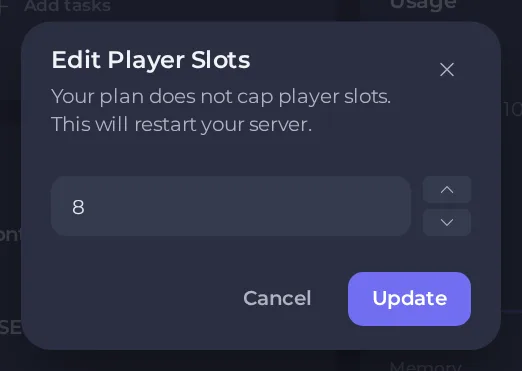
Changing slots restarts your server, so warn players first.
Good to know
- Your plan sets the maximum number of slots. To go higher, upgrade your plan. See How to change your plan or billing cycle.
- More slots does not mean more performance. Pick the plan for the memory and CPU your world needs, then set slots below its limit. See Game server terms explained.
- A very high slot count on a small plan can make the game feel slow once players actually join.





