%7B.s%7Banimation%3Ab%201.5s%20ease-out%20both%7D.d%7Banimation-delay%3A.16s%7D%7D%40keyframes%20b%7B0%25%7Bfill%3A%23F4F6FA%7D18%25%7Bfill%3A%23FFE08A%7D34%25%2C70%25%7Bfill%3A%23FF8A1F%7D80%25%7Bfill%3A%23FFE08A%7D100%25%7Bfill%3A%23FF8A1F%7D%7D%3C%2Fstyle%3E%3Cg%20transform%3D%22translate(143%20428.93)%20scale(3.885906)%22%3E%3Cg%20transform%3D%22translate(0%202)%22%20fill%3D%22%23706EF0%22%3E%3Cpath%20d%3D%22M0%200%20H48%20A40%2040%200%200%201%2048%2080%20V100%20H0%20Z%22%2F%3E%3Cpath%20transform%3D%22translate(91.75%200)%22%20d%3D%22M0%200%20L48%200%20L48%2050%20L76%2050%20L76%20100%20L0%20100%20Z%22%2F%3E%3Cpath%20transform%3D%22translate(173%200)%22%20d%3D%22M0%20100%20L58%20-4%20L116%20100%20Z%22%2F%3E%3Cpath%20transform%3D%22translate(264.25%200)%22%20d%3D%22M0%200%20L104%200%20L76%2050%20L76%20100%20L28%20100%20L28%2050%20Z%22%2F%3E%3Cg%20transform%3D%22translate(375%200)%22%3E%3Cpath%20d%3D%22M0%200%20L50%2038%20L50%200%20L100%200%20L100%20100%20L0%20100%20Z%22%20fill%3D%22%23F4F6FA%22%2F%3E%3Crect%20class%3D%22s%22%20x%3D%2247%22%20y%3D%2263%22%20width%3D%2219%22%20height%3D%2230%22%2F%3E%3Crect%20class%3D%22s%20d%22%20x%3D%2274%22%20y%3D%2263%22%20width%3D%2219%22%20height%3D%2230%22%2F%3E%3C%2Fg%3E%3Cpath%20transform%3D%22translate(484.75%200)%22%20d%3D%22M0%200%20L48%200%20L48%2037%20L52%2037%20L52%200%20L100%200%20L100%20100%20L52%20100%20L52%2063%20L48%2063%20L48%20100%20L0%20100%20Z%22%2F%3E%3Cpath%20transform%3D%22translate(588.5%200)%22%20d%3D%22M0%2050%20A53%2053%200%201%200%20106%2050%20A53%2053%200%201%200%200%2050%20Z%22%2F%3E%3Cpath%20transform%3D%22translate(698.25%200)%22%20d%3D%22M25%200%20H102%20V50%20H77%20A25%2025%200%200%201%2077%20100%20H0%20V50%20H25%20A25%2025%200%200%201%2025%200%20Z%22%2F%3E%3Cpath%20transform%3D%22translate(804%200)%22%20d%3D%22M0%200%20L90%200%20L90%2050%20L69%2050%20L69%20100%20L21%20100%20L21%2050%20L0%2050%20Z%22%2F%3E%3C%2Fg%3E%3C%2Fg%3E%3C%2Fsvg%3E)


Work through these checks in order. Most join problems are one of them: the server is not Online yet, the address or password is mistyped, the game version differs, the player is on a console and needs the join code, or the allow list is on.
1. Is the server Online?
Open your server in the panel. The badge must say Online. With crossplay on, the server registers with Microsoft PlayFab once its world has loaded, so a server that is still Starting, or still making a new world, cannot be found yet. Wait for the Console line Opened PlayFab server, or Opened Steam server with crossplay off.
2. Is the address right?
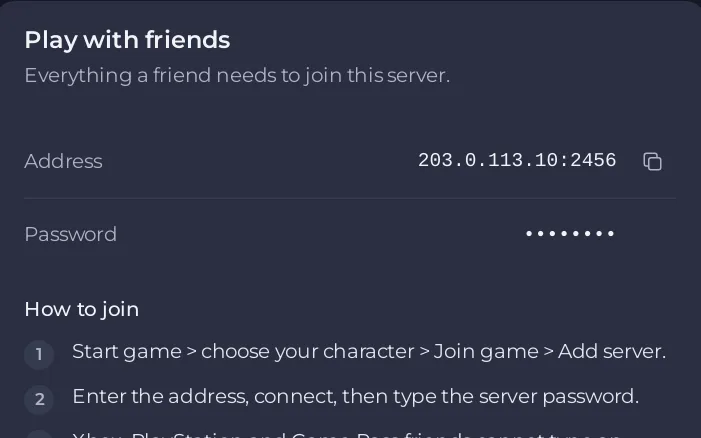
Copy it again from the Play with friends card. Include the port: address:port. A missing or mistyped port is the most common cause. See How to join your Valheim server from Steam.
3. Is the password right?
It must match exactly, capitals included. The Password row of the Play with friends card shows it. The Console line has wrong password confirms it. See How to change your Valheim server name and password.
4. Is the player on a console?
Xbox, PlayStation and Game Pass players join with the six-digit join code on the Play with friends card. Crossplay must be on, and the code can change at every restart, so send the one the card shows now. See How to join your Valheim server from Xbox or Game Pass.
5. Is the game version the same?
The Console line has incompatible version means the player's game and the server differ. When Steam has a newer Valheim, Settings shows A new Valheim version is out with a button to update. See Valheim players get a version mismatch after an update.
6. Is crossplay set the way you think?
With Enable Crossplay off, only Steam players can join, and the Play with friends card says so. Check Settings, then Game Settings: How to turn crossplay on or off on your Valheim server.
7. Is the allow list on, or the player banned?
Under the Active players card, The allow list is on: only the players on it can join. means only listed players get in. The Console line is blacklisted or not in whitelist means the player is banned or not on the allow list. Open Access and check the Banned and Allowed tabs. See Valheim players are refused because the allow list is on.
8. Is the server full?
server is full in the Console means the server had its maximum of 10 players. See How many players can join your Valheim server.
9. Does the server run mods?
On a modded server, players need the mods marked Players need it too, at the same versions. Send them a code with Share with players: How to share your Valheim mods with players. Console players cannot install mods: Console players cannot join your modded Valheim server.
10. Is the address a local one?
A crossplay server cannot be reached by a local or loopback address, such as 127.0.0.1. Use the address from the panel.
Still stuck?
Click Can’t connect? on the Play with friends card, then Ask support, or open a ticket with the last 50 to 100 lines of the Console.





