%7B.s%7Banimation%3Ab%201.5s%20ease-out%20both%7D.d%7Banimation-delay%3A.16s%7D%7D%40keyframes%20b%7B0%25%7Bfill%3A%23F4F6FA%7D18%25%7Bfill%3A%23FFE08A%7D34%25%2C70%25%7Bfill%3A%23FF8A1F%7D80%25%7Bfill%3A%23FFE08A%7D100%25%7Bfill%3A%23FF8A1F%7D%7D%3C%2Fstyle%3E%3Cg%20transform%3D%22translate(143%20428.93)%20scale(3.885906)%22%3E%3Cg%20transform%3D%22translate(0%202)%22%20fill%3D%22%23706EF0%22%3E%3Cpath%20d%3D%22M0%200%20H48%20A40%2040%200%200%201%2048%2080%20V100%20H0%20Z%22%2F%3E%3Cpath%20transform%3D%22translate(91.75%200)%22%20d%3D%22M0%200%20L48%200%20L48%2050%20L76%2050%20L76%20100%20L0%20100%20Z%22%2F%3E%3Cpath%20transform%3D%22translate(173%200)%22%20d%3D%22M0%20100%20L58%20-4%20L116%20100%20Z%22%2F%3E%3Cpath%20transform%3D%22translate(264.25%200)%22%20d%3D%22M0%200%20L104%200%20L76%2050%20L76%20100%20L28%20100%20L28%2050%20Z%22%2F%3E%3Cg%20transform%3D%22translate(375%200)%22%3E%3Cpath%20d%3D%22M0%200%20L50%2038%20L50%200%20L100%200%20L100%20100%20L0%20100%20Z%22%20fill%3D%22%23F4F6FA%22%2F%3E%3Crect%20class%3D%22s%22%20x%3D%2247%22%20y%3D%2263%22%20width%3D%2219%22%20height%3D%2230%22%2F%3E%3Crect%20class%3D%22s%20d%22%20x%3D%2274%22%20y%3D%2263%22%20width%3D%2219%22%20height%3D%2230%22%2F%3E%3C%2Fg%3E%3Cpath%20transform%3D%22translate(484.75%200)%22%20d%3D%22M0%200%20L48%200%20L48%2037%20L52%2037%20L52%200%20L100%200%20L100%20100%20L52%20100%20L52%2063%20L48%2063%20L48%20100%20L0%20100%20Z%22%2F%3E%3Cpath%20transform%3D%22translate(588.5%200)%22%20d%3D%22M0%2050%20A53%2053%200%201%200%20106%2050%20A53%2053%200%201%200%200%2050%20Z%22%2F%3E%3Cpath%20transform%3D%22translate(698.25%200)%22%20d%3D%22M25%200%20H102%20V50%20H77%20A25%2025%200%200%201%2077%20100%20H0%20V50%20H25%20A25%2025%200%200%201%2025%200%20Z%22%2F%3E%3Cpath%20transform%3D%22translate(804%200)%22%20d%3D%22M0%200%20L90%200%20L90%2050%20L69%2050%20L69%20100%20L21%20100%20L21%2050%20L0%2050%20Z%22%2F%3E%3C%2Fg%3E%3C%2Fg%3E%3C%2Fsvg%3E)


Open Settings, then Game Settings, and change Server Name or Server Password. Restart the server to apply it. The name is what players see in the in-game server list. The password is what they type to join.
Change the server name or password
- Open your server in the panel and click Settings, then Game Settings.
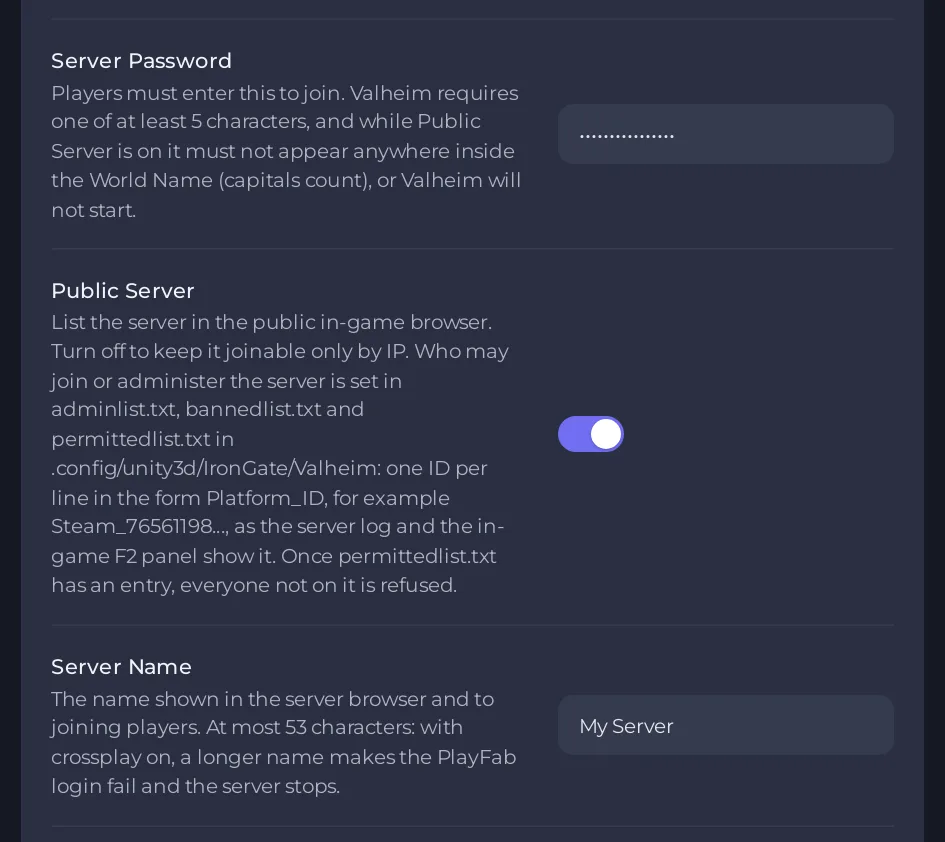
- Click the field of Server Name or Server Password, type the new value, then click outside the field or press Enter. The panel saves it.
- A bar says Saved. The server must restart before these take effect. Click Restart now, or restart from the power menu. Players who are on the server are disconnected by a restart.
- Tell your friends the new password. The Play with friends card shows it.
The rules
| Setting | Rule |
|---|---|
| Server Name | Up to 53 characters. No double quote and no backslash. With crossplay on, a longer name makes the server fail to log in and stop. |
| Server Password | 5 to 20 characters. No double quote and no backslash. Valheim requires a password. |
If a value breaks a rule, the panel tells you and keeps the old one.
The password and the world name
While Public Server is on, the password must not appear anywhere inside the World Name, and capitals count. With the world name Dedicated, the password Dedic stops the server, and dedic does not. A password inside the server name is fine. If the server stops at start, see Valheim server stops at start with a password error.
Your server comes with a password
A new server starts with a long password that was made just for it, so nobody can guess it. You can keep it or choose your own.
The name on the Overview page is a different name
The Server Name row on the Overview page, and the name at the top of the page, only name the server inside your panel. Clicking its pencil opens Rename Server, and it does not change what players see in the game. The in-game name is the Server Name option in Game Settings.





