%7B.s%7Banimation%3Ab%201.5s%20ease-out%20both%7D.d%7Banimation-delay%3A.16s%7D%7D%40keyframes%20b%7B0%25%7Bfill%3A%23F4F6FA%7D18%25%7Bfill%3A%23FFE08A%7D34%25%2C70%25%7Bfill%3A%23FF8A1F%7D80%25%7Bfill%3A%23FFE08A%7D100%25%7Bfill%3A%23FF8A1F%7D%7D%3C%2Fstyle%3E%3Cg%20transform%3D%22translate(143%20428.93)%20scale(3.885906)%22%3E%3Cg%20transform%3D%22translate(0%202)%22%20fill%3D%22%23706EF0%22%3E%3Cpath%20d%3D%22M0%200%20H48%20A40%2040%200%200%201%2048%2080%20V100%20H0%20Z%22%2F%3E%3Cpath%20transform%3D%22translate(91.75%200)%22%20d%3D%22M0%200%20L48%200%20L48%2050%20L76%2050%20L76%20100%20L0%20100%20Z%22%2F%3E%3Cpath%20transform%3D%22translate(173%200)%22%20d%3D%22M0%20100%20L58%20-4%20L116%20100%20Z%22%2F%3E%3Cpath%20transform%3D%22translate(264.25%200)%22%20d%3D%22M0%200%20L104%200%20L76%2050%20L76%20100%20L28%20100%20L28%2050%20Z%22%2F%3E%3Cg%20transform%3D%22translate(375%200)%22%3E%3Cpath%20d%3D%22M0%200%20L50%2038%20L50%200%20L100%200%20L100%20100%20L0%20100%20Z%22%20fill%3D%22%23F4F6FA%22%2F%3E%3Crect%20class%3D%22s%22%20x%3D%2247%22%20y%3D%2263%22%20width%3D%2219%22%20height%3D%2230%22%2F%3E%3Crect%20class%3D%22s%20d%22%20x%3D%2274%22%20y%3D%2263%22%20width%3D%2219%22%20height%3D%2230%22%2F%3E%3C%2Fg%3E%3Cpath%20transform%3D%22translate(484.75%200)%22%20d%3D%22M0%200%20L48%200%20L48%2037%20L52%2037%20L52%200%20L100%200%20L100%20100%20L52%20100%20L52%2063%20L48%2063%20L48%20100%20L0%20100%20Z%22%2F%3E%3Cpath%20transform%3D%22translate(588.5%200)%22%20d%3D%22M0%2050%20A53%2053%200%201%200%20106%2050%20A53%2053%200%201%200%200%2050%20Z%22%2F%3E%3Cpath%20transform%3D%22translate(698.25%200)%22%20d%3D%22M25%200%20H102%20V50%20H77%20A25%2025%200%200%201%2077%20100%20H0%20V50%20H25%20A25%2025%200%200%201%2025%200%20Z%22%2F%3E%3Cpath%20transform%3D%22translate(804%200)%22%20d%3D%22M0%200%20L90%200%20L90%2050%20L69%2050%20L69%20100%20L21%20100%20L21%2050%20L0%2050%20Z%22%2F%3E%3C%2Fg%3E%3C%2Fg%3E%3C%2Fsvg%3E)


On a PC, you join with the server address from the panel: open Join game, choose Add server, enter the address and type the password. If the server is public, you can also find it in the in-game server list, and with crossplay on, the join code works on PC too.
Join with the server address
- Open your server in the panel. If the badge says Offline, click Start and wait for Online.
- Copy the address. The easiest place is the Play with friends card on Overview: click the copy icon beside Address. The Join button at the top of the server card and the copy icon beside Server Address copy the same address. It looks like
address:port.
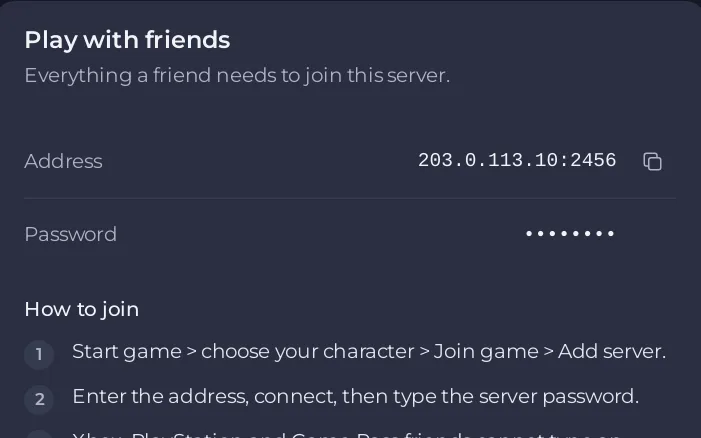
- Start Valheim, choose your character, then choose Join game and Add server. These are the steps the panel itself shows under How to join.
- Enter the address, including the port, and connect.
- When the game asks for the password, type it exactly as it is in the panel, capitals included. The Password row of the Play with friends card shows it to you.
Iron Gate's own server guide calls the address button Join IP. If your version of the game shows a Join IP button, use it the same way: type or paste address:port.
Join with the join code
With crossplay on, the server also has a six-digit join code. Iron Gate says a crossplay server can be joined by address, by join code or from the server list. The code is on the Play with friends card, under the third join step, while the server runs. The card itself says Steam friends can keep using the address. See How to find your Valheim join code.
Join from the server list
If Public Server is on in Settings, then Game Settings, the server is listed in the in-game server browser under the name in Server Name. If it is off, the server is only reachable by address or join code. See How to make your Valheim server public or private.
If it does not work
- The server must say Online. A server that is still starting cannot be joined yet.
- Copy the address again from the panel. A missing or mistyped port is the most common cause.
- The password must match exactly, capitals included.
- You and the server need the same game version. See Valheim players get a version mismatch after an update.
- On a modded server, you need the same mods too. The server owner can send you a profile code with every mod: How to share your Valheim mods with players.
- If you are refused at once, the server may only let in players on its allow list: Valheim players are refused because the allow list is on.
- More: Valheim players cannot join by address.





