

A The Isle (Evrima) server on PlayNHost has three ports: the game port, the join queue port and an RCON port for your own tools. All three are assigned and open from the start. Players never type a port: they find your server by name in the game's Unofficial server list, and nobody needs to open anything on a router or firewall.
Which ports does a The Isle server use?
| Port | What it does | Protocol | The game's default | On your PlayNHost server | Where you see it |
|---|---|---|---|---|---|
| Game port | Players' game traffic, and the port the server list sends players to | UDP | 7777 | The Primary port, a number assigned by PlayNHost | Ports & Network, and the Console line [playnhost] Server list address: ... |
| Queue port | The join queue, when Join queue is on and the server is full | Not stated by the developer; both TCP and UDP are open | 10000 in the developer's sample Game.ini | One of the two other ports, set for you | Nothing to type or copy |
| RCON port | Your own RCON tools, such as a Discord bot or a desktop RCON app | TCP | 8888 | One of the two other ports. It only answers when RCON for your own tools is on | The Console line [playnhost] RCON for outside tools is on, port ... |
The numbers 10000 and 8888 come from the sample Game.ini that the developer, Afterthought, published with Patch 0.17.54, where 8888 is called the "Default port used in game". Earlier samples used other numbers, so 10000 is an example rather than a fixed rule. The notes of Patch 0.15.203 add that the queue port "must be open if Queueing is enabled": on PlayNHost it already is.
Why is my port not 7777?
Many servers share one machine, so each server gets its own port numbers. The panel assigns them, and they are almost never the game's defaults.
Without help, an Evrima server announces itself to the server list on port 7777, whatever port it really runs on. PlayNHost's start tools pass your real port to the game before it starts, so the list sends players to the right one. The Console prints it at every start:
[playnhost] Server list address: 203.0.113.10, port 25573The numbers in this example are made up. Your own line shows your server's address and Primary port.
How do I see my server's ports in the panel?
- Open your server in the panel and click Ports & Network in the left menu.
- Read the address under Give this to your players. On The Isle you only need it for your own tools: players search the server name instead.
- Look at All ports. The port marked Primary, described as The port players connect to, is the game port. The other two are the queue port and the RCON port.
- To tell which one is the RCON port, open the Console after a restart with RCON for your own tools on, and read the number in
[playnhost] RCON for outside tools is on, port ....
Under the All ports heading, the page says Every port accepts TCP and UDP. You never choose a protocol.
Leave all three ports as they are: do not use Make primary or Remove port on any of them, and do not rename the Primary port. The game, its server list entry, the queue and RCON are set up around the three ports your server came with, and moving or removing one breaks the part that uses it. More on the page itself: How to find your server's ports and IP address.
How do players connect?
Players do not type an address or a port. In Steam they put The Isle on the evrima beta, open the Unofficial server list in the game and search for your server's name. The Play with friends card on your Overview page shows the exact name and password to give them.
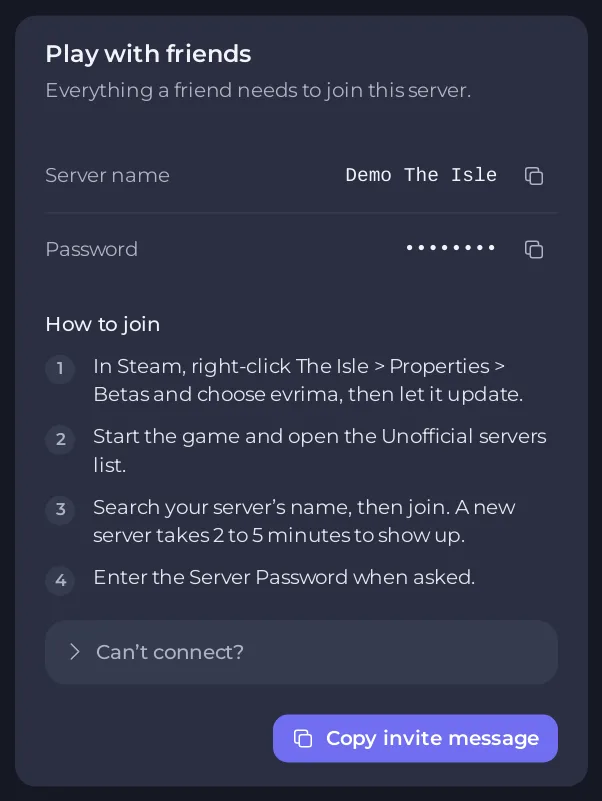
The full steps are in How to join your The Isle server.
Do I need to open ports on my router or firewall?
No. The firewall in front of PlayNHost game servers lets traffic through to the ports the panel gives servers, TCP and UDP, and drops the rest. Your three ports are reachable from the internet as soon as the server runs.
Players connect outwards to your server, which every normal home router allows. Port forwarding is only needed when you host a server on your own computer at home.
How does RCON for your own tools work?
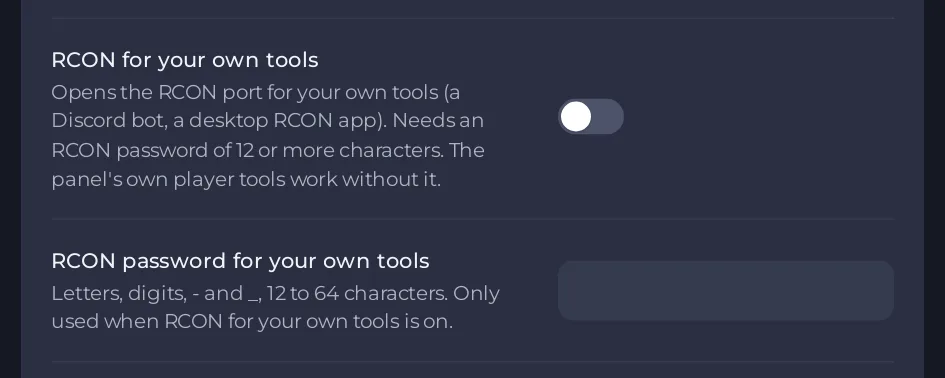
You only need the RCON port for tools outside the panel. The Console, the Active players card, Announce and the other The Isle tools in the panel talk to the game inside your server, so they work while RCON for your own tools is off.
When you switch RCON for your own tools on, set an RCON password for your own tools and restart, your RCON port starts answering. Every connection must send that password within 3 seconds, or it is closed. The steps are in How to connect your own RCON tool to your The Isle server.
Common port problems and their fixes
The server does not show in the Unofficial list
Wait 2 to 5 minutes after the start, check that the game is on the evrima beta, and search the exact name from the Play with friends card. If the Console shows [playnhost] WARNING the server's port is not known; the server list may send players to port 7777, the list does not know your port: restart once, and if the line comes back, open a ticket with that line. More checks: Your The Isle server does not show in the server list.
Players see the server but time out when they join
The port in the Console line [playnhost] Server list address: ... should be your Primary port on Ports & Network. If players still time out, open Can’t connect? on the Play with friends card, click Ask support and paste that line. For build, password and whitelist causes, see Players cannot join your The Isle server.
The RCON tool is refused or disconnected at once
Work through these in order:
- The Console says
[playnhost] RCON for outside tools is off: set an RCON password of 12 or more letters and digits first. Set a password of 12 to 64 letters, digits,-and_under RCON password for your own tools, then restart. - The tool uses the game port or the queue port. Use the port from
[playnhost] RCON for outside tools is on, port .... - The tool speaks Source RCON, the protocol of Valve games. Evrima has an RCON protocol of its own, and the RCON port closes any connection that does not start the Evrima way. Use a tool made for The Isle Evrima.
- The password was wrong 10 times from one address. That address is refused until 10 minutes have passed since the last wrong try.
Players are not put in the queue when the server is full
Join queue is on the Gameplay page under Players and chat, and it is on by default. A change applies at the next start, so restart after switching it on. See How to change players and chat settings on your The Isle server.
For anything else, start with The Isle server problems and fixes.


