

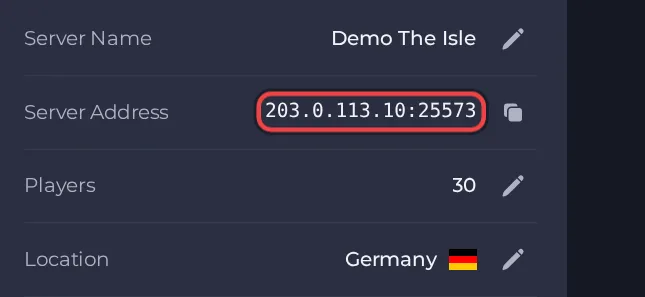
Your players join The Isle server with its Server Address, shown on the server's Overview page in the panel. The Isle (the Evrima version) is a multiplayer survival game in which you play as a dinosaur on a large island; a hosted server gives your community its own always-on island with its own name, password and admins.
Join in a few steps
- Open your server in the panel. If the status badge says Offline, click Start and wait until it says Online. See How to start, stop, restart and force-stop your server.
- On the Overview page, click the copy icon next to Server Address. It looks like
address:port.
- Launch The Isle from Steam and wait for the main menu.
- Open the server list. Make sure it is set to show unofficial (community) servers, because a hosted server is not an official one.
- Search the list for the name you set under Server Name in Settings, then Game Settings, and select your server.
- If you set a Server Password, enter it when the game asks. Leave the password field empty if you did not set one.
- If the server is full and Enable Queue is on, the game puts you in a queue and lets you in when a slot frees up.
Ports
Players use only the address and port shown as the Server Address on the Overview page. The queue uses its own port on the server, which players never type.
Game version
Your game must be the Evrima version of The Isle, which is the version this server runs. With Auto Update on (the default) the server checks for a game update every time it starts, so restart the server after The Isle updates and let players update their game too.
If you cannot join
- The server must be Online. Check the badge at the top of the page.
- Copy the address again from the panel. A missing or mistyped port is the most common cause.
- Make sure every player runs a compatible game version.
- Check the password, if you set one. See How to set up The Isle server.
- More checks: How to join your server and The Isle server problems and fixes.





