

To run a Skyrim Together Reborn server command on PlayNHost, open the Console tab, type the command with a slash in front, such as /players, in the Type a command box and press Enter. /help lists every command and setting. A command that changes a Game Settings option lasts only until the next start.
How do I run a command?
- Open your server in the panel and click the Console tab. The server must be Online.
- Click the Type a command box.
- Type the command with its slash, for example
/players, and press Enter. - Read the answer in the Console.
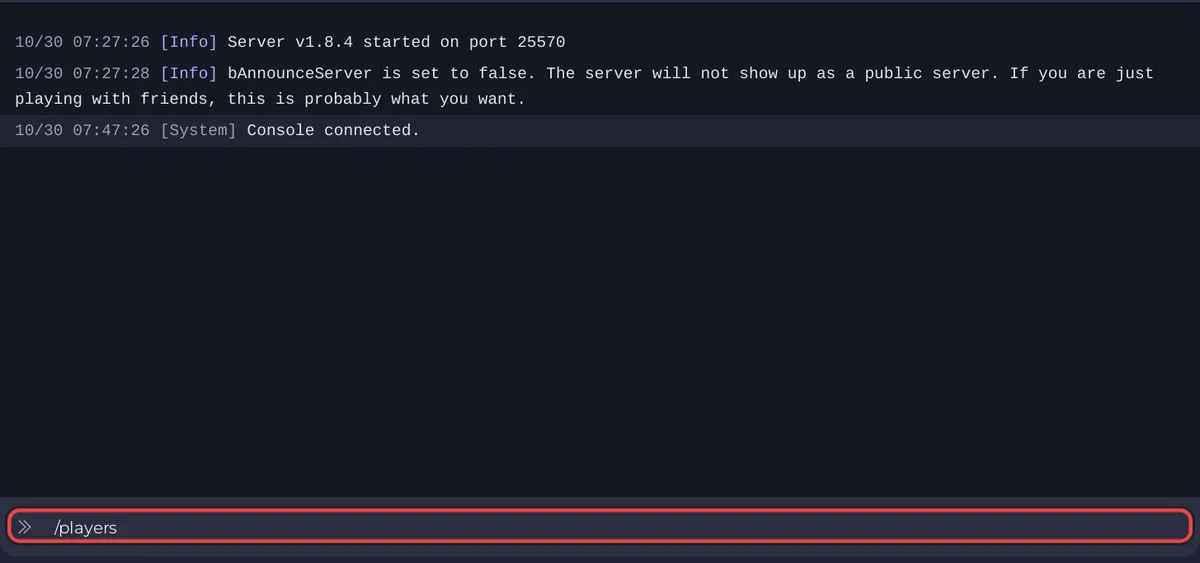
Command names work in upper or lower case: /addadmin and /AddAdmin are the same. PlayNHost tested /help, /admins and /AddAdmin from this Console on a real server.
Which commands does the server have?
The Skyrim Together Reborn 1.8.4 server has these commands. The names and descriptions come from the server's own code and the official server console page.
| Command | What it does | Example answer |
|---|---|---|
/help | Lists every command and setting | <------Commands-(...)---> and the list |
/players | Lists the players on the server | No players on here. Invite some friends! |
/uptime | How long the server has run | Server uptime: 0w 0d 2h 15m |
/version | The server's Skyrim Together version | Server v1.8.4 |
/mods | The server's mods | No mods installed |
/resources | The server's loaded resources | No resources loaded |
/admins | The admins on the server now | No admins |
/AddAdmin <name> | Makes a connected player admin | <name> admin privileges added |
/RemoveAdmin <name> | Takes admin away | <name> admin privileges revoked |
/SetTime <hour> <minute> | Sets the time of day, hour 0 to 23, minute 0 to 59 | Time set to 09:30 |
/SetDate <day> <month> <year> | Sets the in-game date | Time set to and the date |
/SetDifficulty <0-5> | Changes the difficulty until the next start | Difficulty has been set to 3. |
/TogglePvp | Switches PvP until the next start | PvP has been enabled. |
/TogglePremium | Flips the stored premium tick rate value | Premium Tickrate has been disabled. |
/ShowMOPOStats | Shows the mod policy | Modcheck enabled: no and two more lines |
In /AddAdmin and /RemoveAdmin, type a space in a player name as _: /AddAdmin Lydia_Stormblade finds Lydia Stormblade. More on admin: How to become admin on your Skyrim Together server.
Which command changes last?
A command that changes a Game Settings option does not survive a start. /SetDifficulty and /TogglePvp act at once, but at the next start the panel writes Difficulty and Enable PvP from Game Settings into the server again. For a lasting change, use How to change your Skyrim Together server settings.
/TogglePremium does not change the running server: in the Skyrim Together Reborn 1.8.4 code, the tick rate is set when the server starts, and at the next start the panel writes Premium Tick Rate again. Use the Premium Tick Rate switch instead.
/set changes one of the server's own settings while it runs. In the Skyrim Together Reborn 1.8.4 code, the change is written into STServer.ini only when another Console command follows it, so it may or may not survive a stop. For a lasting change, use the panel's settings list with the server stopped: How to change advanced gameplay options on your Skyrim Together server.
Admin rights given with /AddAdmin end when the player leaves.
Which commands should I not use?
/quitstops the server from inside, and on the way out Skyrim Together writes its running settings intoSTServer.ini. Use Stop in the panel instead./crashcrashes the server on purpose. Its own description says "Crashes the server, don't use!"
Is there a kick, ban or whitelist command?
No. The commands in this guide, with /set, /quit and /crash, are everything the Skyrim Together Reborn 1.8.4 server has. To keep players out, use a Server Password: How to make your Skyrim Together server public or private.
What do the error messages mean?
| Message | Cause | Fix |
|---|---|---|
Commands must begin with / | No slash | Type / before the command. |
Unknown command. Type /help for help. | The command does not exist | Check the spelling with /help. |
Expected 2 arguments but got 1 | Values missing or too many | /SetTime 9 30 needs both numbers. A name with a space needs _. |
<name> is not a valid player | Nobody of that name is connected | The player must be on the server. |
Hour must be between 0-23 and minute must be between 0-59 | Time out of range | Use 0 to 23 and 0 to 59. |
Which commands do players type in game?
Players type these in the Skyrim Together chat, as listed on the official in-game chat page:
| Command | What it does | Who |
|---|---|---|
/help | Lists the chat commands | everyone |
/local <message> | Message to players nearby | everyone |
/party <message> | Message to your party | everyone |
/settime <hour> <minute> | Sets the time of day | admins (the official page) |
The official page lists /settime as admin only. In the Skyrim Together Reborn 1.8 server code, the party leader may also use it on a server that is not listed in Public servers; for anyone else it does nothing.
Can I run a command on a schedule?
Yes. Quick Tasks has Send Command, which sends any command you save into it, and you can run it now or on a schedule. See How to schedule tasks and automatic backups. More on the Console itself: How to use the console and run commands.


