

To make a Skyrim Together Reborn server private on PlayNHost, type a password in Server Password under Settings, Game Settings and restart. To make it public, leave Server Password empty, switch Announce Server on and restart: it then shows in the in-game Public servers list. A new server is unlisted with no password.
How do I set a password?
- Open your server in the panel and click Settings, then Game Settings.
- Type the password in Server Password. Up to 64 characters.
- Click outside the field or press Enter. The panel saves it and says
Saved. The server must restart before these take effect. - Click Restart now.
- Send the password to your friends. They type it in Password in the Skyrim Together Connect window.
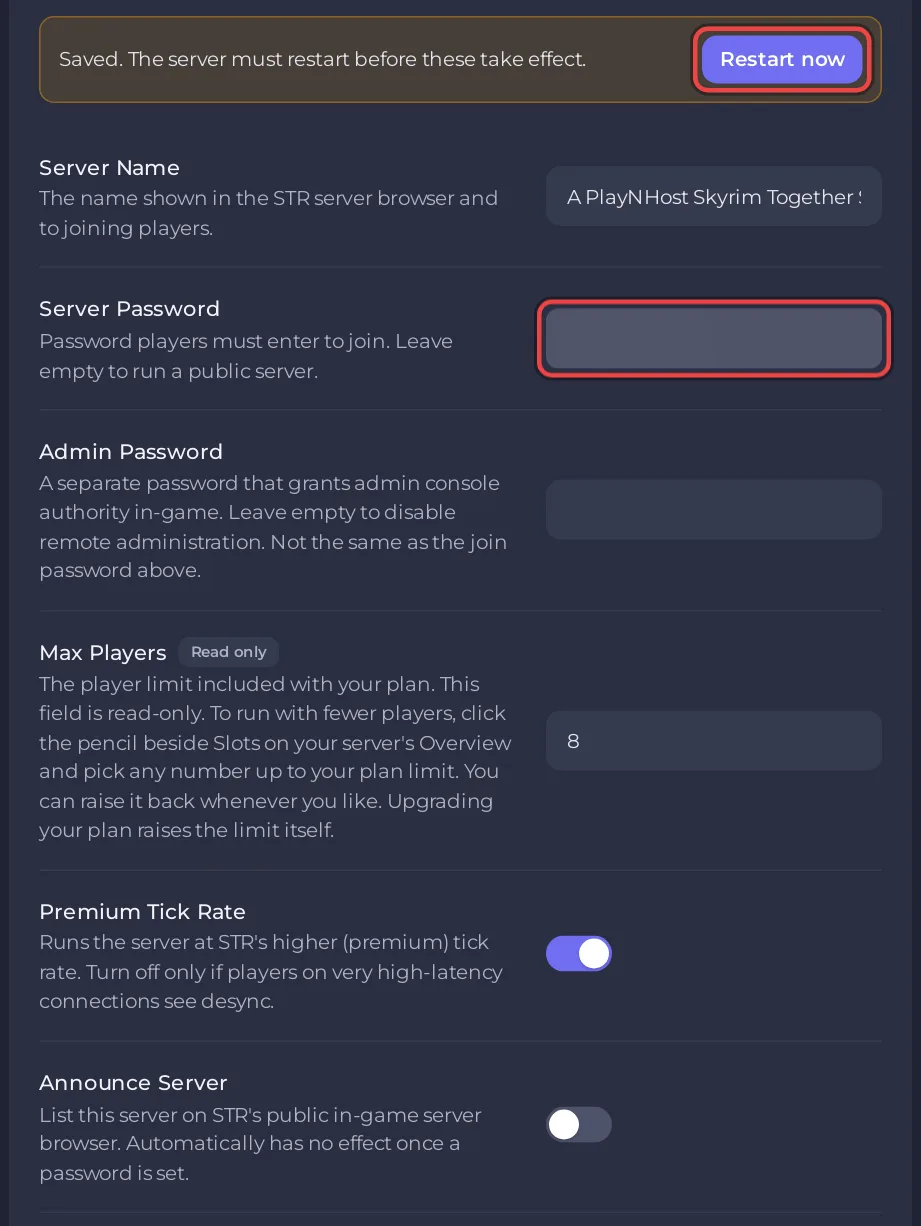
To remove the password, empty Server Password, click outside the field and restart. Anyone with the address can then join.
A player with the wrong password sees The password you entered is incorrect., and your Console shows has a bad password, kicking.
How do I list my server in Public servers?
- Under Settings, Game Settings, empty Server Password if it has one.
- Switch Announce Server on. The panel saves the switch at once.
- Click Restart now.
- In the game, players open the Skyrim Together window with F2 or Right Ctrl, click Connect, then Public servers, and find your Server Name there.
Both the panel's description of Announce Server and the official server configuration page say that a server with a password does not show up in the list. Leave the password empty for a listed server.
What is the difference between Server Password and Admin Password?
- Server Password lets players in. Empty means anyone with the address can join.
- Admin Password also lets a player in, and makes them admin for that visit. Empty means nobody can join as admin. Never use the same text for both, and share the Admin Password only with people you trust. See How to become admin on your Skyrim Together server.
What changes on a public server?
- Anyone who finds it can join, up to your player limit. The Skyrim Together server has no ban or whitelist command, so the only way to turn someone away later is to set a password.
- Automatic party joining stops. With B Auto Party Join on (the default), players join the one party on the server by themselves, but the Skyrim Together Reborn 1.8 server switches this off on a server that is announced. The party leader then invites players from the player list, and each player accepts the invite.
- Only admins can set the time with
/settimein chat. On a server that is not listed, the 1.8 server code also lets the party leader do it. - The list shows your Server Name and the player count. Change the name under Settings, Game Settings, Server Name (up to 128 characters), then restart.
Is my server private when Announce Server is off?
It is unlisted: the Console says bAnnounceServer is set to false. The server will not show up as a public server. But anyone who has the address can still join if Server Password is empty. For a server only your friends can enter, set a password.
More settings: How to change your Skyrim Together server settings. To share the address and password: How to invite friends to your Skyrim Together server.


