

To change the difficulty of a Skyrim Together Reborn server on PlayNHost, type a number from 0 (Novice) to 5 (Legendary) in Difficulty under Settings, Game Settings, then click Restart now. The server sets that difficulty for every player. A new server is at 4, Master.
How do I change it?
- Open your server in the panel and click Settings, then Game Settings.
- Type the number you want in Difficulty. The box takes 0 to 5.
- Click outside the box or press Enter. The panel says
Saved. The server must restart before these take effect. - Click Restart now. The restart disconnects everyone; players connect again and play at the new difficulty.
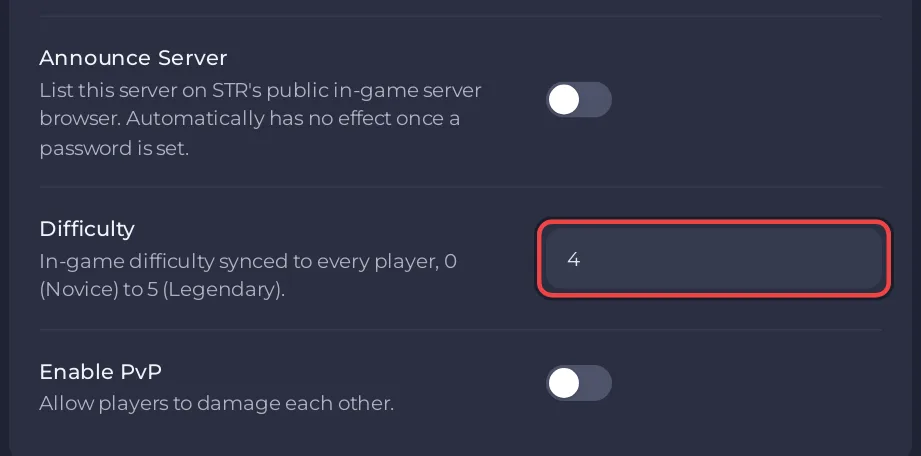
Which number is which difficulty?
| Number | Difficulty |
|---|---|
| 0 | Novice |
| 1 | Apprentice |
| 2 | Adept |
| 3 | Expert |
| 4 | Master (new server) |
| 5 | Legendary |
The names come from the official server configuration page, which says the difficulty "is enforced on all clients". A player cannot pick a different difficulty in their own game while connected.
Which difficulty should we play on?
The mod team's features page recommends a high difficulty, "since the game was not balanced for multiple players". The new server's 4 (Master) follows that advice. If your group finds it too hard, a lower number makes fights easier for everyone at once.
Can I change it without a restart?
For one session, yes: type /SetDifficulty 3 (or another number from 0 to 5) in the Console. The server answers Difficulty has been set to 3. This lasts only until the next start, when the panel writes the Difficulty setting into the server again. For a lasting change, use Game Settings. More commands: How to use the Console and commands on your Skyrim Together server.
Other settings on the same page: How to change your Skyrim Together server settings.


