

A Skyrim Together Reborn server on PlayNHost takes as many players as your plan includes, shown as Max Players under Settings, Game Settings. The Skyrim Together team itself recommends 2 to 8 players for the best experience, and its server describes going over 8 as "not recommended".
What does the Skyrim Together team recommend?
The mod is built for small co-op groups. Three official sources say the same thing:
- The Skyrim Together Reborn wiki: "We aim to bring co-op to these games, meant for 2 to 8 players."
- The mod's FAQ: "While there is no hard player count limit in theory, we recommend that you play with 2 to 8 people for the best experience."
- The server's own description of its player limit (version 1.8.4): "Maximum number of players allowed on the server (going over the default of 8 is not recommended)".
Quests also work best with one party and one party leader on the server, as the official play guide asks: How to join your Skyrim Together server has the short version.
Where do I see my server's player limit?
- Open your server in the panel.
- On Overview, the Slots row shows the current limit.
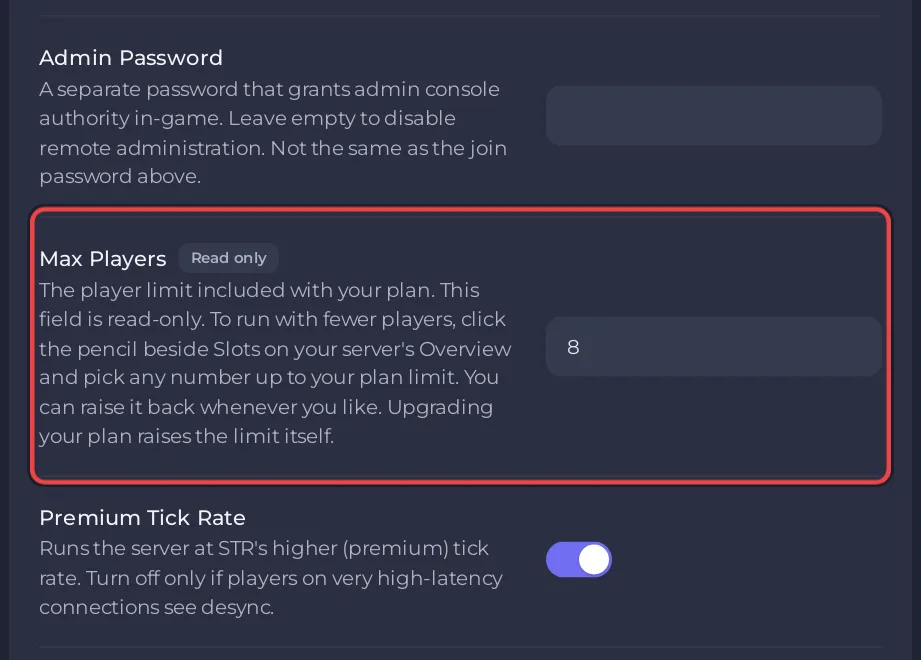
- Under Settings, Game Settings, Max Players shows the same number with the badge Read only. Your plan sets it.
How do I lower the player limit?
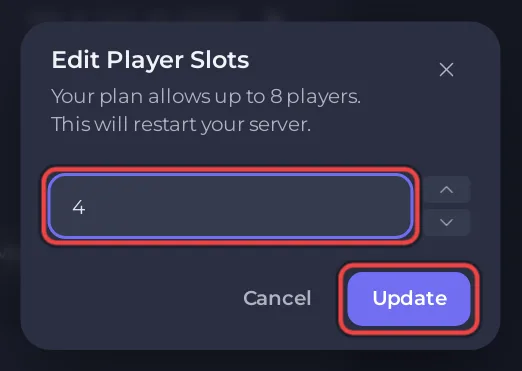
You can run the server with fewer players than your plan includes, for example to keep a group of four at four.
- On Overview, click the pencil beside Slots.
- The Edit Player Slots dialog says
Your plan allows up toand your plan's number. - Type the new number.
- Click Update. The panel restarts the server, and players who are connected are disconnected.
To go back up, open the same dialog and type a higher number, up to your plan's limit. More on this dialog: How to rename your server and change player slots.
What happens when the server is full?
A player who tries to connect when every slot is taken sees This server is full. They can connect as soon as someone leaves. Admins are not let in above the limit either: the check counts every player.
Questions people ask
Can I play alone on the server? Yes. The server runs with one player, though Skyrim Together is meant for co-op.
Does the number of players change what each player needs? No. Each player needs their own Skyrim Special Edition and the mod at the server's version: What players need to join a Skyrim Together server.
Can I change Max Players in Game Settings? No, it is read only there. Use the Slots pencil on Overview.


