

To change a Skyrim Together Reborn server's settings on PlayNHost, open Settings, then Game Settings, change the field or switch, and click Restart now. The page has 8 settings, from Server Name to Difficulty and Enable PvP. Every change takes effect at the next start.
How do I change a setting?
- Open your server in the panel and click Settings.
- Click Game Settings. The card says
Options this game exposes. Changes apply the next time the server starts. - Change what you need. A switch saves as soon as you flip it. A text or number field saves when you click outside it or press Enter.
- The panel says
Saved. The server must restart before these take effect.Click Restart now, or let the change wait for the next start.
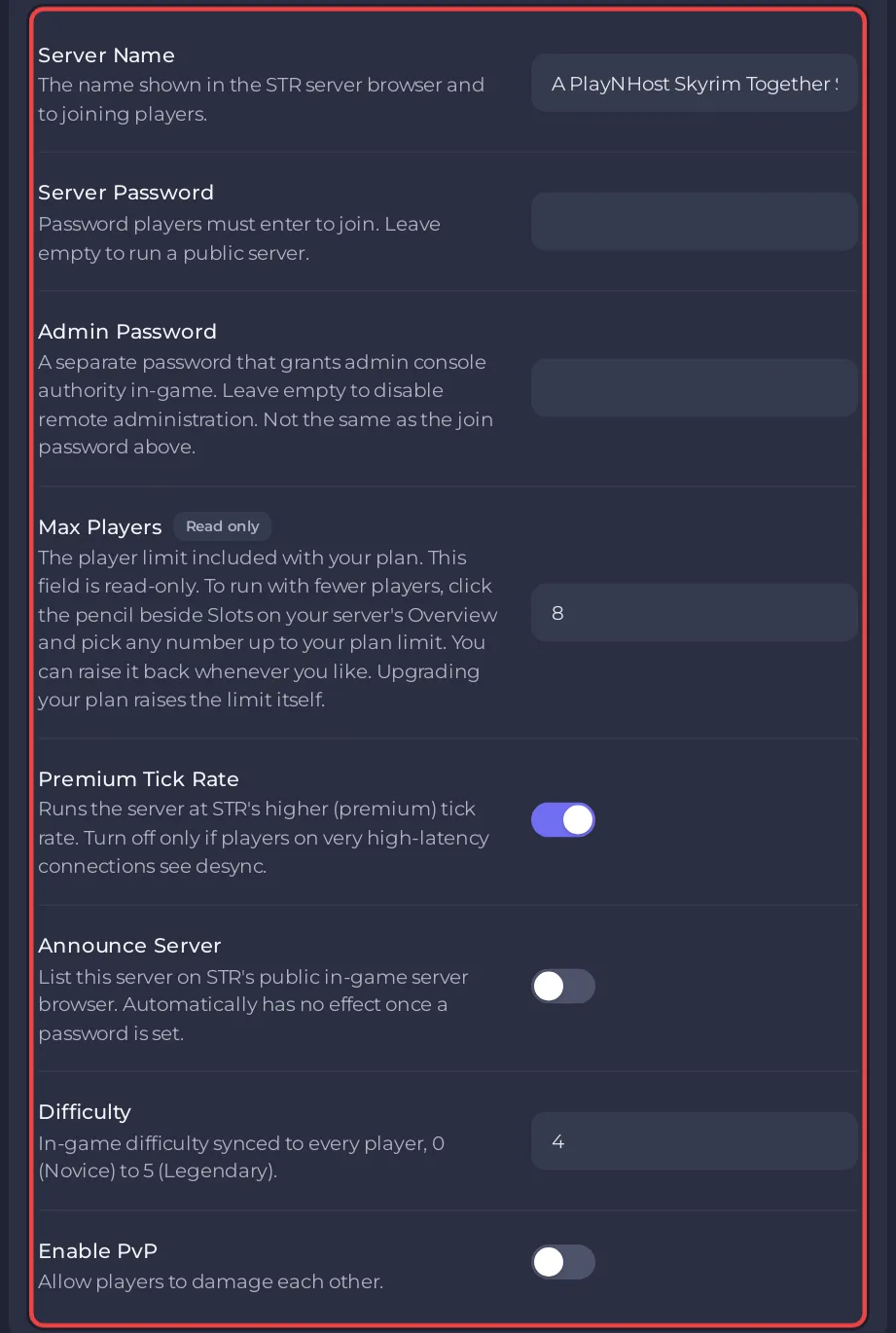
What does each setting do?
| Setting | New server | What it does |
|---|---|---|
| Server Name | A PlayNHost Skyrim Together Server | The name in the Public servers list. Up to 128 characters. |
| Server Password | empty | Players type it to join. Empty: anyone with the address joins. Up to 64 characters. |
| Admin Password | empty | Joining with it makes a player admin for that visit. Empty: nobody joins as admin. Up to 64 characters. |
| Max Players | your plan's slots | The player limit. Read only here; lower it with the pencil beside Slots on Overview. |
| Premium Tick Rate | on | On: 60 updates per second. Off: 30. |
| Announce Server | off | On: the server is listed in the in-game Public servers list. |
| Difficulty | 4 | 0 Novice, 1 Apprentice, 2 Adept, 3 Expert, 4 Master, 5 Legendary, the same for every player. |
| Enable PvP | off | On: players can hurt each other, and shouts work on other players. |
The tick rate and difficulty values come from the Skyrim Together Reborn server's own setting descriptions (version 1.8.4) and the official server configuration page.
Guides for single settings:
- Passwords and listing: How to make your Skyrim Together server public or private
- Admin: How to become admin on your Skyrim Together server
- Difficulty: How to change the difficulty of your Skyrim Together server
- PvP: How to turn PvP on or off on your Skyrim Together server
- Player limit: How many players can a Skyrim Together server have
When should I turn Premium Tick Rate off?
Keep it on. The setting's description says: "Turn off only if players on very high-latency connections see desync." Off halves how often the server sends updates, from 60 to 30 per second.
Why is a restart needed?
The panel writes all 8 settings into the server's settings file, config/STServer.ini, each time the server starts. The Skyrim Together server reads that file only at start. Until you restart, the server keeps running with the old values.
Why did a change I made in the Console go away?
The Skyrim Together Console has commands such as /TogglePvp and /SetDifficulty that change a setting at once. That change lasts only until the next start: then the panel writes Game Settings into the server again. For a lasting change, use Game Settings.
Where are the other options?
Time speed, XP sync, the death system, player homes, NPC greetings, item drops and the mod check are in the server's own file, STServer.ini, under Settings, Config files: How to change advanced gameplay options on your Skyrim Together server.
Is the Overview Server Name the same as the in-game name?
No. The pencil beside Server Name on Overview opens Rename Server, which changes only the name you see in the panel. The window says so: This only changes your server's name in the panel. The name players see in the Public servers list is Server Name under Game Settings.


