

To start a Skyrim Together Reborn server on PlayNHost, click Start on the server's Overview page and wait for the badge to say Online. When it is ready, the Console shows a line such as Server v1.8.4 started on port 25570, with your server's version and port. The server needs no Skyrim files and builds no world.
How do I start it?
- Open your server in the panel. The badge near the name says Offline.
- Click Start. The badge changes to Starting.
- Click the Console tab to watch the server start.
- Wait for the line that starts with
Server vand ends withstarted on portand a number. The badge then says Online and players can connect.
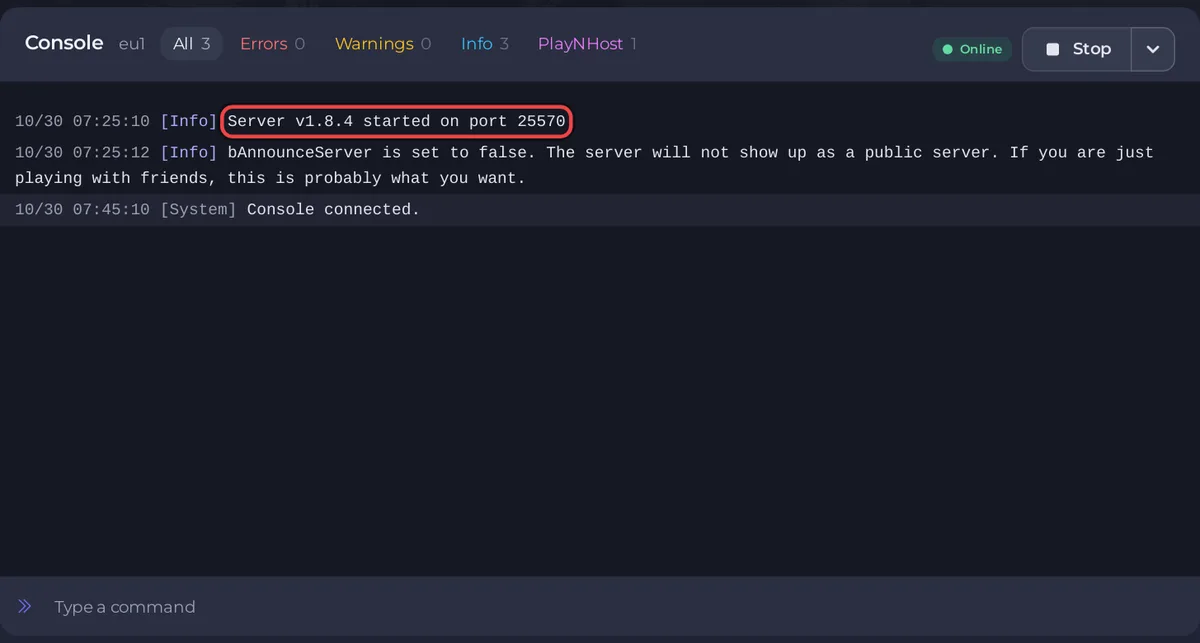
What does the Console show on a Skyrim Together start?
The Skyrim Together Reborn server is a small program from the mod's own team. It passes game state between players; it does not run Skyrim itself. A start prints only a few lines:
Server v1.8.4 started on port 25570: the server is ready. The version is the Skyrim Together build your server has, and the port is your own (the number after the colon in Server Address on Overview).bAnnounceServer is set to false. The server will not show up as a public server. If you are just playing with friends, this is probably what you want.: a normal warning on a new server. Your server is unlisted: only people who have the address can find it. To list it, see How to make your Skyrim Together server public or private.
When a friend connects, the Console prints New player with their name and connected with and the number of mods they run.
How long does the first start take?
On PlayNHost's test (5 October 2026), installing a new server, starting it and then checking that it stayed up for 90 seconds took 111 seconds in total. There is no world to generate and nothing to download at start. As long as new lines keep appearing in the Console, the server is still working.
What does a new Skyrim Together server already have?
All of these are under Settings, Game Settings:
- Server Name:
A PlayNHost Skyrim Together Server. Change it before you invite people. - Server Password: empty, so anyone with the address can join. Set one in How to make your Skyrim Together server public or private.
- Admin Password: empty, so nobody can join as admin yet. You can still make someone admin with the Grant Admin task on Quick Tasks: How to become admin on your Skyrim Together server.
- Max Players: the number of players your plan includes. It is read only here; you lower it with the pencil beside Slots on Overview.
- Premium Tick Rate: on, which means 60 updates per second instead of 30.
- Announce Server: off, so the server is not in the in-game Public servers list.
- Difficulty: 4, which is Master.
- Enable PvP: off, so players cannot hurt each other.
Two more things are worth knowing on day one:
- There is no world on the server. Each player's character, quests and items live in their own Skyrim saves on their own PC. The server holds only its settings. Players should save often with F5, as the Skyrim Together Reborn play guide advises.
- An Automatic backup schedule is on Quick Tasks when your plan has backup slots. It backs up the server's folder, with its settings, each night: How to back up and restore your Skyrim Together server.
What should I do next?
- Check what every player needs: their own Skyrim Special Edition and the same Skyrim Together Reborn version as the server.
- Join your server.
- Invite your friends.
- Make yourself admin.
If the badge never reaches Online, see Skyrim Together server problems and fixes and How to fix a server that will not start.


