

To join a Skyrim Together Reborn server on PlayNHost, copy the Server Address from the server's Overview page, load a save that is past the Helgen intro, press F2 or Right Ctrl, click Connect, paste the full address with its port into Address and click Connect. The chat then says Successfully connected to server.
How do I join my Skyrim Together server?
- Open your server in the panel. If the badge says Offline, click Start and wait until it says Online.
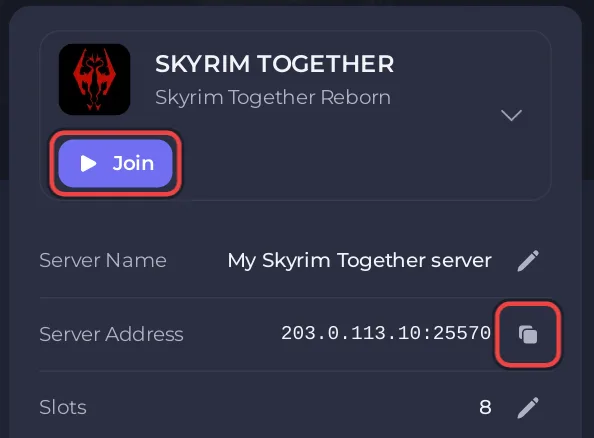
- On the Overview page, click the copy icon next to Server Address, or click Join: both copy the address. It looks like
203.0.113.10:25570. - Start Skyrim Special Edition with Skyrim Together Reborn, the way you set the mod up.
- Load a save where your character has already escaped Helgen. Do not connect during the Helgen intro.
- Press F2 or Right Ctrl to open the Skyrim Together window.
- Click Connect.
- Paste the whole address, port included, into Address.
- If the server has a password, type it in Password. Leave it empty if there is none.
- Click Connect. When the chat shows
Successfully connected to server., you are in.
The window names and the Helgen rule come from the official Skyrim Together Reborn wiki: "Do NOT connect to a server while you are still doing the Helgen intro quest."
Why must I type the port?
Your PlayNHost server has its own port: the number after the colon in Server Address. The Skyrim Together window says "Use the format address:port. The port defaults to 10578." If you type the address without the port, the game tries port 10578, which is not your server's port, and the connection fails. The panel writes your port into the server's settings at every start, so the address on Overview is always the right one.
Which password goes in the Password field?
- The Server Password from Settings, Game Settings, if you set one.
- Or the Admin Password from the same page: it also lets you in, and you join as admin. See How to become admin on your Skyrim Together server.
A wrong password gives The password you entered is incorrect. Copy it again from the panel; it must match exactly.
Can I find the server in Public servers instead?
Only if Announce Server is on. A new server is not listed, so friends connect with the address. To list it: How to make your Skyrim Together server public or private.
What should we do after joining?
Quests sync through a party. One player opens the Skyrim Together window with F2 and starts a party from the Player Manager; that player is the party leader. The official play guide's rules: "Stick to one party leader per playthrough" and "Stick to one party per server." Only the party leader talks to quest characters and loots quest items. Save often with F5: your progress is in your own Skyrim saves, not on the server.
What if I cannot join?
This server expects version ... but you are on version ...: your Skyrim Together Reborn version differs from the server's. See Players see This server expects version on your Skyrim Together server.Could not connect to the specified server.: check that the badge says Online and that you pasted the port.This server is full.: every slot is taken. See How many players can a Skyrim Together server have.- The F2 window does not open: the mod is not running. Check the setup in What players need to join a Skyrim Together server.
Every error with its fix: Skyrim Together server problems and fixes.


