

When a player connects to a modded Satisfactory server and the game closes the connection right after login, their mods do not match the server's. Every player needs the same mods at the same versions as the server. The Modding tab of your PlayNHost server lists exactly which ones in Your players need these mods: send that list and have players install it with Satisfactory Mod Manager.
Give players the exact list
- Open your server in the panel and click the Modding tab.
- Find the card Your players need these mods.
- Click Copy the list and send it to your players. Each line has the mod's name, the version the server runs and its ficsit.app page.
- Each player installs those mods in Satisfactory Mod Manager, at those versions.
- Players join through Server Manager as usual: How to join your Satisfactory server.
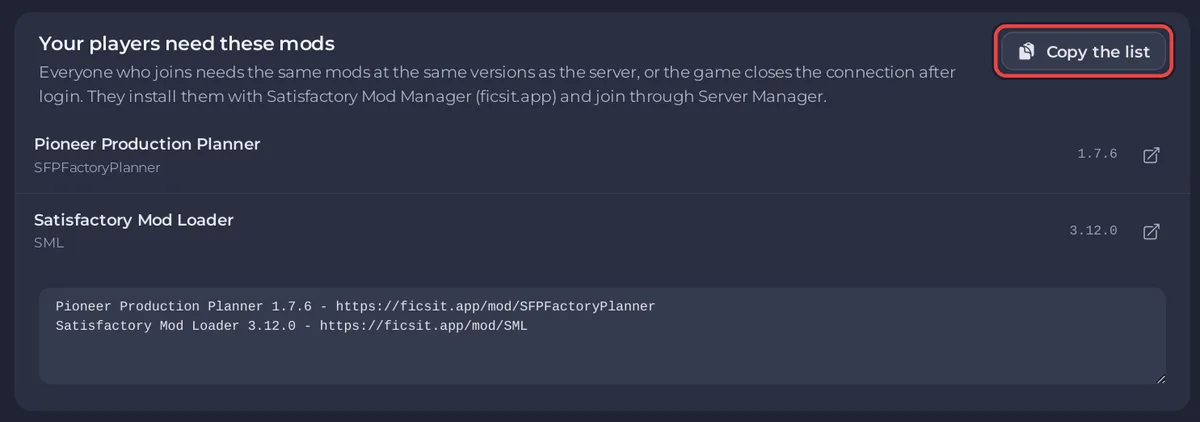
The list comes from what the server really installed at its last start, the Satisfactory Mod Loader included. Mods that only run on the server are left out, because players do not install those.
The ficsit.app documentation states the rule: "client players must have the same mods installed as the server to be able to join." It also notes that some mods only exist on one side, so a player's own extra client-only mods can be fine.
When it starts happening after a while
- You clicked Update mods, or the game updated: the server moved its mods to their newest releases at the last start. Send the list again; players update the same mods.
- You added or removed a mod: send the new list.
- A player updated their mods and the server has not: click Update mods on the Modding tab and restart, then send the list. See How to update or remove mods on your Satisfactory server.
Check the server side too
On the Modding tab, look for these notices before blaming the players:
- Windows mod files cannot run on this server: someone uploaded mods copied from a game PC. Players fail to join until those folders are gone: Your Satisfactory server cannot load Windows mod files.
- The last start could not apply the mods: the server is still on its previous mods: Your Satisfactory mods were not applied at the last start.
- Restart to apply your mod list: the list changed and the server has not restarted yet. Click Restart now.
A save made with mods
If you uploaded a save made with mods, the Worlds page marks its saves Modded. Add the same mods on the Modding tab before you load it, or what they built may be missing: How to upload your own Satisfactory world.


