

Your PlayNHost Palworld server registers in Palworld's Community server list by itself at every start, so when it is missing, first check that the badge says Online and that you search for the exact Server Name from Settings, Game Settings. A new name shows only after a restart. Steam and PC players can always join by address instead.
Check these first
- The server is online. The list only shows running servers. Wait for
Running Palworld dedicated server onin the Console. - The right name. Players search for the Server Name under Game Settings, not the name at the top of the panel: How to change your Palworld server name and description.
- Restarted after a change. A new name or description reaches the list at the next start.
- The platform is allowed. A console player can only connect if Crossplay Platforms lists their platform: How to turn crossplay on or off on your Palworld server.
- The same version. After a Palworld patch, restart the server so it installs the new version: How to update your Palworld server.
Join without the list
On Steam and PC, players do not need the list. They choose Join Multiplayer Game, paste the address from the Play with friends card into the box at the bottom of the server list and press Connect: How to join your Palworld server.
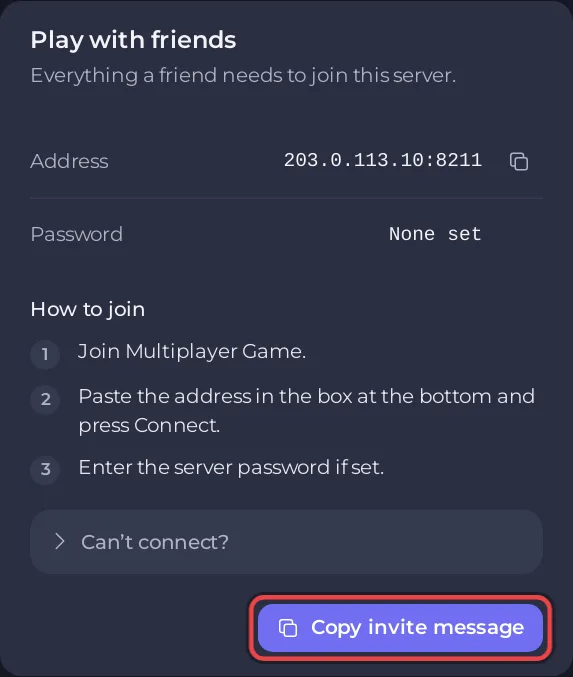
Pocketpair's guide says Xbox and PS5 players need a community server, so for them the list matters: Which platforms can join your Palworld server.
Why it is a community server
Your server starts with Palworld's community server option every time, so there is nothing to switch on. Pocketpair describe a community server as "a dedicated server that has registered a dedicated server on the server list in the game client" (about the server).
Still missing
If the server is online, the name is right and a restart did not help, open a ticket with the exact Server Name and which platform searched for it.


