

To join an open.mp server on PlayNHost, copy the Server Address from your server's Overview page, open the open.mp launcher on your PC, choose Add Server, paste the address and click Connect. Every player needs their own copy of GTA: San Andreas for PC; the open.mp launcher and the server software are free.
What do players need?
- GTA: San Andreas for PC, version 1.0. The open.mp client guide says other versions, such as v2.0 and the Steam release, do not work without a downgrade. open.mp is a mod: it does not include the game.
- The open.mp launcher, free from open.mp. The older SA-MP client also works: your server lets SA-MP 0.3.7 and 0.3.DL clients in.
open.mp's client needs GTA: San Andreas for PC, so console and phone players cannot join. The open.mp team does not support the unofficial SA-MP Android app.
Join with the open.mp launcher
- Open your server in the panel. The badge must say Online. If it says Offline, click Start: see How to start your open.mp server for the first time.
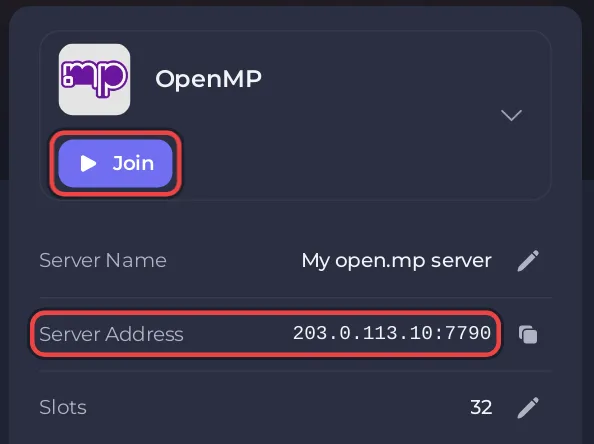
- On Overview, find the server card, with the game logo and Join, and click the copy icon on the Server Address row, or click Join. Both copy the address, which looks like
address:port. - Open the open.mp launcher. The first time, type your Nickname at the top and set the GTA: San Andreas path in its settings to the folder that holds
gta_sa.exe. - Click Add Server. The window says "Add server manually to favorite list."
- Paste the address, with its port, and click Add. The server appears under Favorites.
- Select it and click Connect. If the server has a join password, the launcher asks "This server is protected, please enter password."
GTA: San Andreas starts and connects you to the server. A new server runs the Gun Game gamemode.
Can players find it in the server list?
A new server has Announce switched on in config.json, so open.mp is asked to list it under Internet in the launcher. Searching for a name is slower than adding the address, and the address always works while the server is online. To change the name players see in that list, see How to change your open.mp server name, password and player slots.
What if I cannot connect?
- Stuck at "Connecting to IP:Port...": the server is offline or the address or port is wrong. Copy it again from Server Address.
- "Can't find GTA: San Andreas!": set the GTA: San Andreas path in the launcher's settings.
- "No Nickname!": type a Nickname in the launcher before you connect.
- "Unacceptable Nickname": use only letters, digits and
[ ] ( ) $ @ . _ =, up to 20 characters.
More fixes: open.mp server problems and fixes. To bring your friends in, see How to invite friends to your open.mp server.


