

To invite friends to an open.mp server on PlayNHost, copy the Server Address from your server's Overview page and send it to them, with the join password if you set one. They add it in the open.mp launcher with Add Server and click Connect. Panel access is a separate invite in Team & Roles.
Send your friends the address
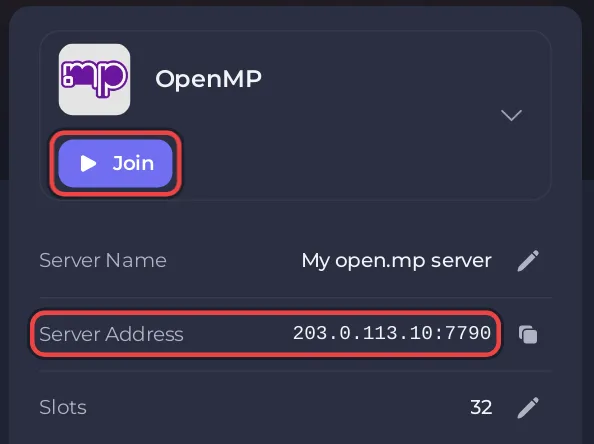
- Open your server in the panel. On Overview, find the server card, with the game logo and Join.
- Click Join, or the copy icon on the Server Address row. The address, with its port, is now copied.
- Paste it into a message to your friends. Add the join password if your server has one.
A message your friends can follow:
Join my open.mp server: open the open.mp launcher, click Add Server, paste <your address> and click Connect.
You need GTA: San Andreas for PC (version 1.0).
Each friend needs their own copy of GTA: San Andreas for PC and the free open.mp launcher. The full steps for them: How to join your open.mp server.
Should I set a join password?
A new server has no join password, so anyone who finds it in the launcher's Internet list can join. For a private server, set a password in config.json and send it with the address: How to change your open.mp server name, password and player slots. open.mp has no whitelist; a join password and bans are the tools for keeping people out.
Let a friend help run the server
A friend who should start and restart the server, use the Console, edit files or take backups needs panel access, not your password.
- Click Team & Roles in the left menu.
- Click Invite someone, type their Email address and choose a Role.
- Click Send invite. They get an email with a link to accept.
The roles, and how to change what someone can do, are in the general guide How to invite friends and give them access.
Can a friend be admin in the game without panel access?
Yes. In-game admin on open.mp is the RCON login: anyone who knows the RCON Password can type /rcon login and the password and run admin commands. Before you invite anyone, change the starting RCON Password to one only you know. Share it only with people you trust, and change it again when someone leaves. See How to become admin on your open.mp server.


