

To add a SA-MP plugin to an open.mp server on PlayNHost, upload the plugin's Linux .so file to a plugins folder under Files, add its name to legacy_plugins in config.json, and restart. A plugin that has its own open.mp version goes in the components folder instead and loads without a line in config.json.
Which file do I need?
Your server runs open.mp on Linux, as a 32-bit program. Use the plugin's Linux .so build. A Windows .dll does not load: open.mp's Linux guide says .dll files work only on Windows. Plugin releases usually offer both, often named with "linux" or ending in .so.
open.mp's installation guide lists plugins that need a special build:
| Plugin | Where it goes on open.mp |
|---|---|
| Pawn.CMD, Pawn.RakNet, sscanf, discord-connector | The open.mp build, in components |
| rustext, keylistener | The open.mp-compatible build, in plugins |
| YSF | Not needed: open.mp has most of the same functions |
| FCNPC | Replaced by open.mp's own NPC component |
| SKY | Use Pawn.RakNet instead |
Add a legacy plugin
- Open your server in the panel and click Files in the left menu.
- A new server has no
pluginsfolder. Click Create Directory, name itpluginsand click Create. - Open
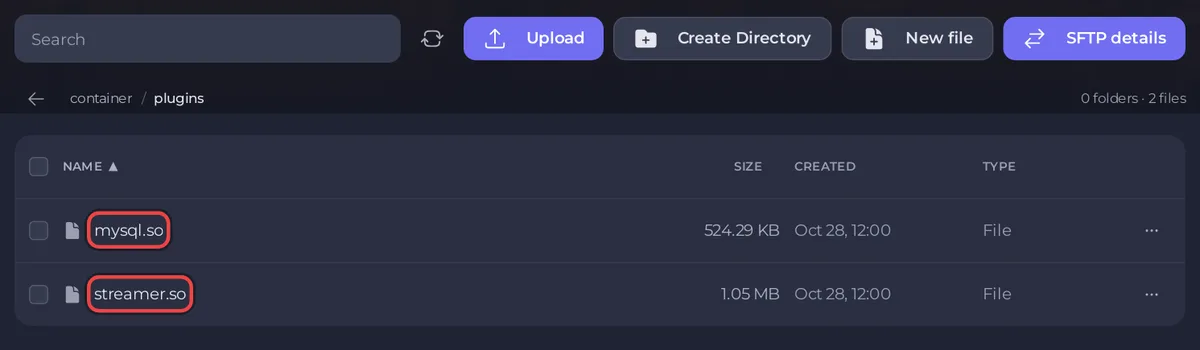
plugins, click Upload and choose the.sofile, for examplestreamer.so. - Go back to the main folder and click
config.jsonto open it in the text editor. - In the
pawnpart, add the plugin's name tolegacy_plugins, in quotes, with commas between several:"legacy_plugins": ["streamer", "mysql"],. The.soending is optional. - Click Save content and restart the server.
The Console prints Loading plugin: and the name for each plugin it loads. If one fails, it prints Could not load plugin: with the file and the reason.
Add an open.mp component
A component is a plugin built for open.mp itself. Upload its .so to the components folder and restart. open.mp loads everything in components at start, so config.json needs no line. The Console lists each one as Loading component with its file name.
Do not delete the files that are already in components: they are open.mp's own parts, such as the Pawn scripting and the console.
Plugins that use a database or the internet
PlayNHost installs the open.mp build that uses the system's OpenSSL library (the "dynssl" build). open.mp's own source code warns that plugins using OpenSSL, such as discord-connector and pawn-requests, "might crash" on the other build and recommends this one. For a MySQL plugin, your server needs a database: see How to use databases with your server.
Do I need the include files?
No. Include files, such as sscanf2.inc or streamer.inc, are only used on your PC when you compile your gamemode. The server needs the compiled .amx and the plugins: How to upload your own gamemode to your open.mp server.
What if a plugin does not load?
- "Could not load plugin": the
.sois missing fromplugins, the name inlegacy_pluginsis spelled differently, or it is a 64-bit or Windows build. - "This file is an open.mp component. Please move it to components/ folder.": you uploaded the open.mp build of a plugin. Move it to
componentsand take its name out oflegacy_plugins. - The server stops right after loading a plugin: the plugin may not be compatible with open.mp. Check the table above, remove it from
legacy_plugins, and restart.
More fixes: open.mp server problems and fixes.


