

To start a Necesse server on PlayNHost, click Start on the server's Overview page and wait for the badge to say Online. The Console shows Type help for list of commands. when Necesse is ready. The first start also creates a new world called Save1.
How do I start it?
- Open your server in the panel. The badge near the name says Offline.
- Click Start. The badge changes to Starting.
- Click the Console tab to watch the server start.
- Wait for the line
Type help for list of commands.. The badge then says Online and players can join.
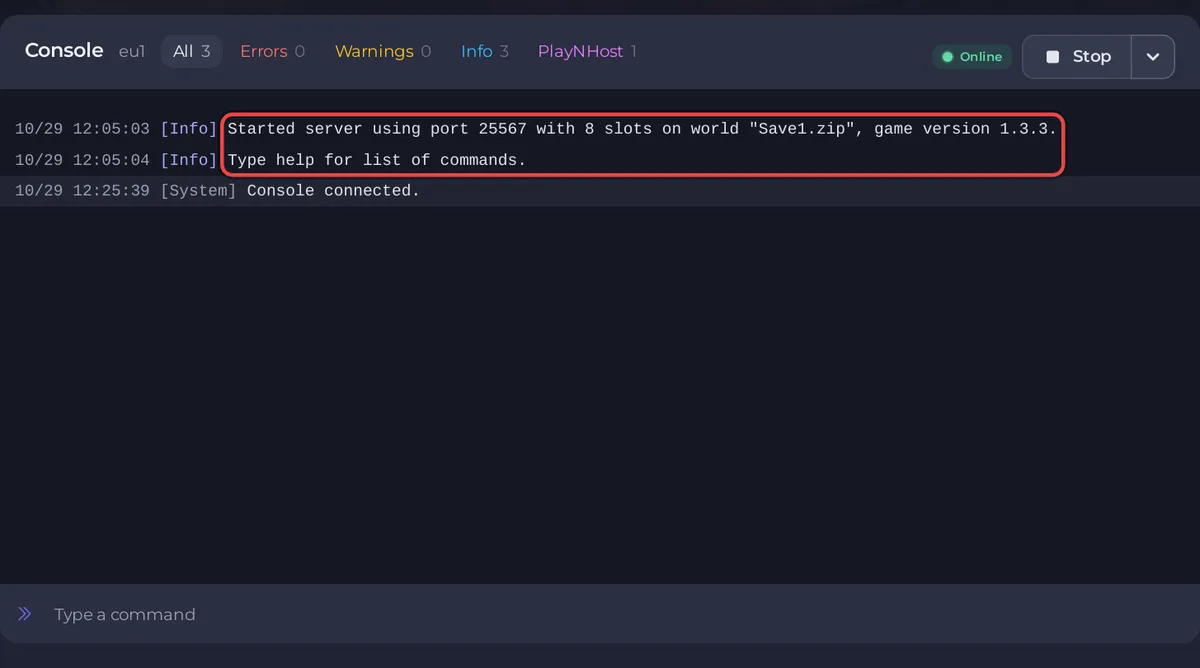
What does the Console show on a Necesse start?
The game files are already installed when you get the server, so the start goes straight to Necesse itself:
- A line that names the port, the slots, the world and the game version, in this form:
Started server using port 25567 with 10 slots on world "Save1.zip", game version 1.3.2.Your port, slot count and version are your own. Type help for list of commands.: the server is ready. From now on the Console box takes Necesse's own commands: How to use the Console and commands on your Necesse server.
When nobody is online, Necesse may print Suggesting garbage collection due to empty server. That is normal and not a fault.
How long does the first start take?
PlayNHost's test server reached Online in about 16 seconds on a normal start of an existing world. The very first start also generates the new world, which takes longer. As long as new lines keep appearing in the Console, the server is still working.
What does a new Necesse server already have?
- Save Name:
Save1. The server creates and loads the worldsaves/Save1.zip. To bring your own world instead: How to upload your own Necesse world. - Server Password: empty, so anyone with the address can join. Set one: How to set a password on your Necesse server.
- Player Slots: the number of slots your plan includes.
- Steam Auto Update: on. Keep it on so the server keeps up with Necesse updates: How to update your Necesse server.
- An empty
modsfolder with aMODS-README.txtinside: How to add mods to your Necesse server. - An Automatic backup schedule under Quick Tasks, when your plan has backup slots. It saves the world and takes a backup once a night.
- Nobody has admin rights in the game yet. Make yourself Owner from the Console: How to become admin on your Necesse server.
What should I do next?
If the badge never reaches Online, see Your Necesse server will not start and How to fix a server that will not start.


