

To put a password on a Necesse server on PlayNHost, open Settings, Game Settings, type it in Server Password and restart the server. Players then type it when they join. Leave the field empty for a server anyone with the address can join.
Set the password
- Open your server in the panel and click the Settings tab.
- On Game Settings, click in Server Password and type the password, up to 32 characters.
- Press Enter or click outside the field. The panel saves it and shows "Saved. The server must restart before these take effect."
- Click Restart now. When the badge says Online again, the password is in force.
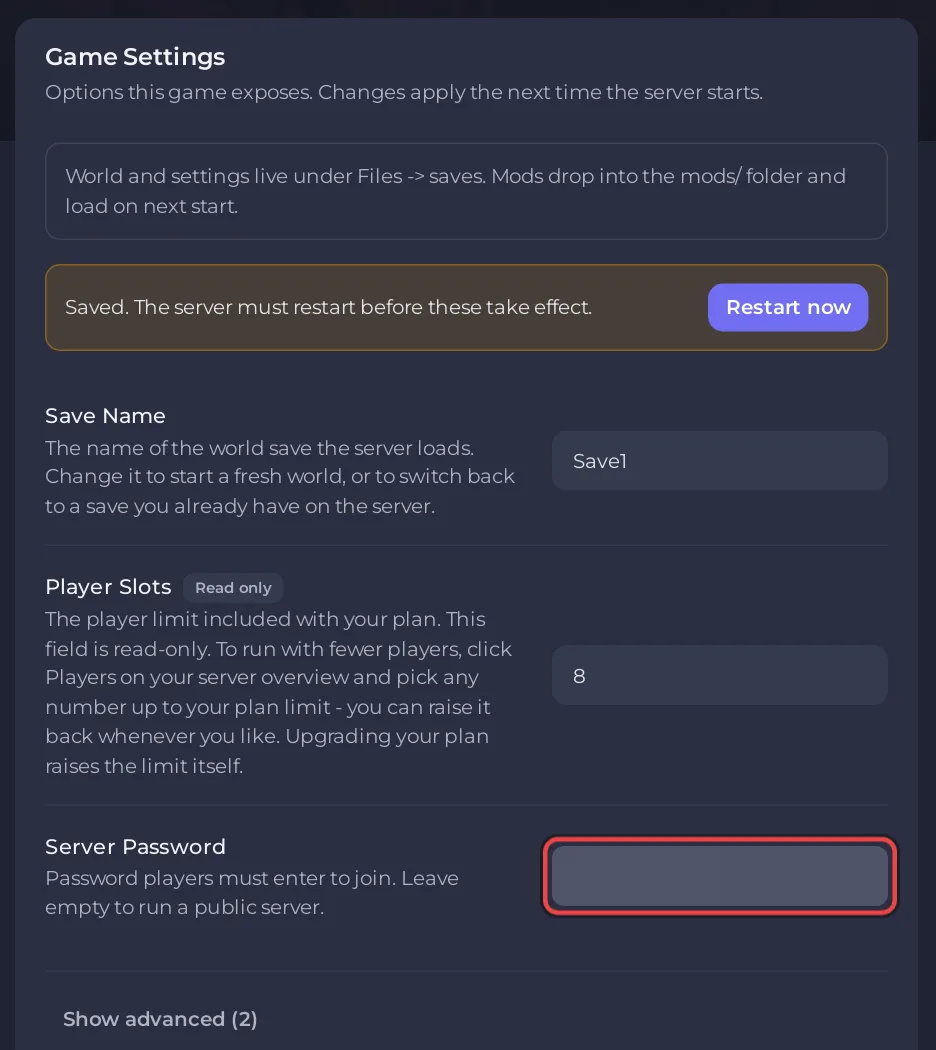
Use letters and numbers. A password can have up to 32 characters, but not a comma and not //: Necesse's settings file uses commas to separate settings and // to start a comment, so the panel refuses a password that has either.
How do players use it?
When a player double-clicks your server in Necesse's Multiplayer menu, the game asks for the password. Send it with the address: How to invite friends to your Necesse server.
How do I change or remove it?
Type a new password in Server Password, or delete the text to remove it, then restart. The panel writes the field into cfg/server.cfg every time the server starts, so the field is the one place to change it.
Necesse also has an Owner command, password, that sets a new password in the running game, and password with nothing after it removes it. The panel's value replaces it at the next start, so use the field for a lasting change.
Is there a whitelist instead?
No. Necesse's server commands have no whitelist, so a password is how you keep a server private. To remove someone who already knows it, ban them and change the password: How to kick, ban and unban players on your Necesse server.


