

When a Necesse server will not start on PlayNHost after you edited cfg/server.cfg by hand, a broken line in that file is the most likely cause: Necesse's format separates settings with commas, and a missing one stops the server. Fix the line, or restore the file from a backup, and start again.
Work through the causes
- A broken line in cfg/server.cfg. Open Files, then
cfg, and openserver.cfg. Compare the line you changed with the lines around it: the settings sit inside a block that opens withSERVERand{and closes with}, each setting iskey=valuefollowed by a comma (on a new server the last line,MOTD, has none), and a comment starts with//. Put back any missing comma or brace. To avoid this, change the file with the panel's editor, which refuses values that would break it: How to change the server.cfg settings of your Necesse server. - A mod. If the server stopped starting after you added a mod, move its
.jarout ofmods(or delete it) and start again: How to add mods to your Necesse server. - A new world is still being made. A first start with a new Save Name takes longer while Necesse generates the world. Watch the Console for a few minutes before you restart.
- Memory. Check the Usage card on the Overview page. If memory sits at your plan's limit when the server stops, remove mods and see How much RAM does a Necesse server need?.
- The install did not finish. The panel then says "This server’s installation did not finish, so it has not been set up and most actions are unavailable." Open a ticket.
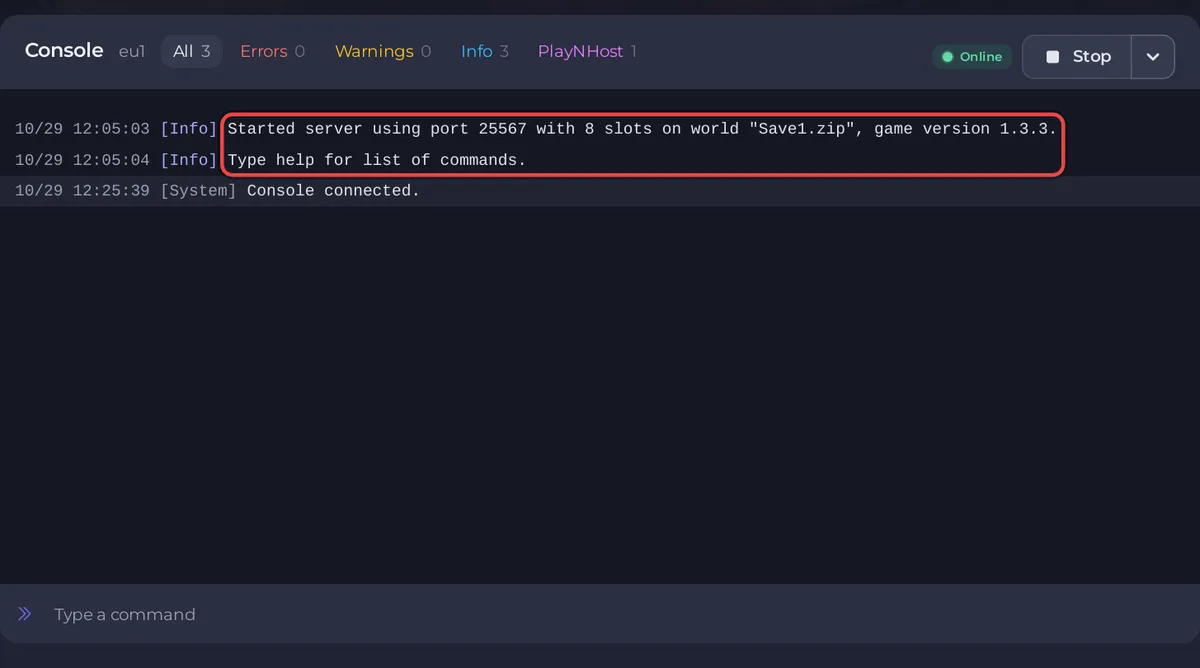
A good start ends with Type help for list of commands. and the badge Online.
How do I restore only the settings file?
Restore a backup taken before the edit: How to restore only some files or one area of your map from a backup. Or download the backup, take cfg/server.cfg out of it and upload it to the cfg folder.
What should I send support?
The last 50 to 100 lines of the Console from the failed start, and what you changed right before it. See What to include in a ticket for each kind of problem and How to fix a server that will not start.


