

The Console tab of a Necesse server on PlayNHost is Necesse's own server console. Type a command in the box at the bottom, without a slash, and press Enter: help lists every command. The Console has every permission, so it can run any command, including the Owner ones.
Run a command
- Open your server in the panel and click the Console tab. The badge must say Online.
- Click in the Type a command box at the bottom.
- Type the command without a slash, for example
help, and press Enter. - Necesse's answer appears in the Console.
helplists the commands in pages;help 2shows page 2, andhelpfollowed by a command explains that command.
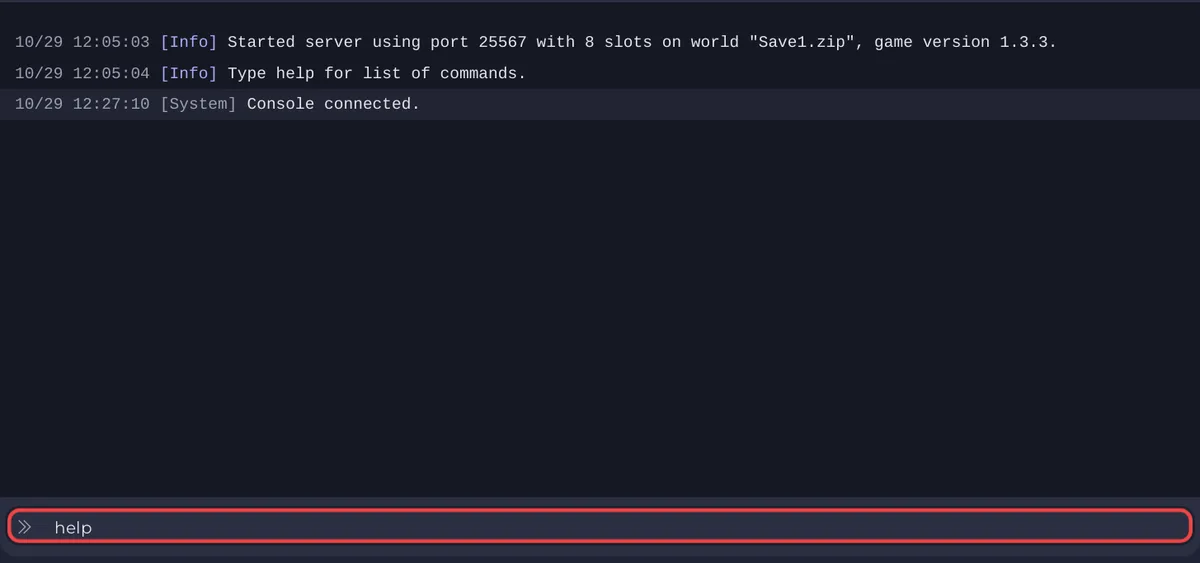
The server answers in the Console only while it is running. Necesse has no RCON, so the Console box is the way to reach it from the panel.
What is the difference with chat commands?
The same commands work in the game's chat, starting with a slash, for example /players. In chat they are limited by your permission level: a new player is a User and most commands need Moderator, Admin or Owner. Make yourself Owner first: How to become admin on your Necesse server.
Which commands do owners use most?
From the official Necesse wiki, with the level a player needs in chat:
| Command | What it does | Level |
|---|---|---|
help [page or command] | Lists the commands, or explains one | User |
mypermissions | Shows your permission level (in chat) | User |
players | Lists the players online now | Moderator |
playernames | Lists every player the server knows, with their name | Moderator |
save | Saves all data now | Moderator |
kick <player> [reason] | Removes a player from the server | Moderator |
say <message> | Talks in the chat as the server | Moderator |
ban <name>, unban <name>, bans | Bans, unbans, lists bans | Admin |
difficulty, deathpenalty, raids | With list shows the choices; with a name changes it | Admin |
settings <list or setting> [value] | Lists or changes world settings | Admin |
pausewhenempty <0 or 1> | Pauses the world while nobody is online, or not | Admin |
motd <clear, get or message> | Sets, shows or clears the message of the day | Admin |
time <set or add> [amount] | Sets or moves the world time | Admin |
permissions <list, set or get> | Lists, sets or shows permission levels | Owner |
password [password] | Sets the server password; empty removes it | Owner |
allowcheats | Allows cheats in this world; the wiki marks it "NOT REVERSIBLE" | Owner |
stop | Saves and stops the server | Owner |
Some commands need cheats. Necesse warns first, and using one disables achievements for that world.
Can I run a command on a schedule?
Yes. Quick Tasks has Send Command, which sends any text to the Console, plus Save World (save) and Announce to Players (say): How to use Quick Tasks on your Necesse server.
What else is on the Console page?
Filters above the output (All, Errors, Warnings, Info, plus Players, Chat or Commands once the output has such lines), Search output..., and the power buttons: Start when the server is stopped, Stop while it runs, with Restart and Kill in the arrow menu next to it. The general guide: How to use the console and run commands.
Commands that do nothing: Necesse commands do not work on your server.


