

A DDNet (DDraceNetwork) server uses one UDP port for everything players do: joining, playing, the remote console on F2 and the server list check. DDNet's usual port is 8303, but a PlayNHost server has a port of its own, which the panel writes into the server's config at every start. Nobody needs to open a port on a router or firewall.
Which ports does a DDNet server use?
| Port | What it does | Protocol | DDNet's default | On your PlayNHost server | Where you see it |
|---|---|---|---|---|---|
| Game port | DDNet and Teeworlds 0.7 players, the remote console (F2) and the server list | UDP | 8303 | The Primary port, a number assigned by PlayNHost | Ports & Network, and the Address row of Play with friends |
| External console (econ) | A TCP console for outside tools | TCP | Off (ec_port 0) | Not used: there is no port for it | Type commands in the panel's Console instead |
DDNet's server opens a UDP socket only for its players, as the DDNet source shows for version 20.2.1. The admin login on F2 travels inside that same connection, so there is no separate RCON port to find or open. DDNet's own start file says the server port "defaults to 0 to automatically select free port in range 8303-8310": every setting is listed on DDNet's Settings and Commands page.
Maps are the one thing players can get another way. With Fast map downloads on (the default) and no join password, players download maps over HTTPS from the PlayNHost download network. Otherwise they download them from your server, through the game port.
Why is my port not 8303?
Many servers share one machine, so each server gets its own port number. At every start the panel writes it into data/autoexec_server.cfg as sv_port, so DDNet listens on it and tells the server list about it. You never set it.
How do I see my server's port in the panel?
- Open your server in the panel and click Ports & Network in the left menu.
- Copy the address under Give this to your players. It is the address and the port, written as
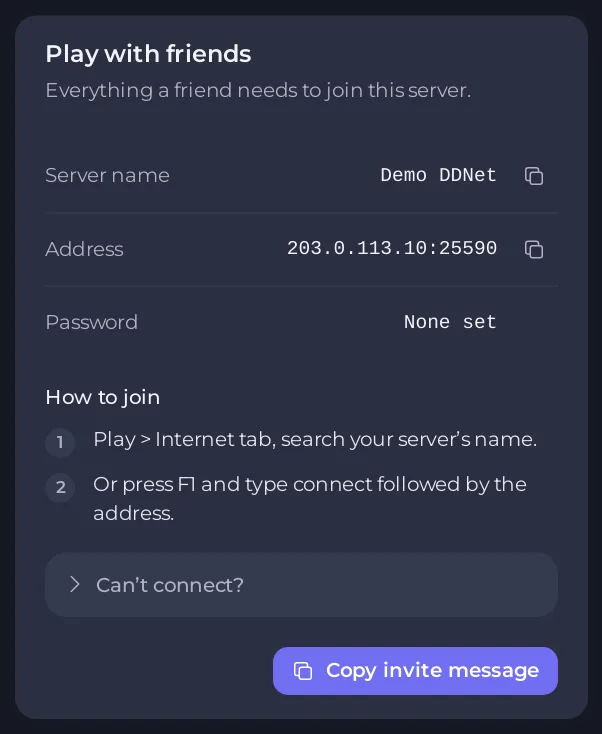
address:port, for example203.0.113.10:25590. - Check All ports. The port marked Primary, described as The port players connect to, is your DDNet port. Under the All ports heading the page says Every port accepts TCP and UDP.
The same address is on the Address row of the Play with friends card on your Overview page.
More about the page itself: How to find your server's ports and IP address.
How do players connect?
- The server browser. In the DDNet client, players click Play, open the Internet tab and search for your server's name. This needs Public server list set to
ipv4on Game Settings. - By address. Players press F1 to open the client's console and type
connectfollowed by your address, port included, for exampleconnect 203.0.113.10:25590. This works whether or not the server is listed.
Teeworlds 0.7 players join the same port, by address. The full steps are in How to join your DDNet server.
Do I need to open ports on my router or firewall?
No. The firewall in front of PlayNHost game servers lets traffic through to the ports the panel gives servers, TCP and UDP, and drops the rest. Your DDNet port is reachable from the internet as soon as the server runs.
Players connect outwards to your server, which every normal home router allows. Port forwarding is only needed when you host a server on your own computer at home.
Common port problems and their fixes
The server is not in the Internet tab
Check that Public server list is ipv4 under Settings, then Game Settings, and restart after a change. After a start the Console shows register/6/ipv4: successfully registered and the same for register/7/ipv4. When those lines are there, DDNet's list has your server. The other checks are in Your DDNet server does not show in the server browser.
Players time out after you added your own settings
myServerconfig.cfg runs after the line where the panel sets your port, so a line in it wins. If you pasted a config from another host, look for these lines and delete them:
sv_port, which moves DDNet to a port your server does not have.sv_register_port, which tells the server list a different port from the one DDNet listens on.bindaddr, which ties DDNet to one address.
Save the file and restart the server. Then copy the address again from Play with friends. More on that file: How to add your own settings to your DDNet server.
The Console says the port might already be in use
DDNet stops at start with couldn't open socket. port ... might already be in use. Most often a copy of the server had not finished shutting down: wait a minute and press Start again. If the number in the line is not your Primary port, an sv_port line in myServerconfig.cfg is the cause: remove it as described above. If neither helps, send the line to support in a ticket.
A player typed the address but cannot connect
- The port is missing, or it is DDNet's 8303. Copy the whole address from the Address row of Play with friends.
- The server is still starting. Wait until the Console shows
server name isand your server's name. - A school, work or public network can block unusual ports. Try another network to test.
The F2 admin login does not work
The port is not the problem: F2 uses the same connection as the game. Check the password and the restart, as in The RCON password does not work on your DDNet server.
For anything else, start with DDNet server problems and fixes.


