

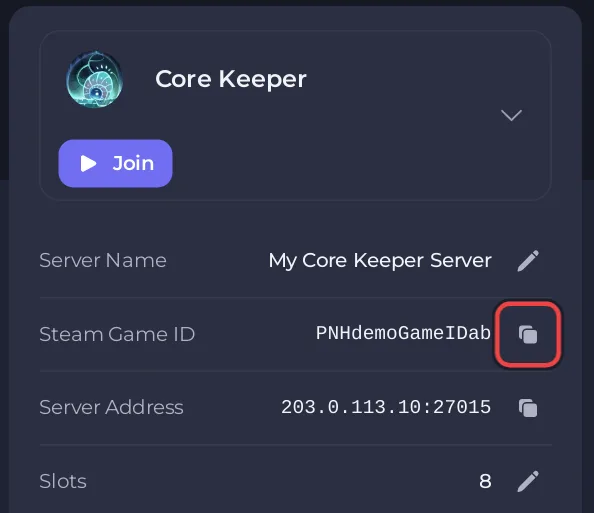
To start a new Core Keeper server on PlayNHost, click Start on its Overview page and wait for the badge to say Online. The first start builds a brand new world, which takes 3 to 5 minutes. When it is ready, the Steam Game ID your friends join with appears on Overview.
How do I start the server?
- Open your server in the panel. You land on Overview.
- Set the world options on the Settings tab, Game Settings, if you want a hard world or your own seed. You can skip this step for a normal world.
- Click Start. The badge says Starting.
- Open the Console tab, or watch the small console on Overview, to follow the start.
- Wait for a Console line with
Started session. The badge changes to Online. - Look at the server card on Overview: a Steam Game ID row with a copy button is now there.
Do not restart the server while it builds the world. A restart only starts the wait again. After it is Online, give the panel about 5 minutes to save the Game ID before you restart.
Should I change any settings before the first start?
Only if you want a hard world, your own seed or your own world name. The panel's help on Game Settings says the world options "apply when the world is first created", so set them before you press Start:
- Hard mode: off is a normal world, on is a hard world.
- World Seed: the number the terrain is built from.
- World Name: the name shown in the game.
Details: How to set the world name, seed and Hard mode on your Core Keeper server. If a normal world is fine, start straight away.
How do I know the Core Keeper server is ready?
The server is ready when the Console shows Started session and the badge says Online. The panel then shows the Game ID the server made on Overview, in the Steam Game ID row. It also saves the code in your settings by itself, within about 5 minutes of the first start, so the code stays the same after restarts. Nobody has to open Overview first. See How to find your Core Keeper Game ID.
Later starts load the saved world instead of building a new one, so they are quicker.
What does a new Core Keeper server already have?
- World Index:
0, the first world slot. - World Name:
Core Keeper Server. - World Seed:
0. - Hard mode: off.
- Game ID: empty until the first start, then the code the server made, kept by the panel.
- Player slots: the number your plan includes.
- Auto Update: on, so each start installs a new game build when there is one.
- Mods: none. The mods folder
CoreKeeperServer_Data/StreamingAssets/Modsalready exists: How to add mods to your Core Keeper server. - Automatic backup: if your plan includes backups, a schedule that backs the server up every night: How to back up and restore your Core Keeper world.
What should I do after the first start?
- Join your server with the Game ID.
- Invite your friends.
- Check who is admin in the game.
If the badge stays on Starting for much longer than 5 minutes, see Your Core Keeper server is stuck on starting.


