

The Game ID of your PlayNHost Core Keeper server is on its Overview page, in the Steam Game ID row of the server card, with a copy button next to it. The row appears once the server has finished its first start and is Online.
How do I copy the Game ID?
- Open your server in the panel. You land on Overview.
- Look at the server card: Server Name, then Steam Game ID, then Server Address.
- Click the copy button at the end of the Steam Game ID row. The code is now in your clipboard. The Join button at the top of the card copies the same code once the server has one.
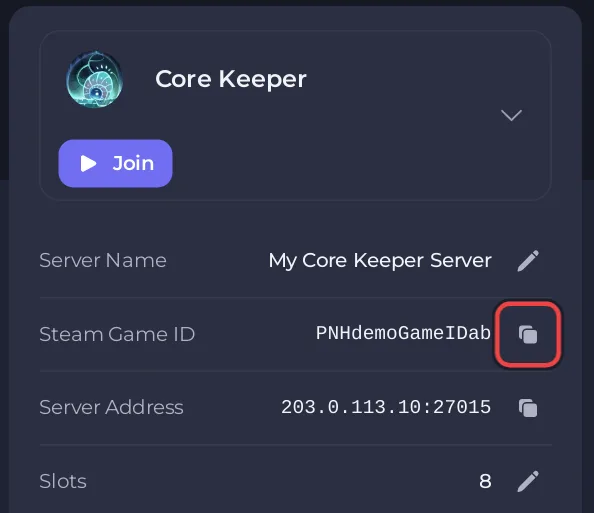
Why is there no Game ID row?
- The server has never been started. The server makes its first Game ID when it starts for the first time. Start it and wait for Online.
- The server is starting. The server writes its Game ID file again at every start, so the row disappears while it starts and comes back when it is up.
- It came up a moment ago. If the badge says Online and the row is still missing, reload the page.
- You are a helper, not the owner. The row needs the View startup permission. Ask the owner, or see How to let a friend help run your Core Keeper server.
Where is the Game ID in Game Settings?
The panel saves the Game ID that the server made in your settings by itself, within about 5 minutes of the first start. Nobody has to open Overview first. From then on, every start uses the same code. To see it there:
- Click the Settings tab, then Game Settings.
- Click Show advanced (2) at the bottom of the list.
- Read the Game ID field.
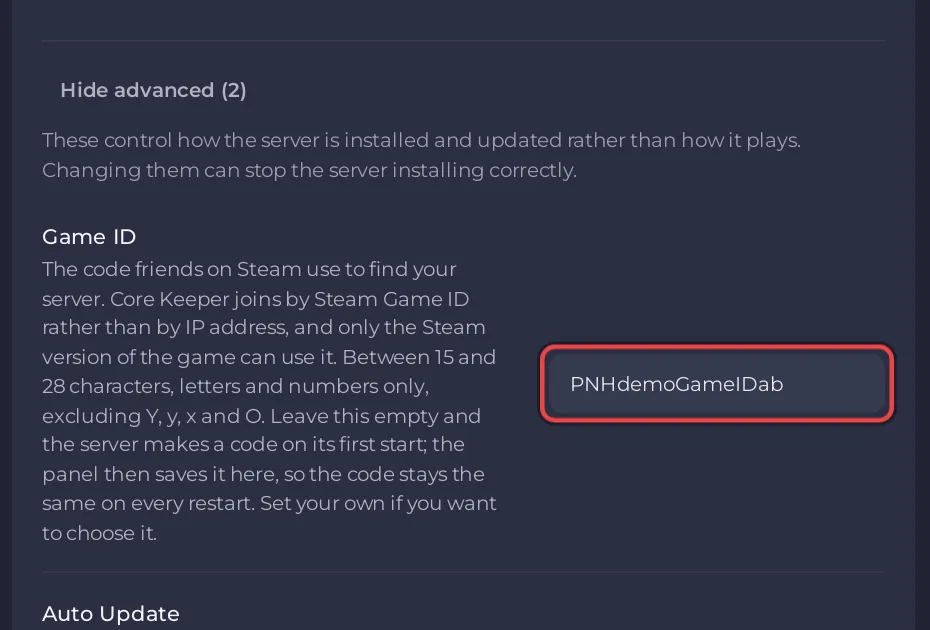
To pick your own code instead, see How to change the Game ID of your Core Keeper server.
What does the Steam Game ID row say?
Its help text reads: "Friends who play Core Keeper on Steam join with this, not with an address." The row is called Steam Game ID because Pugstorm's own connection info says only the Steam version can join with it.
Is the Game ID in a file too?
Yes. The server writes it to GameID.txt in the main folder of Files. The first line is the Game ID. The file is deleted and written again at every start. The other lines are for direct connections and are not needed to join with the Game ID.
What should I know before I share the Game ID?
- Only players on the Steam version of Core Keeper can join with it: Can friends on other platforms join your Core Keeper server?
- Anyone who has the code can find your server, so send it only to people you want to play with: How to keep your Core Keeper server private.
- Next: How to join your Core Keeper server.


