

To invite friends to your Core Keeper server on PlayNHost, copy the Steam Game ID from the server's Overview page and send it with the three join steps below. That is all a friend on Steam needs: there is no address or password to share for Core Keeper.
How do I send an invite?
- Open your server in the panel. Make sure the badge says Online.
- On Overview, click the copy button on the Steam Game ID row. The Join button at the top of the server card copies the same code once the server has one.
- Paste the code into this message and send it to your friends:
Join my Core Keeper server:
1. Start Core Keeper on Steam.
2. On the main menu, choose Join Game.
3. Enter this Game ID: <your Game ID>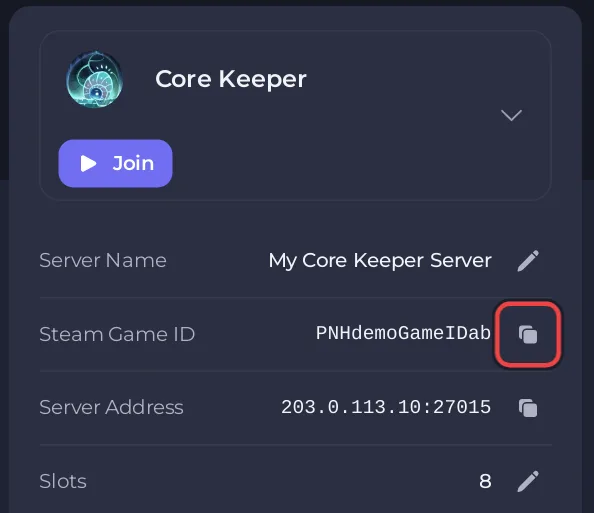
The panel has no ready invite button for Core Keeper, so use this message.
What should I check before my friends join?
- Their copy of the game. The Game ID works for the Steam version of Core Keeper. Friends on another PC store or on a console: Can friends on other platforms join your Core Keeper server?
- Admin. Join yourself and check you are admin before the group arrives: How to become admin on your Core Keeper server.
- Slots. Check you have enough: How to change player slots on your Core Keeper server.
- Mods. If the server uses mods, tell your friends which ones to install. Everyone joining needs the same mods: How to add mods to your Core Keeper server.
- Privacy. The Game ID is the key to your server. Send it only to people you want there: How to keep your Core Keeper server private.
How do I let a friend help run the server?
The Game ID lets a friend play. To let a friend start or restart the server, change settings or manage backups, invite them to the panel from Team & Roles and give them a role: How to let a friend help run your Core Keeper server.
To make a friend admin in the game, an admin promotes them from the pause menu: How to become admin on your Core Keeper server.


