

When friends cannot join a Core Keeper server on PlayNHost, the cause is most often a server that is not Online yet, an old or mistyped Game ID, a friend who is not on the Steam version of the game, or a game version that differs from the server's. Go through the checks below in order.
How do I fix it, step by step?
- Open your server in the panel and check the badge says Online. On Starting, wait: a new world takes 3 to 5 minutes to build. On Offline, click Start.
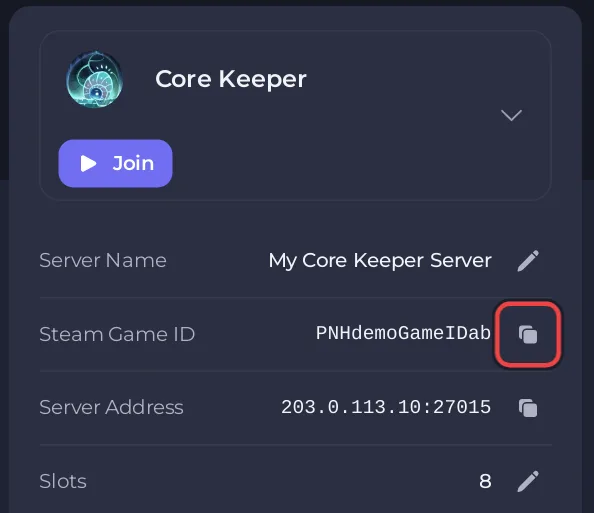
- On Overview, copy the code from the Steam Game ID row with its copy button, or click Join on the server card, and send that exact code again. Pasting is safer than typing: codes mix capital and small letters.
- Ask your friend to join from the main menu with Join Game and the Game ID, not with the Server Address.
- Check your friend plays Core Keeper on Steam. The Game ID only works for the Steam version.
- Restart the server so it installs any new game update, and ask your friend to update their game.
- If the server runs mods, check your friend has the same mods.
- Check the server is not full on the Active players card.
Why does a Game ID stop working?
If the code changed since your friend saved it, see Your Core Keeper Game ID changed after a restart. The Server Address row on Overview copies the address, which Core Keeper does not ask for with a Steam Game ID join. The Join button on the server card copies the Steam Game ID once the server has one: How to join your Core Keeper server.
Can a friend on Epic, GOG, Microsoft Store or a console use the Game ID?
No. Pugstorm made the Game ID a Steam-only code in patch 1.1.2.4 (September 2025), and the same notes say Core Keeper has no crossplay between PC and consoles. More: Can friends on other platforms join your Core Keeper server?
What if only some players cannot join after an update?
After a Core Keeper update, players' games update first. Restart the server so it installs the update too: Players cannot join your Core Keeper server after a game update.
What about mods, slots and bans?
- Every player needs the same mods as the server: How to add mods to your Core Keeper server.
- The server may be full: How to change player slots on your Core Keeper server.
- A banned player cannot join: How to kick and ban players on your Core Keeper server.
What should I send support?
Open a ticket with the Game ID you used, the exact message your friend sees, their store (Steam or another), and the last 50 to 100 lines of the Console. See How to open a support ticket.


