

Lag on an ARK: Survival Ascended server usually comes from memory near its limit, too many creatures or structures, or a mod. Check the RAM graph on the Overview page first. If it sits near the top while players are on, lower Wild creature numbers, respawn the wild dinos, and remove mods you do not need.
Check memory first
- Open your server in the panel. On Overview, open the Usage card and choose RAM.
- Compare the line with the limit while players are on.
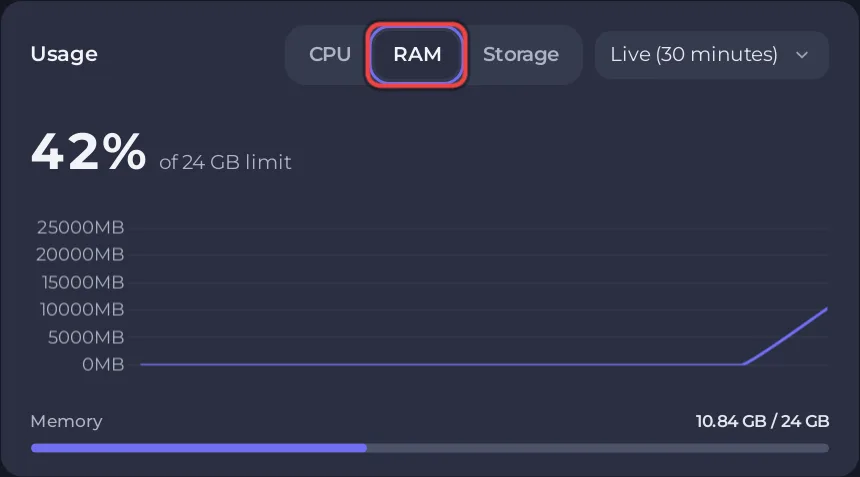
ARK needs 8 to 10 GiB on an empty The Island world. See How much RAM does an ARK: Survival Ascended server need?
Causes, most likely first
Too many wild creatures
Wild creature numbers above 1 in the Difficulty group of Game User Settings spawns more creatures, which the panel says uses more memory and CPU. Set it back toward 1, then run Respawn Wild Dinos on Quick Tasks to clear the surplus: How to respawn wild dinos on your ARK: Survival Ascended server.
Many structures and tames
The ARK wiki says memory rises as players advance and the game creates more objects: structures, creatures and items. Tame limit for the server (default 5000) caps tames: How to set tribe size and tame limits on your ARK: Survival Ascended server. Structure decay clears bases of players who left: How to change structure and decay settings on your ARK: Survival Ascended server.
A mod
Remove the newest mod from Mod IDs, restart, and compare: How to add mods to your ARK: Survival Ascended server.
Items left on the ground
High Dropped item lifetime and Body lifetime keep more objects in the world: How to change crop growth and spoiling on your ARK: Survival Ascended server.
Players on a newer build
After an ARK patch, players on the new build cannot join an old server at all. Keep the Daily restart on so the server installs updates every morning: How to restart your ARK: Survival Ascended server on a schedule.
Lag for one player only
If only one player lags, the cause is usually their own connection or game. Ask them to restart the game and check their connection.
Good to know
- Out of memory messages: Your ARK: Survival Ascended server ran out of memory.
- Still slow? Open a ticket with the time it happened: How to open a support ticket.


