

Your ARK: Survival Ascended server restarts early every morning with the Daily restart schedule, so it installs the newest ARK update and players on the new version can join. On Quick Tasks, under Schedules, you can make it wait until nobody is playing, switch it off, or build your own restart at another time.
What the Daily restart does
New ARK: Survival Ascended servers get a schedule called Daily restart. It restarts the server early every morning, only while the server is running. ARK installs updates when it starts, so this restart is what keeps your server on the newest build. The world is saved before the server stops. The exact minute differs from server to server, so that many servers do not restart together.
If your server is older and has no Daily restart, find it in the Ready-made for ARK: Survival Ascended list on Quick Tasks and click Add.
See it or switch it off
- Open your server in the panel and click Quick Tasks in the left menu.
- Find Daily restart under Schedules. Its line says when it runs next.
- To turn it off, use its switch. To test it, open its options menu and choose Run now: the server restarts at once.
The Quick Tasks page cannot change the time of a schedule that exists. For another time, build your own as below and switch Daily restart off. If you switch it off, restart the server yourself after each ARK patch: How to update your ARK: Survival Ascended server.
Do not restart while people are playing
The panel counts the players on your ARK server, so a schedule can wait for an empty server.
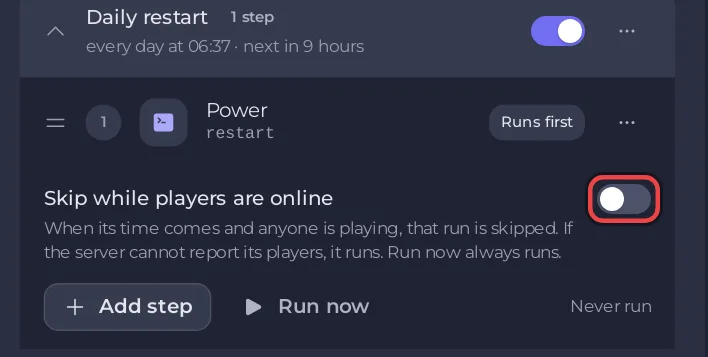
- Click the Daily restart row to open it.
- Switch on Skip while players are online.
Under When players are online, choose:
- Skip that run: no restart that day.
- Wait up to a set time for the server to empty: the panel looks again every 5 minutes, restarts as soon as nobody is on, and restarts anyway when the wait is over.
If the panel cannot read the player count at that moment, the restart runs. Run now always runs. A wait is better than Skip that run on a busy server, or it may miss updates for days.
Build your own restart with a warning
- On Quick Tasks, under All tasks, open Default tasks and find Send Restart.
- Open its menu and choose Schedule….
- Give it a Name, click Next step, choose Repeats, set How often to Every day and pick the time under At. The window says what time that is where you are.
- Keep Enabled on and click Schedule.
- For a warning, schedule Announce to Players with your message 5 or 10 minutes before the same time: How to send a message to every player on your ARK: Survival Ascended server.
Good to know
- A restart disconnects players while the world saves and loads. On an empty The Island test server on PlayNHost the stop took 44 seconds and the start reached
advertising for joinabout 2 minutes later; a big world or an update takes longer. - Every ready-made schedule: How to use Quick Tasks on your ARK: Survival Ascended server. The general guide: How to schedule tasks and automatic backups.


