

 MINECRAFT HOSTING
 GAME SERVERS
 Game Panel
Your account controls your servers, your files and your payment details, so it is worth a few minutes to lock it down. All of this is in the Security page of your account.
Change your password
- Open the panel and click Account in the top menu.
- In the left menu, under Access, click Security.
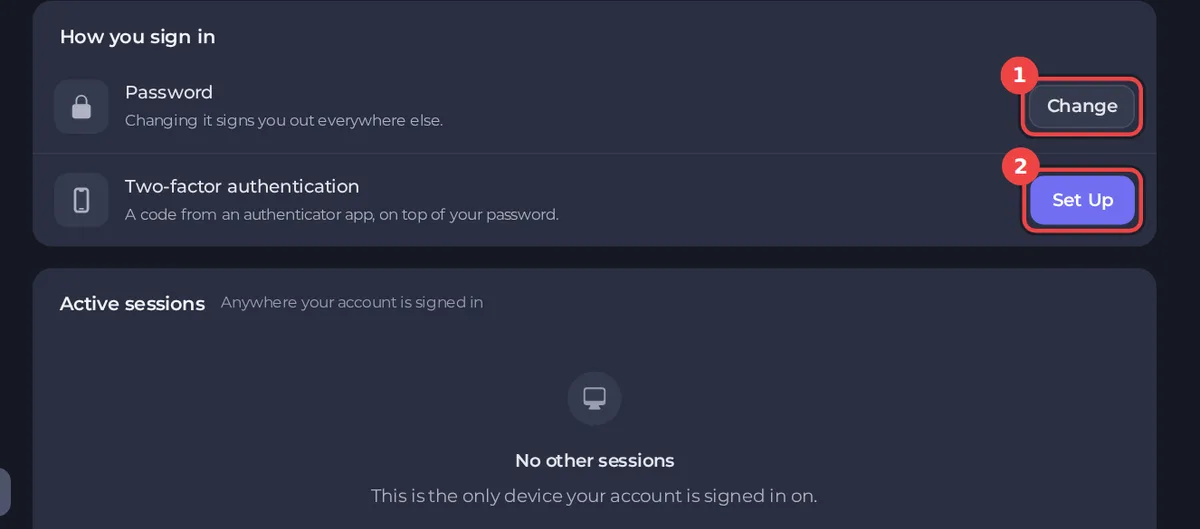
- Next to Password, click Change.
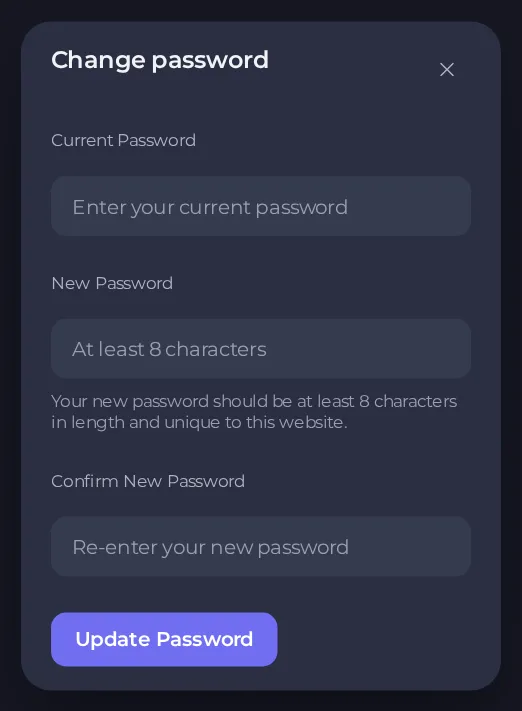
- Enter your Current Password, then your New Password twice. It must be at least 8 characters and include an upper-case letter, a lower-case letter and a number. A long phrase of several words that includes them is stronger and easier to remember than a short mix of symbols.
- Click Update Password.
Changing your password signs you out everywhere else. You stay signed in on the device you used, and every other browser and device must sign in again. If you think someone else has your password, this is exactly what you want.
A checklist that protects your account
- Use a password you use nowhere else. If another site is breached, attackers try the same password here.
- Turn on two-factor authentication. It protects you even if your password leaks. See How to set up two-factor authentication.
- Check where you are signed in. Remove sessions you do not recognise. See How to review your account activity and active sessions.
- Share access, never your password. Invite people to your server with a role. See How to invite friends and give them access.
- Keep your email address safe. Password resets and account notices go there.
- Be careful with links. Always check you are on
panel.playnhost.combefore typing a password. Support never needs your password.
If you cannot sign in
See How to reset your password or get back into your account.
If you think your account was accessed by someone else
- Change your password now. This signs out every other device.
- Turn on two-factor authentication.
- Open Account activity to look for sign-ins or changes you did not make.
- Revoke every session you do not recognise.
- Open API and SSH keys and delete any key you do not recognise. Changing your password does not remove keys.
- Open a ticket in the category Account & login and tell us what you saw. See How to open a support ticket.





