

 MINECRAFT HOSTING
 GAME SERVERS
 Game Panel
Locked out? Find your situation below.
I forgot my password
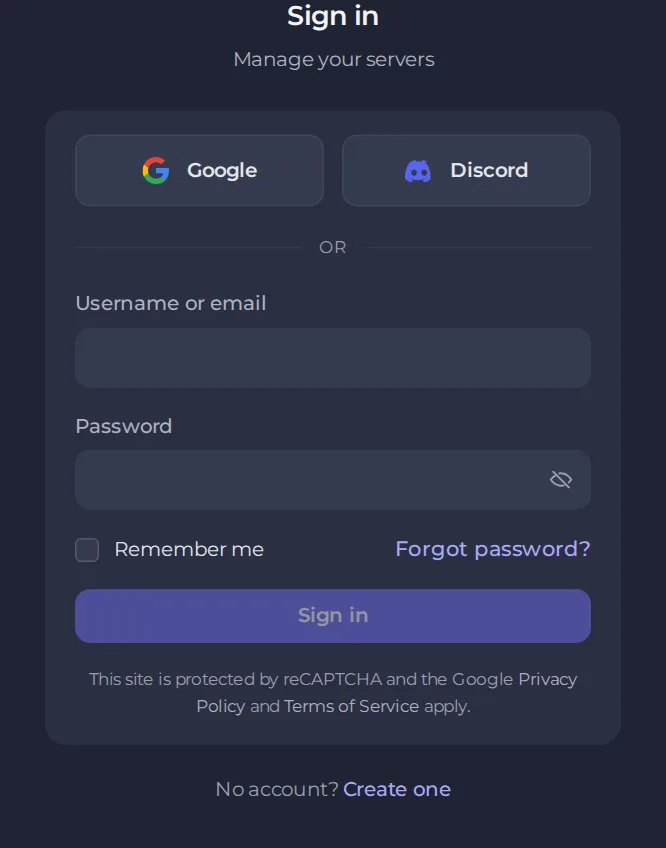
- Go to panel.playnhost.com.
- Click Forgot password? next to the password field.
- Enter the email address of your account and click Send reset link.
- Open the email we send you and follow the link to choose a new password. The new password needs at least 8 characters, with upper and lower case letters and a number.
- Sign in with the new password.
If the email does not arrive within a few minutes:
- Check your spam or junk folder.
- Make sure you typed the address you registered with. If you have more than one address, try the others.
- Add our sending address to your contacts and try once more.
I signed up with Google or Discord
If you created your account with Google or Discord, use that same button on the sign-in page. They sign you in without a PlayNHost password.
I lost access to my email address
You cannot reset a password by email if you no longer receive that email. Open a ticket from a device where you are still signed in, or contact support, and tell us the email address of the account and what you can no longer reach. We will ask for proof that the account is yours before changing anything, because an account holds servers and payment details. See How to open a support ticket.
To avoid this, keep an email address you control on your account.
I lost my two-factor device
Use one of your backup recovery codes in place of the 6-digit code. If you have none left, contact support and we will verify the account before removing two-factor. See How to set up two-factor authentication.
After you get back in
- Change your password if you suspect anyone else knew it. See How to change your password and secure your account.
- Turn on two-factor authentication.
- Check Account activity and your active sessions for anything unfamiliar.





