

To set the admin password of a The Bus server on PlayNHost, open Settings, then Game Settings, type a new value in Admin Password (at least 8 characters), press Enter and click Restart now. Do this first on a new server: it starts with an admin password you did not choose, and anyone who knows it gets full admin rights.
How do I change the Admin Password?
- Open your server in the panel and click the Settings tab.
- Click Game Settings in the Server Settings list.
- Click in the Admin Password field, delete the old value and type a new one of at least 8 characters, with letters as well as numbers, that only you know.
- Press Enter, or click outside the field. The panel shows "Saved. The server must restart before these take effect."
- Click Restart now. When the badge says Online again, the new password is active.
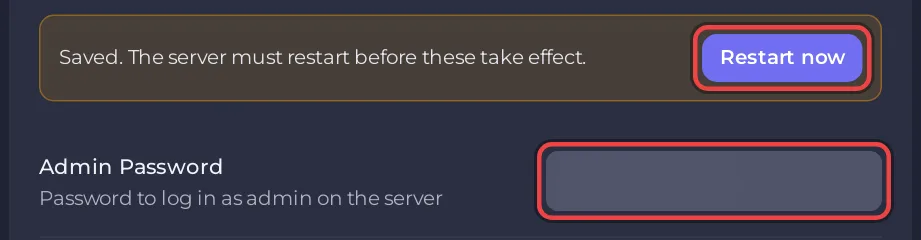
The panel writes Admin Password into TheBus/Settings/ServerSettings.cfg before every start. Pick a password you do not use anywhere else, and share it only with people you want as admins.
Why does a new server need a new Admin Password?
The panel fills Admin Password with a starting value when it creates the server, because the field cannot be empty. You did not choose that value, so it is not a secret only you know: until you change it, someone else who knows it could open your Admin Menu. Changing it takes a minute and a restart.
What does the Admin Password unlock in the game?
The Admin Menu in the game's pause menu. The developer's dedicated server guide says there you can "configure everything from Server Name to the Map and Operating Plan used on the server", that players who open the Admin Menu "are automatically granted admin permissions", and that "admins are not asked for password again when entering the admin menu".
That last point matters when you change the password to lock someone out: a new password alone may not remove someone who is already admin, so also change their rank as owner: How to become owner or admin on your The Bus server.
Can I change the admin password from the game's Admin Menu?
You can, but the panel puts its own Admin Password back into ServerSettings.cfg at the next start. Change it under Settings, Game Settings, so the panel and the game agree.
Questions people ask
Is the Admin Password the same as the join password? No. Server Password is what players type to join; Admin Password opens the Admin Menu. Join password steps: How to set a password on your The Bus server.
Can I leave it empty? No. The panel requires an Admin Password of at least 8 characters.
Who can change it in the panel? You, and anyone you gave panel access whose role can change startup settings: How to invite friends and give them access.


