

To set a join password on a The Bus server on PlayNHost, open Settings, then Game Settings, type the password in Server Password, press Enter and click Restart now. Players then type that password when they join. Clear the field and restart to remove it.
How do I set the join password?
- Open your server in the panel and click the Settings tab.
- Click Game Settings in the Server Settings list.
- Type the password in Server Password. Use letters as well as numbers.
- Press Enter, or click outside the field. The panel shows "Saved. The server must restart before these take effect."
- Click Restart now. When the badge says Online again, the password is active.
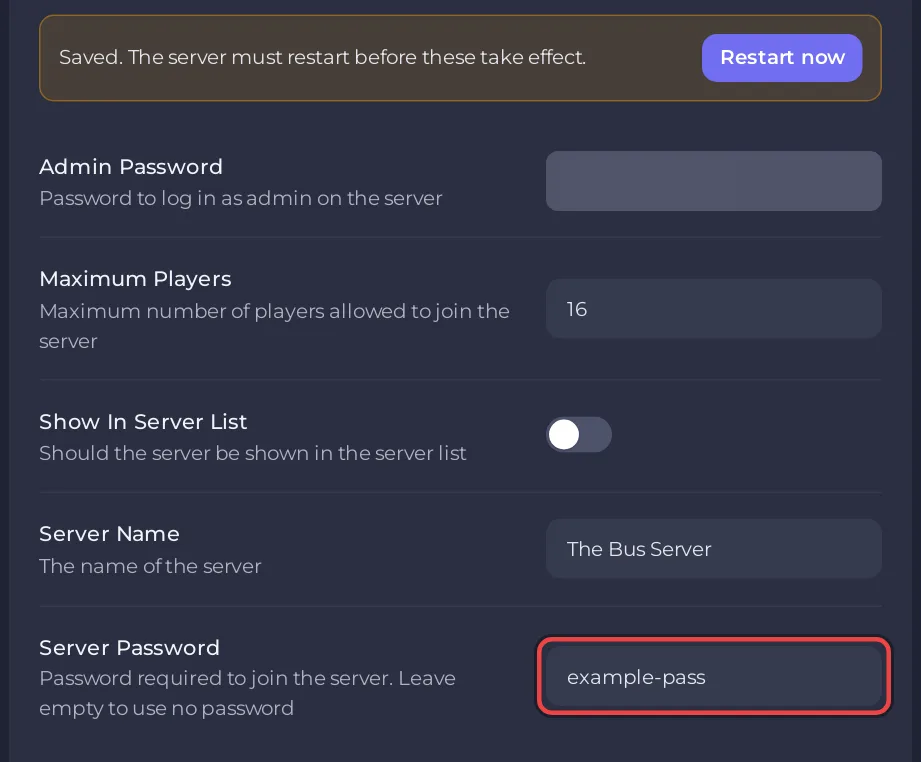
The panel writes Server Password into TheBus/Settings/ServerSettings.cfg before every start, so the password in the panel is always the one the server uses.
How do I remove the password?
Delete everything in Server Password, press Enter and click Restart now. The setting's own description says: "Leave empty to use no password". Anyone who has your server GUID can then join.
How do players use the password?
They join with the server GUID as usual and type the password when the game asks for it: How to join your The Bus server. Send the password with the GUID: How to invite friends to your The Bus server.
Questions people ask
Is this the admin password? No. Server Password only lets players in. The Admin Menu uses Admin Password: How to set the admin password on your The Bus server.
I changed the password in the game's Admin Menu and it went back. The panel writes its own Server Password at every start. Change it under Settings, Game Settings.
Should a server in the public list have a password? If you only want your friends, yes. With Show In Server List on, anyone can see the server: How to make your The Bus server public or private.


