

A The Bus dedicated server needs far less memory than the game on a PC: in PlayNHost's own test in September 2026, a running The Bus server with nobody connected used about 489 MiB of RAM. Players and mods add to that. The smallest PlayNHost plan for The Bus has 1 GB, and the Usage card in the panel shows what your server really uses.
Is the 8 GB on the Steam page for the server?
No. The Steam page of The Bus lists 8 GB of RAM as the minimum for playing the game on Windows: that is for each player's PC, with graphics, sound and the whole city drawn on screen. The dedicated server draws nothing. It is a separate Steam tool, The Bus Dedicated Server, which PlayNHost installs for you.
How do I see how much memory my server uses?
- Open your server in the panel. The Overview page opens.
- Find the Usage card and pick RAM.
- Compare the graph over a busy evening with your plan's memory.
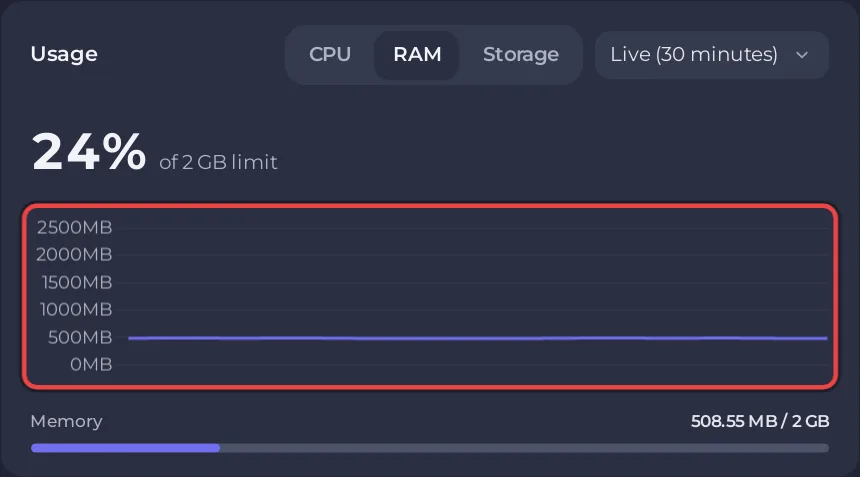
How to read the graphs: How to read your server's usage graphs.
What happens if the server runs out of memory?
The system stops it, and the Overview page shows a card called This server ran out of memory, with when it happened and how often. If you never see that card, your server has enough memory for how you play.
Does the server use more memory with players on?
PlayNHost has measured an empty server, not a full one, so there is no measured figure for a busy server yet. Watch the Usage card as your group grows. Each plan's player limit and memory are listed on the The Bus server hosting page.
Related: How many players can a The Bus server have? and How to add mods to your The Bus server.


