

When the Mods page on the Modding tab says The last start could not apply the mods, the server started with the mods it already had, because one entry on your list could not be installed. The notice names the reason, for example a name that is not a ficsit.app Mod Reference, or a mod with no build for the game version your server runs. The game itself still started.
Read the reason
- Open your server in the panel and click the Modding tab.
- Read the notice The last start could not apply the mods.
- Open the Console tab and look at the lines starting with
[pnh-ficsit]from the last start. They say the same, with the mod's name.
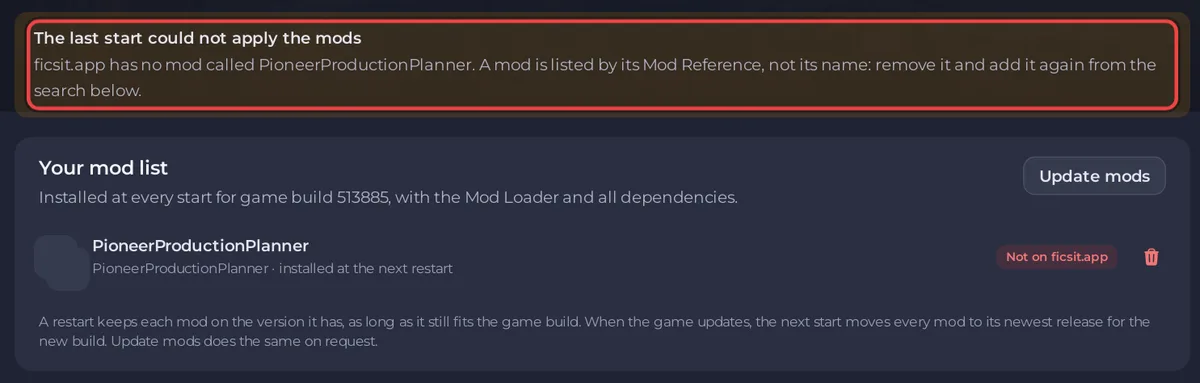
ficsit.app has no mod called ...
The list holds something that is not a Mod Reference, for example a mod's display name. The notice says ficsit.app has no mod called with the entry, and the Console says WARNING ficsit.app has no mod called: with the same entry.
- In Your mod list, click the remove icon next to the entry and confirm Remove from the list.
- Search the mod by name in Add mods from ficsit.app and click Add.
- Click Restart now.
See How to find the Mod Reference of a Satisfactory mod.
A mod has no build for this game version
The notice says A mod on the list has no build for the game version this server runs, so no mod change was made. It shows up after a game update or a switch to the Experimental branch, until the mod's author releases a matching build. In the search, that mod shows Not updated for this game version.
- Wait for the author, then restart: the next start installs the new release by itself.
- Or remove that mod from Your mod list and restart, so the rest of the list can install. Take a backup first if the world uses it.
Players whose game has updated cannot join a server held on the old game version, so do not switch Automatic Updates off for long. See How to update your Satisfactory server.
Other reasons
is not a Mod Reference: an entry has characters a Mod Reference cannot have, such as a hyphen or a dot. Remove it and add the mod from the search.- This server was installed before mod support: reinstall the server from Settings to add the mod installer. Your saves are kept; take a backup first anyway.
- The server could not write to its own folder: the disk may be full. Check the disk space on the Overview page.
- The mods could not be installed at the last start, so the ones already there were kept, followed by the installer's own message: restart once more, and if it repeats, open a ticket with the Console lines: How to open a support ticket.


