

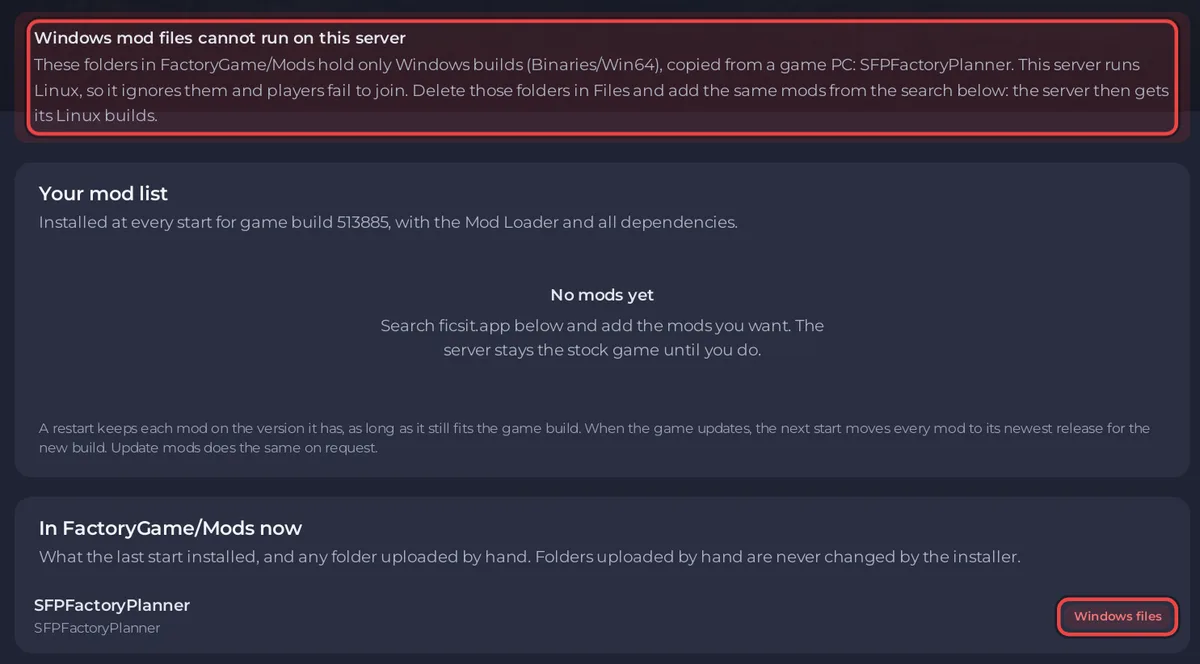
Mods copied from the Mods folder of your gaming PC are Windows builds, and a PlayNHost Satisfactory server runs Linux, so it cannot load them, and players then fail to join over the mismatch. Delete those folders in Files and add the same mods on the Modding tab: the server then installs their Linux server builds itself.
How you know
- The Mods page on the Modding tab shows Windows mod files cannot run on this server, with the folder names.
- In In FactoryGame/Mods now, those folders carry the badge Windows files.
- At every start, the Console says
WARNING FactoryGame/Mods/<folder> is a Windows build (Binaries/Win64, nothing for Linux).
The check looks at the folders in FactoryGame/Mods and one level down in FactoryGame/Mods/GameFeatures, where some mods install.
Fix it
- Open your server in the panel and stop it.
- Open Files and go to
FactoryGame/Mods. - Delete every folder the notice names.
- Click the Modding tab. In Add mods from ficsit.app, search each of those mods by name and click Add.
- Start the server. The Console lines starting with
[pnh-ficsit]show the Linux server builds being installed, with the Satisfactory Mod Loader and every dependency. - Send your players the list from Your players need these mods: Players cannot join your modded Satisfactory server.
Why this happens
Satisfactory mods for a dedicated server are built and packaged separately from the ones players use. The ficsit.app documentation warns: "The compiled files used by the game client will not work on dedicated servers." A folder from a gaming PC holds Binaries/Win64 and nothing for Linux.
The Modding tab never offers such a build: its search only lets you add a mod with a Linux server build for your game version, and marks the others No server build.


