

When players connect to your Satisfactory server but stay on the loading screen, first make sure the world has finished loading: wait for [PlayNHost] Ready. in the Console. If a big factory drops players before they arrive, raise Client Initial Connection Timeout in Settings. If it still hangs for everyone, open a ticket: the server's second port may not be reachable, and only we can check that.
Check in this order
- Open the Console tab in the panel. After a start, a load or a new game, players can only get in once the world has loaded. Wait for
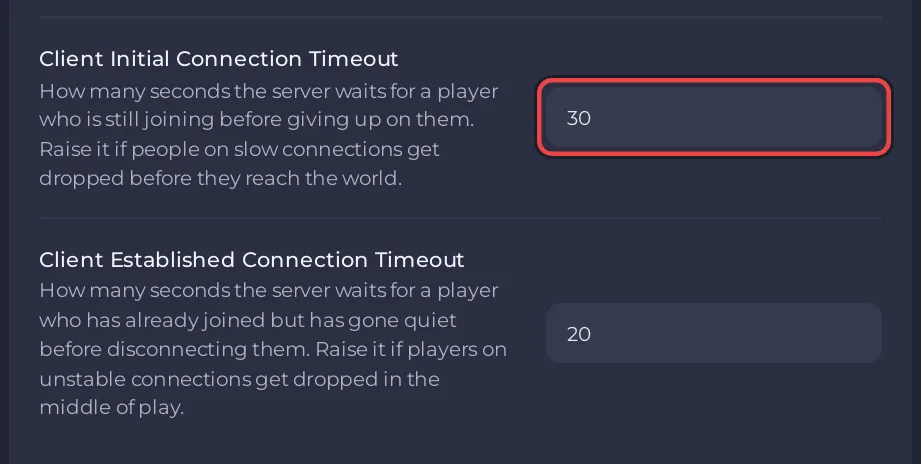
[PlayNHost] Ready., or after a Load on the Worlds page, for the Running now card to show your session again. - If players are dropped after a long wait on a large save, open Settings, Game Settings, and raise Client Initial Connection Timeout from 30 to, for example, 120 seconds. Restart the server.
- If the server runs mods, check that the player has the same mods: Players cannot join your modded Satisfactory server.
- If every player hangs forever, with no timeout, open a ticket: How to open a support ticket.
The second port
The official wiki explains that a Satisfactory server uses a Reliable Messaging Port next to its game port, and that when it cannot be reached, "players can initiate a connection but will be perpetually stuck on the 'loading' screen." On PlayNHost that port is assigned and opened with your server: you can see it as Reliable Messaging Port in Game Settings and on the Ports & Network page. Players never type it, and you cannot change it. If players hang forever although the world is loaded, tell support which port the setting shows.
Dropped in the middle of play
A player who joined and is then disconnected on an unstable connection is covered by Client Established Connection Timeout (20 seconds by default, up to 300). Raise it and restart.


