%7B.s%7Banimation%3Ab%201.5s%20ease-out%20both%7D.d%7Banimation-delay%3A.16s%7D%7D%40keyframes%20b%7B0%25%7Bfill%3A%23F4F6FA%7D18%25%7Bfill%3A%23FFE08A%7D34%25%2C70%25%7Bfill%3A%23FF8A1F%7D80%25%7Bfill%3A%23FFE08A%7D100%25%7Bfill%3A%23FF8A1F%7D%7D%3C%2Fstyle%3E%3Cg%20transform%3D%22translate(143%20428.93)%20scale(3.885906)%22%3E%3Cg%20transform%3D%22translate(0%202)%22%20fill%3D%22%23706EF0%22%3E%3Cpath%20d%3D%22M0%200%20H48%20A40%2040%200%200%201%2048%2080%20V100%20H0%20Z%22%2F%3E%3Cpath%20transform%3D%22translate(91.75%200)%22%20d%3D%22M0%200%20L48%200%20L48%2050%20L76%2050%20L76%20100%20L0%20100%20Z%22%2F%3E%3Cpath%20transform%3D%22translate(173%200)%22%20d%3D%22M0%20100%20L58%20-4%20L116%20100%20Z%22%2F%3E%3Cpath%20transform%3D%22translate(264.25%200)%22%20d%3D%22M0%200%20L104%200%20L76%2050%20L76%20100%20L28%20100%20L28%2050%20Z%22%2F%3E%3Cg%20transform%3D%22translate(375%200)%22%3E%3Cpath%20d%3D%22M0%200%20L50%2038%20L50%200%20L100%200%20L100%20100%20L0%20100%20Z%22%20fill%3D%22%23F4F6FA%22%2F%3E%3Crect%20class%3D%22s%22%20x%3D%2247%22%20y%3D%2263%22%20width%3D%2219%22%20height%3D%2230%22%2F%3E%3Crect%20class%3D%22s%20d%22%20x%3D%2274%22%20y%3D%2263%22%20width%3D%2219%22%20height%3D%2230%22%2F%3E%3C%2Fg%3E%3Cpath%20transform%3D%22translate(484.75%200)%22%20d%3D%22M0%200%20L48%200%20L48%2037%20L52%2037%20L52%200%20L100%200%20L100%20100%20L52%20100%20L52%2063%20L48%2063%20L48%20100%20L0%20100%20Z%22%2F%3E%3Cpath%20transform%3D%22translate(588.5%200)%22%20d%3D%22M0%2050%20A53%2053%200%201%200%20106%2050%20A53%2053%200%201%200%200%2050%20Z%22%2F%3E%3Cpath%20transform%3D%22translate(698.25%200)%22%20d%3D%22M25%200%20H102%20V50%20H77%20A25%2025%200%200%201%2077%20100%20H0%20V50%20H25%20A25%2025%200%200%201%2025%200%20Z%22%2F%3E%3Cpath%20transform%3D%22translate(804%200)%22%20d%3D%22M0%200%20L90%200%20L90%2050%20L69%2050%20L69%20100%20L21%20100%20L21%2050%20L0%2050%20Z%22%2F%3E%3C%2Fg%3E%3C%2Fg%3E%3C%2Fsvg%3E)


Click Bans on the Active players card on your server's Overview page, then click Unban next to the player. The server must be running. You can also type the player's SteamID64.
Unban from the list
- Open your server in the panel and make sure the badge says Online.
- On the Active players card, click Bans. The window Unban a player opens.
- Under Banned on this server, find the player. Each row shows the name and the SteamID64.
- Click Unban on their row. The panel says
Unbannedand the name, andThe server accepted it. The player with this ID can join again.
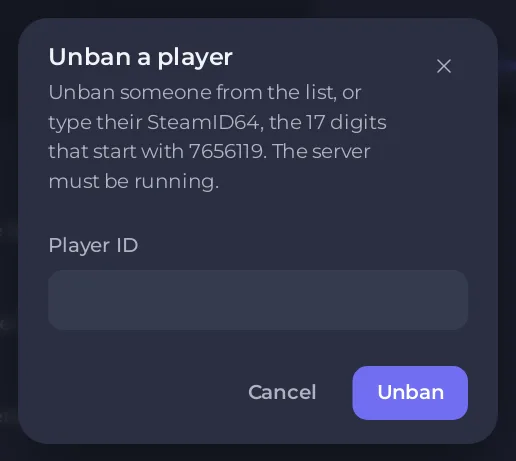
If nobody is banned, the window says Nobody is banned.
Unban by SteamID64
If the player is not on the list, type their SteamID64 in Player ID and click Unban. A SteamID64 is the 17 digits that start with 7656119, without spaces. The panel checks it before it sends anything.
When the server is stopped
The list can be read while the server is stopped, but the unban needs the server running. Start the server and try again. If it has to stay stopped, open server/rust/cfg/bans.cfg in Files, delete the line that starts with banid and the player's SteamID64, save, and start the server.
If it does not work
- The server refused the RCON password. If you changed RCON Password under Settings, restart the server so it uses the new one, then try again.
- The buttons are missing. Bans needs the console permission and the file permissions to read contents and create files: How to let a friend help run your Rust server.
- Nothing happens. Check that the server badge says Online and the card is not showing No answer from the server: The Rust players card says No answer from the server.
Good to know
- You can unban by typing in the Console too:
unbanand a space, then the SteamID64. - Restoring an old backup also brings back old bans: How to back up and restore your Rust world.
- A ban made with Ban in a player's row menu is lifted here too. Its entry in the Activity log shows the player's ID if you need to type it.
- To ban or kick, see How to kick, ban and add admins on your Rust server.





